Introduction
Charting is one of the biggest operational challenges in modern healthcare. For most outpatient medical practices, documentation consumes more provider time than any other non-clinical activity. Physicians, nurse practitioners, and clinical staff routinely spend hours each week completing charts after clinic hours. This creates burnout, reduces patient throughput, impacts work-life balance, and slows practice growth. In 2026, faster charting is not just a convenience—it is a competitive advantage. Medical practices that chart faster can see more patients without reducing quality, improve coding accuracy, improve patient communication, and reduce staff stress. The right EHR system can dramatically reduce documentation time by using automation, smart templates, structured data, reusable plan content, integrated orders, and efficient workflows. This guide explains what “faster charting in EHR” really means, why most practices struggle with documentation, how to chart faster without compromising compliance, and which EHR features and workflows have the highest impact. Whether you are opening a clinic, switching EHRs, or trying to optimize existing workflows, this article will help you create a faster, cleaner, and more scalable charting process.
What Does Faster Charting in EHR Actually Mean?
Faster charting does not mean “doing less documentation.” It means creating clinically complete notes in less time through smarter workflows. The goal is not to write shorter notes. The goal is to reduce unnecessary clicks, repetitive typing, duplicate data entry, and workflow interruptions. Faster charting in EHR means that providers can document while the patient is still in the room, finish the note during the visit, and close the chart quickly after the encounter ends. It means fewer open charts at the end of the day. It means fewer late-night charting sessions. It means higher accuracy, because documentation is completed closer to the time of care.
For medical practices, charting speed impacts both clinical and financial performance. Faster documentation improves patient flow, reduces documentation backlog, supports accurate coding, and improves collections. It also improves staff satisfaction and reduces burnout, which is a major financial issue because replacing a clinical provider is costly and disruptive. Faster charting is fundamentally a workflow design problem—and the EHR is the central tool that either solves it or causes it.
Why Charting Is Slow in Many EHR Systems
Many practices assume that charting is slow because providers “take time.” In reality, slow charting is usually caused by EHR design, poor templates, lack of training, and workflow fragmentation. Practices often inherit inefficient workflows from old paper processes or previous EHR setups. Providers are asked to type long narratives instead of using structured templates. The system forces multiple clicks to reach common actions. Notes require redundant information in multiple locations. Staff cannot assist with pre-charting or intake. Data does not flow smoothly from intake forms to the note. Orders are separate from documentation. Diagnoses are not linked to plan content. In some systems, even simple follow-up visits require navigating multiple screens.
Another major reason charting becomes slow is inconsistent use across providers. When each provider documents differently, the practice cannot optimize templates or workflows across the organization. This results in variable chart quality and inconsistent coding support.
Charting also slows down when practices use disconnected tools. For example, a practice might use one system for scheduling, another for telehealth, another for documentation, and another for billing. Every separation adds extra steps and extra data entry. Modern practices in 2026 are increasingly choosing all-in-one EHR + practice management platforms to reduce workflow fragmentation. Faster charting is one of the biggest reasons integrated platforms are becoming more popular.
Why Faster Charting Matters for Practice Growth and Profitability
Faster charting affects nearly every major performance metric in a medical practice. First, it improves provider productivity. When charting is faster, providers can schedule more visits per day without working longer hours. This increases revenue potential without adding new providers. Second, faster charting reduces claim delays. If the chart is not complete, coding and billing cannot proceed. Faster chart completion means claims are submitted sooner and reimbursements arrive faster. Third, faster charting improves coding accuracy. Efficient templates reduce missing documentation and support appropriate coding levels. Fourth, charting speed improves patient satisfaction. When documentation is efficient, the provider spends more time engaging with the patient rather than focusing on the computer. Lastly, faster charting reduces burnout. Documentation burden is one of the leading causes of provider stress. Practices that reduce charting burden retain providers longer and operate more smoothly.
In short, faster charting is not just a provider issue. It is a practice growth strategy. Clinics that optimize charting workflows create more capacity, reduce revenue leakage, improve cash flow, and scale faster.
The Biggest Barriers to Faster Charting (And How to Fix Them)
To chart faster, practices must address the specific barriers that slow documentation.
One barrier is lack of standardized templates. Without templates, providers type too much. The fix is to implement specialty-specific SOAP templates and visit-type templates that include common findings, common diagnoses, and reusable plan content.
Another barrier is poor intake workflows. If patient history and symptoms are not captured efficiently before the visit, the provider spends time gathering and typing routine information. The fix is digital intake forms and patient portal questionnaires that feed directly into the subjective section of the note.
Another barrier is redundant documentation. Providers often document the same information in multiple places because the EHR does not flow logically. The fix is optimizing workflows so information entered once populates across the system.
Another barrier is unoptimized EHR navigation. Many providers waste time clicking and searching. The fix is configuring favorites, quick buttons, shortcuts, and custom workflows that surface commonly used actions.
Another barrier is order entry friction. When ordering labs, imaging, referrals, or medications requires multiple steps, charting slows down. The fix is using order sets, default preferences, and integrated ordering workflows inside the plan.
Another barrier is lack of team-based charting. Many practices underutilize staff for pre-charting and documentation support. The fix is designing workflows where staff capture vitals, reconcile medications, update histories, and prepare visit templates before the provider enters the room.
The fastest charting practices treat documentation as a process involving templates, automation, staff workflows, and EHR configuration—not just individual provider effort.
The Most Effective Strategies for Faster Charting in EHR
Below are the most practical and high-impact methods medical practices use to chart faster in 2026.
1) Use Specialty-Specific SOAP Note Templates
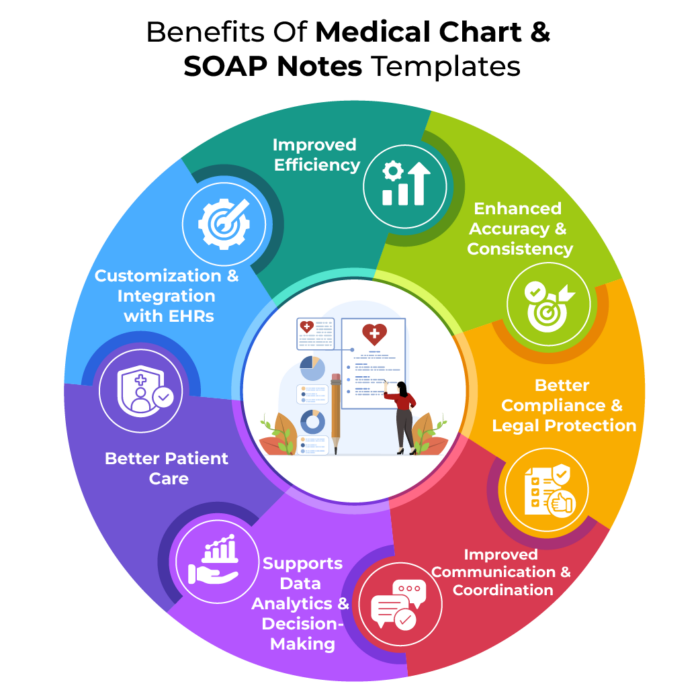
SOAP templates are the foundation of faster charting. Providers should not start every note from scratch. Specialty templates include structured fields for the most common symptoms, exam findings, diagnoses, and plans relevant to that specialty.
For example, primary care templates should include structured ROS options, chronic disease follow-up components, preventive care prompts, and refill workflows. Urgent care templates should include symptom-driven workflows, rapid POCT documentation, and standardized discharge instructions. Behavioral health templates should include mental status exam fields, therapy progress prompts, and safety planning components. Women’s health templates should include gynecologic history fields, hormone therapy workflows, and lab tracking options.
The goal of templates is to reduce typing while improving consistency. When templates are designed properly, providers select structured options quickly rather than typing paragraphs. This also improves audit readiness because documentation becomes standardized and complete.
2) Build Visit-Type Templates (Not Just Specialty Templates)
Practices should create templates based on visit type because workflow differs by encounter.
Common visit types include annual physical, new patient visit, follow-up visit, chronic care check, sick visit, telehealth visit, medication refill visit, procedure visit, pre-op clearance, work injury evaluation, and urgent care walk-in.
When templates match visit type, documentation becomes significantly faster. Providers spend less time removing irrelevant sections and more time completing relevant information. This also reduces note bloat and improves clarity.
3) Use Digital Intake Forms That Auto-Populate the Note
Digital intake forms are one of the most underutilized tools for faster charting. Instead of staff handing paper forms and later scanning them, modern practices send intake forms through the portal before the visit. The patient fills them out digitally, and the EHR stores structured responses.
When intake forms are designed correctly, they auto-populate the subjective section, saving the provider 5–10 minutes per visit. Intake forms can include chief complaint selection, symptom questionnaires, medication lists, allergies, past history updates, social history, and screening tools.
For chronic care visits, intake forms can include condition monitoring questions. For behavioral health, intake forms can include PHQ-9, GAD-7, or other screening tools. For women’s health, intake forms can include menstrual history and symptom tracking.
These forms reduce provider data gathering time and improve documentation completeness, leading to faster charting and better billing support.
4) Implement Pre-Charting Workflows
Pre-charting means preparing the chart before the provider begins the visit. Staff can support this by verifying demographics, checking insurance, updating medications, reconciling allergies, collecting vitals, and documenting the chief complaint.
When staff follow a consistent pre-charting workflow, the provider enters the visit with a prepared chart. This reduces interruptions and improves efficiency. The visit flows faster and chart completion becomes easier.
Practices that use pre-charting consistently often reduce documentation time significantly because providers spend less time on administrative chart fields and more time on clinical decision-making.
5) Use Smart Phrases, Macros, and Quick Text Libraries
Even with templates, providers still need narrative elements. Macros allow providers to insert commonly used text instantly.
For example, common counseling text, standard return precautions, chronic care instructions, medication education, lifestyle counseling, and patient education can be stored as reusable phrases.
This reduces repetitive typing and ensures consistency. It also improves compliance because standard phrases include important legal and safety instructions.
Practices should create a shared library of approved phrases and allow providers to personalize them based on style and specialty.
6) Create Standardized Care Plans and Order Sets
Order sets streamline lab ordering, imaging, medications, and referrals for common conditions. They reduce clicks and ensure consistent care.
For example, a diabetes follow-up order set can include A1C, microalbumin, lipid panel, medication review, referral prompts, and counseling components. A UTI order set can include urinalysis, culture, antibiotic prescribing defaults, and follow-up instructions. A hypertension visit order set can include BP monitoring, medication adjustments, and lifestyle counseling templates.
Order sets speed up charting because the plan is completed with fewer steps. They also reduce errors and ensure best practices.
7) Reduce Click Burden Through EHR Configuration
Many EHR systems are powerful but poorly configured. Practices should customize their EHR interface for speed.
This includes provider favorites lists for diagnoses and medications, default prescription settings, frequently used labs saved in favorites, quick navigation menus, and automatic linking of diagnoses to plan content.
Even small configuration improvements can save seconds per action, which adds up across dozens of visits daily.
8) Improve Documentation Workflow for Coding Accuracy
Faster charting must still support coding. The best workflows guide providers to document appropriately for complexity.
EHR systems can support coding by connecting assessment diagnoses to plan actions and ensuring documentation supports medical necessity. This reduces undercoding and reduces claim denials.
Practices should optimize templates to include relevant documentation prompts without bloating the note.
9) Standardize Documentation Across Providers
For multi-provider clinics, standardization is essential. When each provider uses different workflows, optimization is impossible.
Practices should create standardized templates by specialty and visit type. Providers can still personalize, but the core workflow should remain consistent.
Standardization improves efficiency, chart quality, billing outcomes, and training speed for new providers.
10) Use Integrated EHR + Practice Management to Eliminate Duplicate Workflows
A major reason charting slows down is system fragmentation. When scheduling, documentation, telehealth, billing, and patient messaging exist in separate tools, providers and staff waste time transferring information.
Integrated EHR + practice management systems reduce duplication. Appointment context flows into the chart. Documentation supports billing automatically. Portal messages connect to the chart. Orders connect to results. This unified workflow is essential for charting efficiency.
Medical practices looking for faster charting in 2026 should strongly consider unified cloud systems rather than patchwork stacks.
How to Measure Charting Speed Improvement
Practices should treat charting speed as a measurable metric. Key indicators include average time to close charts, number of open charts after business hours, provider after-hours charting time, claim submission delay due to incomplete documentation, and provider satisfaction surveys regarding documentation workload.
Improvement should be continuous. Practices can optimize templates every month based on provider feedback and report data.
What to Look for in an EHR if Faster Charting Is Your Priority
If your practice is evaluating EHR software primarily to improve charting speed, prioritize systems with customizable templates, structured SOAP notes, smart phrases, order sets, digital intake forms, portal integration, staff workflows, and intuitive navigation.
The EHR should support your specialty. It should allow quick charting without forcing excessive clicks. It should integrate billing workflows and practice management to eliminate duplication. It should support telehealth templates and offer strong reporting.
Many practices make the mistake of choosing EHRs designed for hospitals. Those systems often create complexity and slow charting. For outpatient practices, the best EHR is one designed for outpatient workflow speed and usability.
Why Faster Charting Drives Revenue Growth
Faster charting supports more than provider convenience. It drives revenue growth by improving throughput, reducing no-shows through better workflow integration, speeding billing cycles, reducing denials, improving coding accuracy, and enabling scalability without proportional staffing increases.
For independent clinics, efficiency equals profitability. Faster charting is one of the highest ROI improvements a clinic can make.
Final Thoughts: Faster Charting Is a System Strategy, Not Just Provider Effort
In 2026, the practices that thrive are those that operate efficiently. Faster charting reduces burnout, improves clinical quality, increases revenue, and improves patient experience. The key is building workflows around templates, automation, staff support, integrated practice management tools, and smart EHR configuration. Practices that choose a modern EHR with these capabilities can dramatically reduce documentation time and build a sustainable, scalable clinic.
If your clinic is struggling with slow documentation, it is often not a provider problem. It is a workflow and EHR configuration problem. With the right system and optimization approach, charting can become faster, cleaner, and less stressful—without sacrificing compliance or clinical quality.
To see how DocVilla can optimize your Medical Practice documentation and billing, schedule a free demo today.