
What Is the Best EHR for Urgent Care?
Updated: August 2026
The best EHR for urgent care combines fast walk-in intake, quick clinical documentation, and clean claims in a single cloud-based platform. DocVilla is a HIPAA-compliant, cloud-based EHR built for urgent care clinics, combining EHR, practice management, telehealth, eRx with EPCS, patient portal, and medical billing in one system. Front desks run walk-in and same-day scheduling in the same platform providers chart in, notes come together with urgent care templates and quick notes, and every visit flows straight into the claim without re-entry — the workflow practices are looking for in urgent care EMR and billing software. That combination is why independent practices rate DocVilla among the best EHRs for urgent care.
Streamlining Urgent Care with Comprehensive Cloud-Based EHR Software
Urgent care clinics need software that can support fast patient intake, efficient documentation, flexible scheduling, billing workflows, telehealth, and patient communication. DocVilla brings urgent care EHR, EMR, practice management, medical billing, telehealth, and patient portal tools into one cloud-based platform.
For walk-in clinics and urgent care practices, this connected workflow can help reduce duplicate work, support faster visits, improve front-desk coordination, and keep clinical and administrative tasks organized in one system.
Urgent Care EHR Features for Faster Clinical Workflows
DocVilla helps urgent care practices manage high-volume visits, walk-in appointments, acute care documentation, patient communication, billing, and follow-up workflows from one cloud-based EHR and practice management system.
Key urgent care workflow features include:
Rapid Registration: Streamline the patient intake process with quick registration features that capture essential patient information efficiently, reducing wait times and allowing medical staff to attend to patients more quickly.
Triage and Workflow Management: Implement effective triage workflows within the EHR EMR system to prioritize patient care based on the severity of conditions, enhancing patient flow and treatment efficiency.
Integrated Diagnostic Tools: Seamlessly connect with laboratory and radiology services to expedite the ordering and reviewing of tests, which is critical in urgent care settings where rapid diagnostics are often needed.
Customizable Clinical Templates: Utilize urgent care-specific templates that can be quickly adapted to a wide range of common urgent care scenarios, from injuries to acute illnesses, ensuring thorough documentation under time constraints.
Urgent Care Practice Management for Front-Desk and Billing Workflows
Urgent care practices need front-desk, scheduling, billing, and reporting workflows that can keep up with walk-in volume and same-day visits. DocVilla helps urgent care teams manage patient flow, appointment scheduling, billing tasks, claims, reporting, and administrative coordination from one connected platform.
Patient flow and scheduling:
- Manage patient flow effectively, even during peak times, with dynamic scheduling tools that adjust resources based on patient volume and urgency, minimizing bottlenecks and enhancing service delivery.
Streamlined Billing and Financial Management:
- Leverage urgent care-specific billing functionalities designed to handle the complexities of urgent care coding and billing, ensuring accurate and swift reimbursement for services rendered.
Robust Reporting and Analytics:
- Utilize detailed analytics to monitor key performance indicators such as patient wait times, visit lengths, and billing efficiency. These insights are crucial for continuously improving service delivery and operational efficiency.
Telehealth Workflows for Urgent Care Follow-Ups and Virtual Visits
Urgent care clinics often need telehealth options for follow-up visits, minor acute issues, quick provider check-ins, and patient communication. DocVilla connects telehealth with scheduling, clinical documentation, patient messaging, and billing workflows so urgent care teams can manage virtual visits without using a separate disconnected system.
Virtual visits: Support follow-up consultations, minor acute concerns, and provider check-ins through a connected telehealth workflow.
Integrated Communication Tools: Use integrated video and messaging tools that facilitate seamless communication between patients and providers, enhancing the capability to provide remote care effectively.
Patient Portal for Urgent Care Intake, Follow-Up, and Communication
Urgent care clinics need patient portal tools that support fast intake, online forms, secure communication, visit summaries, lab result sharing, payments, and follow-up communication. DocVilla connects the patient portal with urgent care EHR, scheduling, documentation, billing, and telehealth workflows so patients and staff can manage more of the visit process digitally.
Patient portal features for urgent care include:
Real-Time Access to Health Records: Patients can access their health records immediately after their visit, including visit summaries, prescriptions, and lab results, empowering them with the information they need to manage their health.
Online Appointment Scheduling and Check-In: Allow patients the convenience of scheduling their visits and checking in online, reducing administrative workload and wait times at the facility.
Direct Communication Channels: Provide a secure platform for patients to ask questions, request prescription refills, and receive medical advice, improving overall patient satisfaction and engagement.
Urgent Care Billing, Claims, and Revenue Cycle Workflows
Urgent care billing can involve a wide range of visit types, procedures, insurance requirements, patient payments, and follow-up tasks. DocVilla helps urgent care practices manage billing, claims, payment collection, ERA/EOB workflows, patient responsibility, and denial follow-up from one connected platform.
Urgent care billing workflows: Adapt billing protocols to efficiently handle the diverse and complex scenarios typical in urgent care, from minor procedures to more complex treatments.
Efficient Claim Processing: Manage claims more efficiently with tools designed to quickly process and follow up on billing, minimizing delays and denials.
Advanced Denial Management: Equip your practice with robust tools to identify, address, and minimize claim denials, ensuring a steady cash flow.
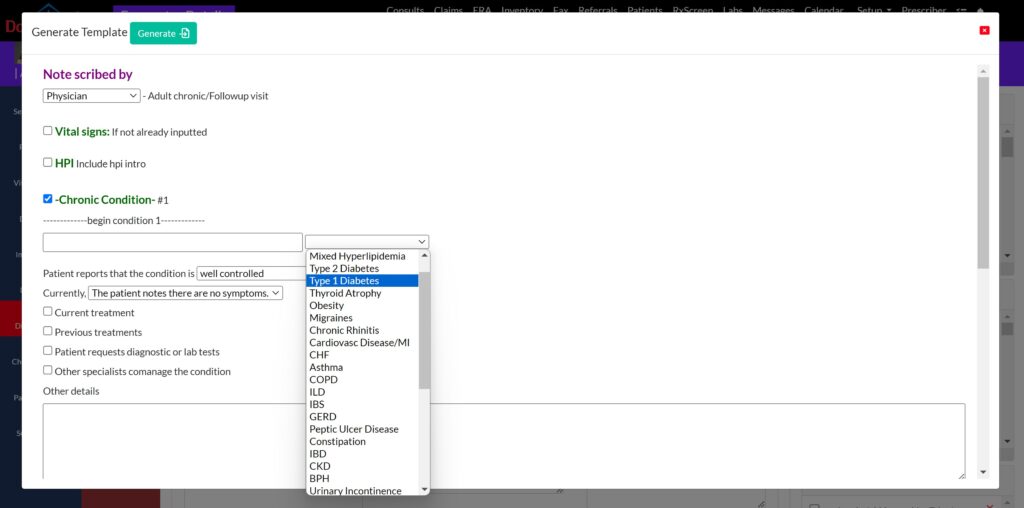
Generate quick notes using Urgent Care specific templates
Urgent care providers often document a wide range of acute visits, including cough, fever, UTI, injuries, abdominal pain, headache, respiratory symptoms, minor procedures, and follow-up visits. DocVilla supports urgent care documentation with customizable templates, quick notes, macros, and speech-to-text dictation so providers can complete charts more efficiently while keeping documentation connected to billing, prescriptions, lab orders, and patient follow-up.
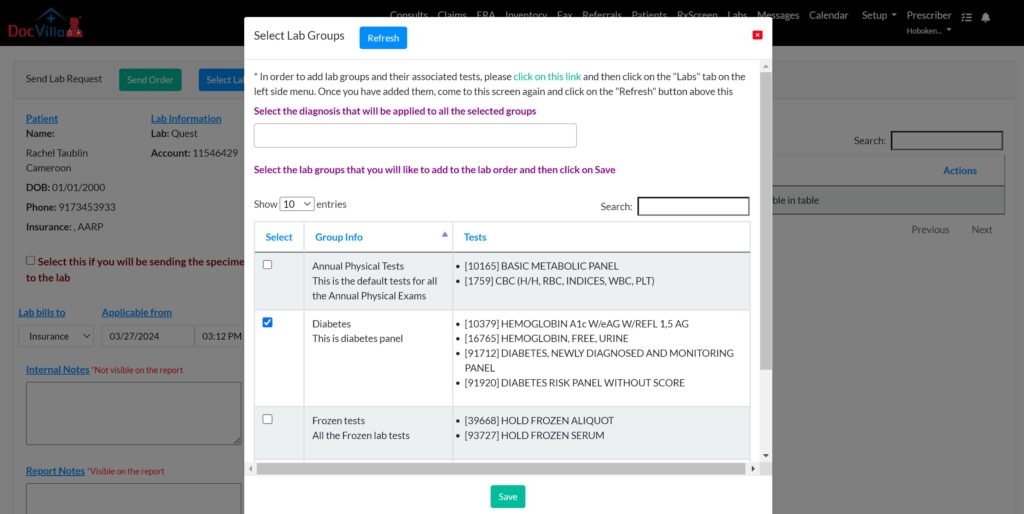
Send Lab Order and Receive Results
Urgent care clinics often need quick lab ordering, result tracking, and follow-up communication. DocVilla supports lab order workflows and result management through supported lab integrations, helping providers keep lab information connected to the patient chart and share results with patients through the portal when appropriate.
Urgent Care Referrals and Direct Secure Messaging
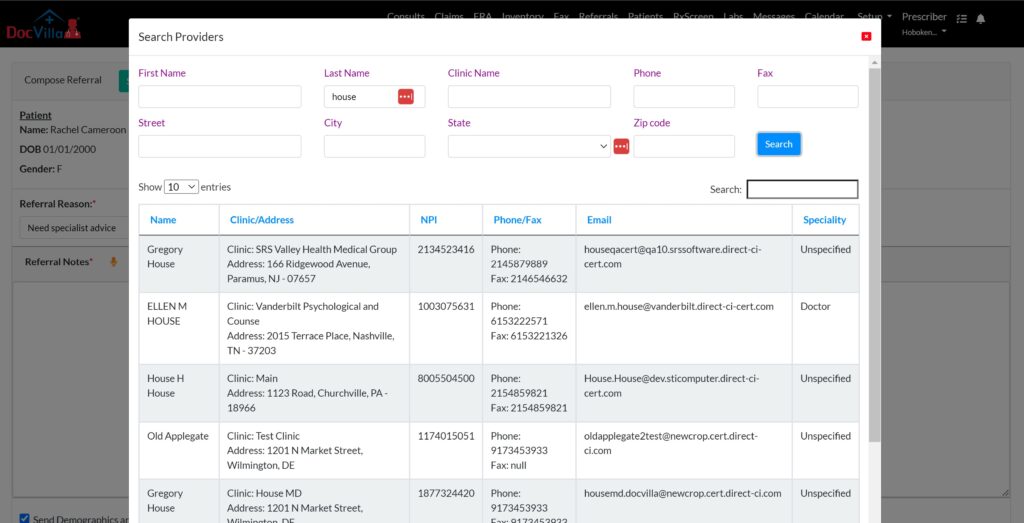
Urgent care practices often need to send referrals, share clinical information, and coordinate follow-up care with other healthcare providers. DocVilla supports Direct Secure Messaging and electronic referral workflows so urgent care teams can exchange patient information securely while keeping referral activity connected to the patient record.
Practices can also use integrated electronic fax workflows when needed to send or receive patient charts, referral documents, and other clinical information.
Urgent Care ePrescribing and EPCS Workflows
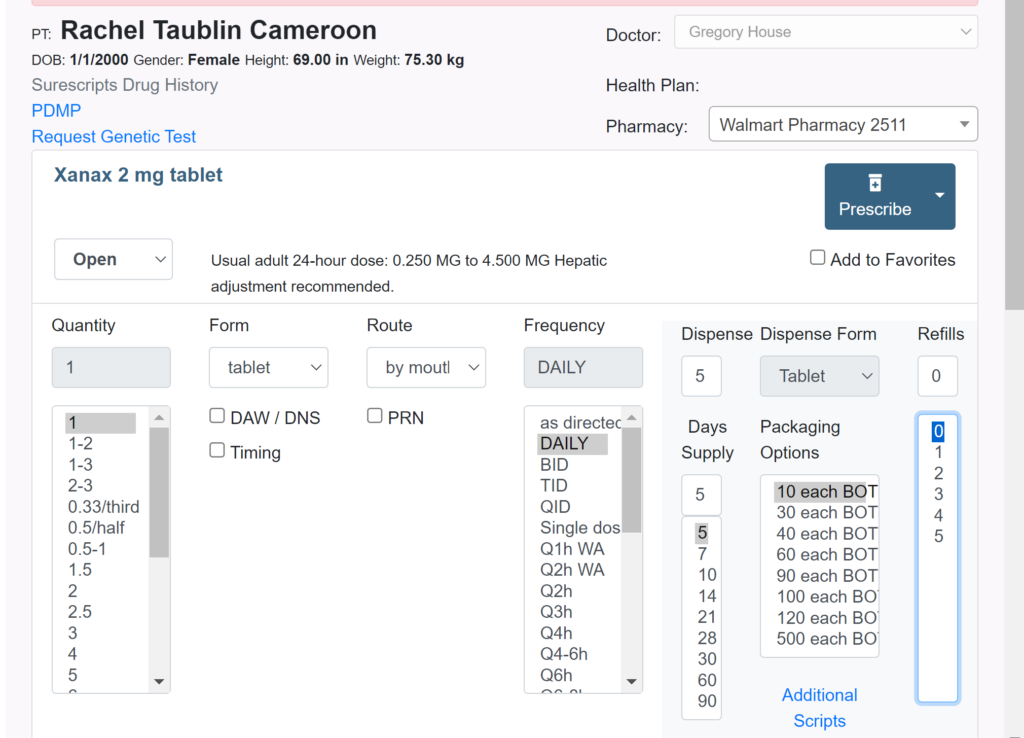
Urgent care providers often need to send prescriptions quickly after acute visits, follow-up encounters, and minor procedures. DocVilla supports electronic prescribing workflows, including controlled substances where applicable, so prescribing can stay connected to the patient chart and visit documentation.
Providers can also review available medication history and controlled substance information through supported networks where enabled, helping them make more informed prescribing decisions during urgent care visits.
Urgent Care Claims, ERAs, EOBs, and Patient Payments
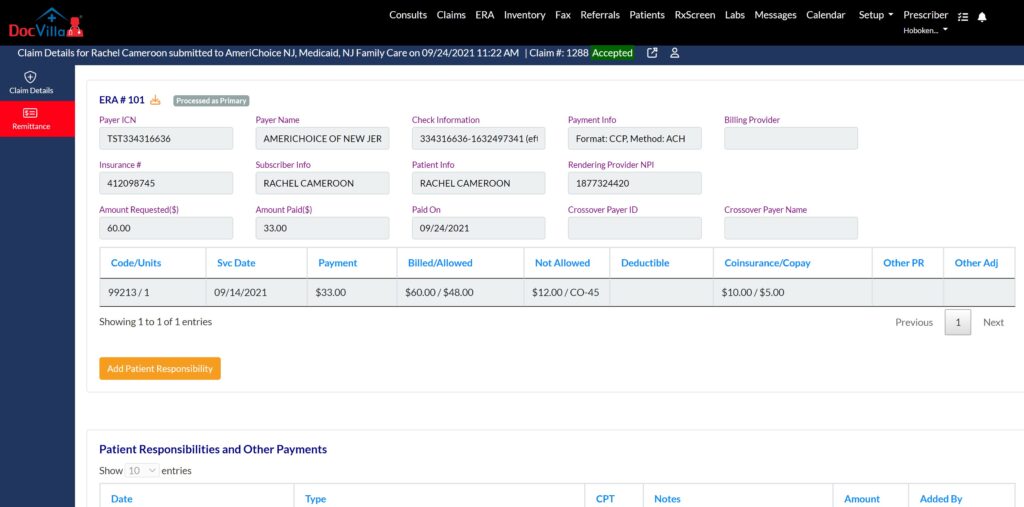
Urgent care practices need billing workflows that can support insurance claims, patient responsibility, electronic remittance, EOB tracking, payment collection, and denial follow-up. DocVilla helps practices submit claims, receive ERAs/EOBs, assign patient balances, send electronic statements, and collect payments through secure patient payment links connected to the billing workflow. For coding guidance, see our guide to common ICD-10 codes for urgent care.
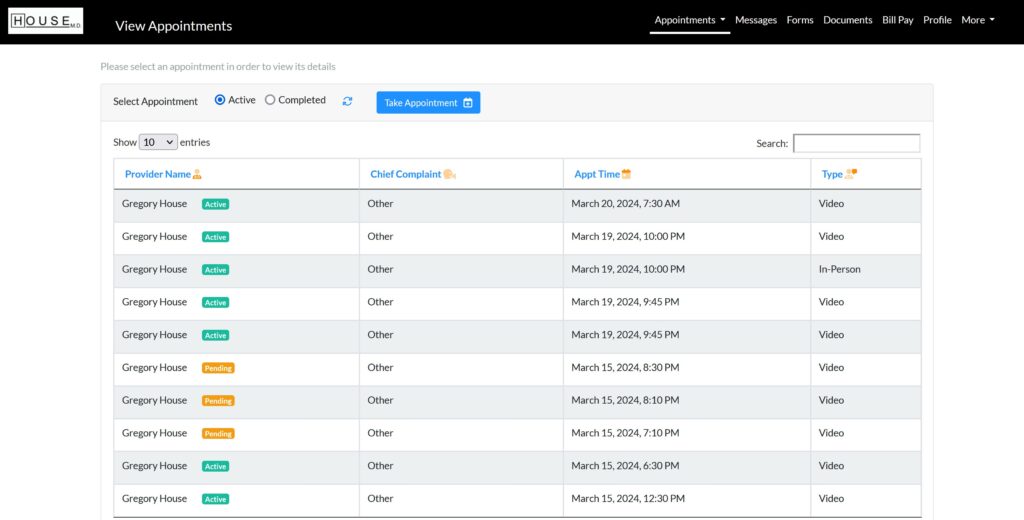
Urgent Care Patient Engagement and Digital Communication
Urgent care clinics need fast, simple ways to communicate with patients before and after the visit. DocVilla’s patient portal helps urgent care practices support online forms, document upload, secure messaging, bill payment, visit summaries, and follow-up communication from one connected platform.
Providers and staff can share documents, communicate with patients, and support family or caregiver access when appropriate. This helps urgent care teams reduce front-desk workload while giving patients a more convenient digital experience.
Urgent Care Software Features for Clinical, Billing, and Administrative Workflows
DocVilla combines urgent care EHR, EMR, practice management, billing, telehealth, patient portal, ePrescribing, lab ordering, referrals, reporting, and document management tools in one cloud-based platform.
Cloud-Based Access for Urgent Care Teams
Urgent care providers and staff can access DocVilla through a secure cloud-based system using a supported web browser. This helps clinics manage patient documentation, scheduling, billing, telehealth, and administrative workflows without relying on local server-based software.
Urgent Care Templates and Quick Notes
Urgent care providers often document a wide range of acute complaints, procedures, follow-ups, and walk-in visits. DocVilla supports customizable templates, SOAP notes, quick notes, and macros so providers can document urgent care visits more efficiently while keeping the chart connected to billing, prescriptions, lab orders, and patient follow-up.
Urgent Care ePrescribing
DocVilla helps urgent care providers send electronic prescriptions, including controlled substances where applicable, from the same workflow used for patient documentation. Providers can manage medication workflows, review supported medication information, and keep prescribing activity connected to the urgent care visit record.
Urgent Care Scheduling and Patient Flow
Urgent care clinics need scheduling tools that support walk-ins, same-day appointments, follow-up visits, provider calendars, reminders, and front-desk coordination. DocVilla helps urgent care teams manage appointments and patient flow from the same platform used for intake, documentation, billing, telehealth, and patient communication.
Urgent Care Lab Ordering and Results
Urgent care clinics often need lab ordering and result tracking for acute visits, follow-up care, and patient communication. DocVilla supports lab ordering and result workflows through supported lab integrations, helping providers keep lab information connected to the patient chart, documentation, billing, and patient portal communication.
Urgent Care Reporting and Analytics
Urgent care practices need visibility into patient volume, visit trends, billing performance, provider productivity, claims activity, and operational workflows. DocVilla provides reporting and analytics tools that help urgent care owners and administrators monitor practice performance, identify follow-up needs, and make more informed operational decisions.
Urgent Care Telehealth and Virtual Follow-Ups
Urgent care clinics can use telehealth for follow-up visits, minor acute concerns, quick provider check-ins, and patient communication. DocVilla connects telehealth with scheduling, clinical documentation, billing, and patient messaging so virtual visits stay part of the same urgent care workflow.
Urgent Care Patient Portal
DocVilla’s patient portal helps urgent care clinics manage patient intake, online forms, secure document upload, patient communication, visit summaries, bill payment, and follow-up workflows. This helps reduce front-desk workload while giving patients a convenient way to complete common tasks before and after urgent care visits.
Urgent Care Billing and Patient Payments
Urgent care practices need billing tools that support superbills, ICD-10 and CPT workflows, copays, deductibles, patient balances, insurance claims, electronic statements, and patient payments. DocVilla helps urgent care teams manage billing and payment workflows from the same platform used for scheduling, documentation, claims, and patient communication.
Urgent Care Task Management and Follow-Up Tracking
Urgent care teams often need to track follow-up calls, lab results, referrals, billing tasks, patient messages, and internal staff responsibilities after the visit. DocVilla helps practices assign tasks with due dates, notes, patient records, and chart context so staff can coordinate follow-up work more efficiently.
Cloud-Based Updates for Urgent Care Practices
DocVilla is cloud-based, so urgent care practices can access the platform through a supported web browser without managing local server installations. Updates, improvements, and system access are handled through the cloud, helping clinics stay current while supporting scheduling, documentation, billing, telehealth, and patient communication workflows.
Urgent Care Document Management
Urgent care clinics often need to manage insurance cards, referral documents, lab reports, imaging reports, visit-related files, and patient-uploaded documents. DocVilla helps practices store and organize documents in the patient chart so clinical, billing, and follow-up information stays connected to the urgent care visit.
Urgent Care Insurance Eligibility Checks
Urgent care clinics can verify patient insurance eligibility, copays, deductibles, and coverage details before or during the visit. DocVilla helps front-desk and billing teams check eligibility information more efficiently so practices can reduce billing surprises, improve payment collection, and support cleaner claims workflows.
Urgent Care Electronic Claim Filing
Urgent care practices can use DocVilla to support electronic claim filing for urgent care visits, procedures, and follow-up encounters. Visit details such as CPT codes, ICD-10 codes, dates of service, provider information, and billing details can flow into the claims workflow to help reduce duplicate entry and support cleaner claim submission.
Urgent Care Patient Statements
Urgent care practices can use DocVilla to generate patient statements that explain patient responsibility, services rendered, insurance payments, and remaining balances. Patients can access paperless statements through the DocVilla patient portal, helping practices support clearer billing communication and more convenient payment workflows.


Why Urgent Care Practices Choose DocVilla?

Urgent care practices need software that can support walk-in visits, same-day scheduling, fast documentation, billing, patient communication, prescriptions, lab workflows, referrals, and follow-up tasks. DocVilla brings these urgent care workflows together in one cloud-based EHR and practice management platform:
Tailored to Urgent Care Needs: Whether your facility handles minor emergencies, routine illnesses, or both, DocVilla’s customizable features ensure you can provide fast, effective care.
Security and Compliance: With robust security measures and compliance with HIPAA and other regulatory standards, DocVilla ensures that all patient data is protected and securely managed.
Scalability: As your urgent care facility grows, DocVilla’s scalable solutions can expand to meet increasing demands without disrupting existing operations.
Dedicated Support: Benefit from ongoing support and training from experts who understand the nuances of urgent care, ensuring you maximize the use of your EHR system.
See how DocVilla can support scheduling, documentation, billing, ePrescribing, labs, telehealth, patient communication, and follow-up workflows for your urgent care clinic.
A Top-Rated EHR for Urgent Care Practices
DocVilla is rated 4.9 out of 5 from 178 reviews across Capterra, Software Advice, and GetApp — one of the highest-rated cloud-based EHR platforms for urgent care practices. With all essential features consolidated into one platform — EHR, practice management, eRx, patient portal, patient communication, customizable templates, medical billing, and document management — urgent care practices can streamline their workflows and eliminate copying and pasting patient data between different software systems. Read what practices say on our reviews and testimonials page, or schedule a free demo to see DocVilla configured for an urgent care practice.
DocVilla Pricing for Urgent Care Practices
DocVilla is priced per provider, so urgent care practices pay for the providers they have — not for modules they don’t use. Plans come in four tiers — Bronze, Silver, Gold, and Platinum — and scale as your practice grows. See the DocVilla plans and pricing page for current details, or schedule a 1-hour demo to get exact pricing for your practice.
What to Test in Your DocVilla Demo as an Urgent Care Provider
A DocVilla demo is a live online walkthrough with our team — you tell us what matters to your practice, and we run it on screen while you watch. In your 1-hour DocVilla demo, ask to see three things end to end. First, a walk-in from the front door to an open chart — quick registration, a same-day slot, and the encounter ready to document while the patient is still in the room. Second, a typical acute visit charted with urgent care templates and quick notes — cough, laceration, or UTI — so you can watch how fast a complete, billable note comes together. Third, one visit taken from chart to claim — eligibility checked up front and codes flowing from the note into the claim without re-entry, which is the workflow behind clean urgent care billing. The demo is configured for your specialty, so what you watch is your own workflow, not a generic reel.
Switching to DocVilla from another EHR
Many urgent care practices come to DocVilla from other EHR systems. Our team manages the full transition — demographics, clinical notes, documents, and balances — and because every practice’s records are different, we prepare a migration plan and quote after reviewing your data. See the EHR data migration guide for how the process works and what typically transfers, and the EHR Data Migration Checklist for how to prepare your practice for the switch.
Comparing urgent care EHRs? See our side-by-side comparison: DocVilla vs Experity.
Frequently asked questions
What is the best EHR for urgent care?
The best EHR for urgent care combines fast walk-in intake, quick documentation, and clean claims in one cloud-based platform. DocVilla brings urgent care EHR, EMR, practice management, telehealth, eRx with EPCS, patient portal, and medical billing together in one system, so walk-in visits move from registration to chart to claim without switching software. DocVilla is rated 4.9/5 from 178 reviews across Capterra, Software Advice, and GetApp.
Does DocVilla handle urgent care billing and claims?
Yes. DocVilla supports urgent care billing and revenue cycle workflows — insurance eligibility checks, ICD-10 and CPT coding from the visit note, electronic claim filing, ERA/EOB tracking, denial follow-up, patient statements, and patient payments — all connected to the same chart the visit was documented in.
Can DocVilla manage walk-ins and same-day appointments?
Yes. Urgent care clinics use DocVilla’s scheduling tools for walk-ins, same-day slots, provider calendars, and front-desk coordination, with quick registration to get patients into an open chart fast. Scheduling, intake, documentation, and billing all run in the same platform, so patient flow stays visible during peak hours.
Can DocVilla migrate my data from my current EHR?
Yes. DocVilla’s team manages the full transition — demographics, clinical notes, documents, and balances. Because every practice’s records are different, we prepare a migration plan and quote after reviewing your data. See the EHR data migration guide for details.
How much does DocVilla cost for an urgent care practice?
DocVilla is priced per provider, with four plan tiers: Bronze, Silver, Gold, and Platinum. See the plans and pricing page for current details, or schedule a demo to get exact pricing for your practice.
Urgent Care EHR and Practice Management Resources
Explore practical resources on urgent care EHR workflows, clinical documentation, billing, patient engagement, practice management, EHR migration, and cloud-based healthcare technology.

AI Claim Scrubbing in DocVilla: Cleaner Claims Before They Leave the EHR
October 6, 2026
No Comments
Read More »

Patient AI Summary in DocVilla: AI-Generated Chart Summaries Before Every Visit
October 6, 2026
No Comments
Read More »

Denial Codes Explained: CO-45, CO-97, CO-16, and the Other CARC Codes Every Practice Sees (and How to Fix Each)
September 4, 2026
No Comments
Read More »

Provider Credentialing for a New Medical Practice: CAQH, PECOS, Timelines, and How Enrollment Differs
September 4, 2026
No Comments
Read More »