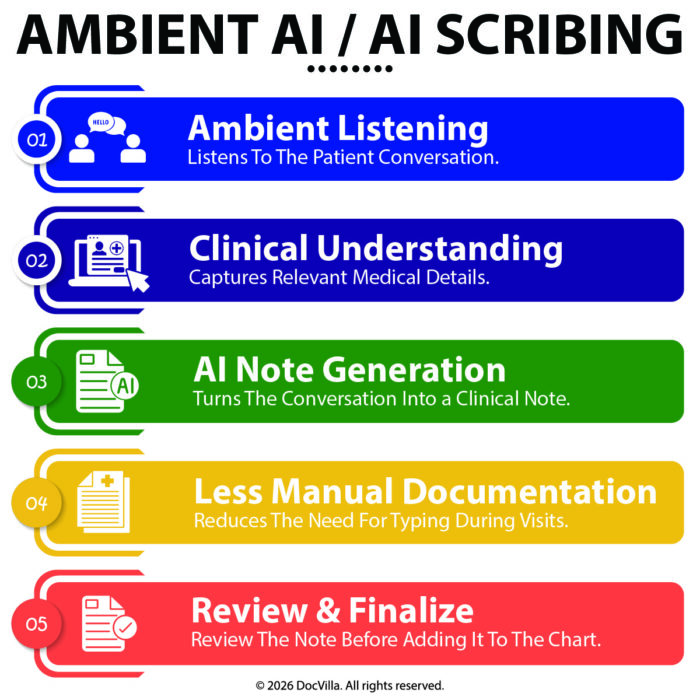
DocVilla is a web-based EHR, so the ambient AI scribe a practice already uses runs in the same browser as the chart, and the note it drafts reaches the DocVilla SOAP note through the scribe’s own push-to-EHR or insert step, or by paste when the scribe has neither. Which of those you get depends on the scribe, not on DocVilla. That is what makes DocVilla scribe-agnostic: a practice can change scribes without changing its EHR, and can adopt a scribe later without waiting on its EHR vendor.
Why a web-based EHR is scribe-agnostic
Most ambient scribes are built for the browser: a Chrome extension, a web app in a second tab, or a phone app that hands the finished note to the desktop. DocVilla runs entirely in the browser too, with nothing installed on the workstation, so the scribe and the chart share the same screen and the same session. There is no desktop client or remote-desktop layer between them, which is where many scribe integrations with older EHRs break down. The scribe does its work; DocVilla is the open page it writes into.
How the note gets into the DocVilla SOAP note
Three paths exist, in order of how automated they are. The scribe’s capabilities decide which one applies to you.
- Push-to-EHR. Some scribes can send the drafted note directly into the open DocVilla note, populating the subjective, objective, assessment and plan sections. This is the smoothest path and it depends entirely on whether the scribe supports it for web-based EHRs.
- Insert at the cursor. Browser-extension scribes commonly insert the finished text wherever the cursor sits, so the provider places it in the right SOAP field and moves on.
- Copy and paste. Every scribe can do this, including phone-first scribes. It is one extra step per visit and it works today with no setup.
In every case the provider reads the draft, edits it and signs it inside DocVilla. The scribe produces a draft; the signed note in the chart is the provider’s.
What stays with the scribe vendor, and what lives in DocVilla
The recording, the transcription, the drafting and the patient’s recording consent all happen inside the scribe, under the practice’s own agreement and Business Associate Agreement with that vendor. DocVilla has no part in those steps and no affiliation with any scribe beyond what is stated on the AI EHR page. Once the note is in the chart it is part of the patient record in DocVilla, covered like any other chart entry, and available to the rest of the workflow: the patient portal, the superbill, and billing.
What to check with your scribe vendor before you choose an EHR
- Does it offer push-to-EHR for web-based EHRs, insert-at-cursor only, or export only? That decides which of the three paths above you will use.
- Does it map the note to SOAP sections or deliver one block of text?
- Does it run as a browser extension, a web app, or a phone app? Phone-first scribes usually mean the paste path.
- Who holds the recording consent and the BAA for the audio and the draft? It should be the scribe vendor, under your agreement with them.
- Can the provider leave it off for a given visit? Not every patient wants to be recorded.
What DocVilla provides itself
The AI inside DocVilla is built into the chart rather than beside it. Medical dictation is an add-on that converts speech to text in the note for providers who want hands-free charting without an ambient scribe. The Patient AI Summary prepares a summary of the patient’s selected encounters before the visit. AI claim scrubbing runs within DocVilla’s billing services, flagging issues for the practice’s billing contact before claims go out. All of it, including what is built in and what is compatible, is described on the AI EHR page, which is kept current as the AI features change.
Frequently asked questions
Does DocVilla have its own AI scribe?
No. DocVilla ships medical dictation as an add-on and the Patient AI Summary as part of the AI EHR. Ambient scribes are third-party tools that run alongside DocVilla in the browser.
Will my scribe fill in the SOAP note automatically?
Only if the scribe supports push-to-EHR for web-based EHRs. If it supports insert-at-cursor, the provider places the text in the right section; otherwise the note is pasted in. Ask the scribe vendor which it offers.
Can I use an AI scribe during a DocVilla telehealth visit?
DocVilla’s telehealth runs in the browser. Whether a scribe can capture a video visit depends on how that scribe records audio on the device, so confirm it with the vendor before relying on it for virtual visits.
Do I have to choose a scribe before I choose DocVilla?
No. Because DocVilla is scribe-agnostic, a practice can start with dictation, add a scribe later, or switch scribes without any change to the EHR.
DocVilla is rated 4.9/5 from 178 reviews across Capterra, Software Advice and GetApp. Book a free demo and ask to open a test chart with your scribe running, so you can see which path your scribe takes into the note.