What Is an AI EHR?
Updated: October 2026
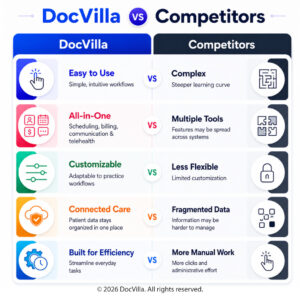
An AI EHR is an electronic health record with artificial intelligence working inside the clinical and billing workflows — not a separate tool a practice has to open, copy into, and reconcile. DocVilla’s cloud-based EHR now includes AI where it saves a provider or a biller real time: Patient AI Summary, which generates a structured recap of a patient’s selected encounters before a visit; AI claim scrubbing inside DocVilla’s billing services, which checks claims against payer and coding-consistency rules before they are filed; medical dictation with speech-to-text in the chart; and compatibility with ambient AI scribe tools that run in the browser. Every AI feature is a review aid — the provider verifies, the provider decides — and runs alongside the same charting, scheduling, e-prescribing with EPCS, telehealth, patient portal, and integrated billing DocVilla is known for. DocVilla is rated 4.9/5 across 178 verified reviews on Capterra, Software Advice, and GetApp; see the AI features on real charts in a live demo.
Patient AI Summary: Know the Patient Before You Walk In
From a consult or the patient profile, a provider selects how many recent encounters to include and clicks Generate. Patient AI Summary reads the documentation already in the chart for those visits — chief complaint and history, SOAP notes, past medical history, allergies, medications, family history — and returns a concise, consistently structured recap, with items that look garbled or contradictory in the source notes flagged for verification. Summaries are saved with the patient and listed by the service dates they cover. It is built for pre-visit preparation, for long-history patients, and for covering providers, and it is available as an add-on metered by AI token usage, with a usage report for practice administrators. How Patient AI Summary works →
AI Claim Scrubbing: Cleaner Claims Before They Leave
For practices on DocVilla’s medical billing services, every claim the practice submits is checked by AI claim scrubbing — completeness, coding consistency, place-of-service alignment, and payer-specific rules — before it is filed. Flagged items are shared with the practice’s designated contact, the practice makes the corrections, and the claim goes out right the first time. Coding stays with the provider; the scrubber surfaces the small errors that turn a correctly coded visit into a denied claim. How AI claim scrubbing works →
AI Dictation: Speak the Note, Keep Your Hands Free
DocVilla’s medical dictation add-on turns speech into text directly inside the chart — history, exam findings, assessment, and plan — with medical vocabulary built in, so providers who think faster than they type can document a visit without leaving the note. It is the fastest path to shorter charting time for a practice that isn’t ready for an ambient scribe. Medical dictation software →
Ambient AI Scribes: Works With the Tools Providers Already Choose
Because DocVilla is fully web-based, ambient AI scribe tools that run as browser extensions can be used alongside it — the scribe listens to the visit and drafts the note, and, depending on that third-party software’s capabilities and your plan with it, its push-to-EHR option can send the generated note into the DocVilla SOAP note. The provider reviews and signs in DocVilla as usual. DocVilla is also completing a direct integration with an ambient AI scribe partner; details will be announced when it is live. The scribe vendor’s own agreement and Business Associate Agreement govern that tool.
Responsible AI in a Medical Practice
Three rules govern every AI feature in DocVilla. First, AI assists; it does not decide. Summaries are review aids, scrubbing flags issues for the practice to resolve, and dictation produces text the provider edits and signs — clinical and coding judgment stays with the clinician. Second, nothing leaves the workflow: AI features operate on the practice’s own records within DocVilla’s HIPAA-compliant environment, covered by your Business Associate Agreement with DocVilla. Third, usage is transparent: add-on AI features are metered, and administrators can see consumption in the reports at any time.