
What Is the Best EMR System for a Medical Practice?
Updated: October 2026
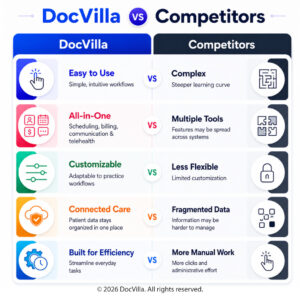
The best EMR systems for an independent practice are cloud-based platforms that put charting, e-prescribing, scheduling, billing, telehealth, and a patient portal in one system — priced per provider and configurable by specialty. DocVilla is built exactly that way: a cloud-based ambulatory EMR and EHR with integrated practice management, billing, and telehealth for independent practices, on per-provider plans, rated 4.9/5 across 178 verified reviews on Capterra, Software Advice, and GetApp. Below is our list of the 10 best EMR systems used by medical practices — including athenahealth, eClinicalWorks, NextGen, AdvancedMD, and Tebra — compared by practice fit, features, and pricing model, so you can shortlist the right one for your practice size and specialty, then see it in a live demo.
The 10 Best EMR Systems for Medical Practices
Every system below is a cloud-based EMR/EHR used by independent medical practices in the U.S. We compared them on practice fit, what’s built in versus bolted on, deployment, and pricing model — using each vendor’s publicly available product information. Rankings reflect fit for independent practices; the right choice still depends on your specialty and size.
1. DocVilla — Best all-in-one EMR for independent practices
Best for: solo providers, small and mid-sized groups, and multi-specialty practices that want one system instead of five. Standout: DocVilla combines charting, e-prescribing with EPCS, scheduling, medical billing and RCM, telehealth, and a free patient portal in a single cloud platform, with customizable templates for 20+ specialties and a white-labeled patient portal and apps under your own practice brand. It is rated 4.9/5 across 178 verified reviews on Capterra, Software Advice, and GetApp. Pricing model: tiered per-provider plans from core EHR and telehealth up to full practice management with billing services. See it in a live demo.
2. athenahealth — Best for larger groups wanting an integrated network
Best for: established multi-provider groups and organizations that value a large payer and clinical network. Standout: athenaOne bundles EHR, practice management, and revenue cycle services in one cloud suite, with strong claims-scrubbing and reporting. Consider: it is built at enterprise scale, and pricing is quote-based and commonly tied to collections, so smaller practices should model total cost carefully. Compare DocVilla vs athenahealth.
3. eClinicalWorks — Best for feature depth across ambulatory specialties
Best for: practices that want a very broad feature set and the option of cloud or on-premise deployment. Standout: one of the most widely used ambulatory EHRs, with integrated practice management, optional RCM services, and the healow patient-engagement suite. Consider: that breadth comes with a steeper learning curve and a larger implementation than lighter systems. Compare DocVilla vs eClinicalWorks.
4. NextGen Healthcare — Best for mid-to-large ambulatory groups
Best for: growing and multi-location groups, with a separate edition aimed at smaller practices. Standout: deep specialty-specific content and strong population-health and reporting tools in the enterprise edition. Consider: the enterprise product is a significant implementation; independent practices should confirm which edition they are being quoted. Compare DocVilla vs NextGen.
5. AdvancedMD — Best for billing-led multi-provider practices
Best for: groups whose priority is practice management and revenue cycle performance. Standout: a mature cloud PM and billing engine with detailed financial reporting, available with or without the EHR. Consider: the platform is modular, so the total cost depends on how many components you add. Compare DocVilla vs AdvancedMD.
6. Tebra — Best for independent practices focused on patient acquisition
Best for: small independent practices that want billing and practice-growth tools alongside the EHR. Standout: formed from Kareo and PatientPop, Tebra pairs a cloud EHR and billing platform with online scheduling, reputation, and marketing features. Consider: clinical depth is lighter than specialty-heavy systems, and pricing is quote-based by module. Compare DocVilla vs Tebra.
7. DrChrono — Best for mobile-first small practices
Best for: providers who chart primarily on an iPad or iPhone. Standout: a native Apple-device EHR with integrated billing and patient check-in, now part of EverCommerce. Consider: the workflow is designed around Apple hardware, which suits some practices and not others. Compare DocVilla vs DrChrono.
8. Practice Fusion — Best entry-level EMR for very small practices
Best for: solo and very small practices that need core charting and e-prescribing at a low subscription cost. Standout: a long-established cloud EHR, now owned by Veradigm, with a simple interface and quick setup. Consider: practice management and billing are lighter and rely on partner integrations, so practices that bill in-house often outgrow it. Compare DocVilla vs Practice Fusion.
9. Greenway Health — Best for established ambulatory practices with revenue services
Best for: established and multi-location ambulatory practices that want EHR, practice management, and revenue cycle services from one vendor. Standout: the Intergy platform covers clinical, financial, and analytics workflows, with optional outsourced revenue services. Consider: implementation scale and pricing are geared to larger practices. Compare DocVilla vs Greenway Health.
10. RXNT — Best modular option for budget-conscious practices
Best for: practices that want to start with e-prescribing or billing and add the EHR later. Standout: a modular cloud suite — eRx, EHR, and practice management/billing — that can be purchased separately, with straightforward per-provider pricing. Consider: assembling modules means confirming the full bundle covers everything your practice needs. Compare DocVilla vs RXNT.
EMR Systems Comparison at a Glance
| EMR system | Best for | Practice size | Deployment | Billing / RCM | Telehealth | Compare |
|---|---|---|---|---|---|---|
| DocVilla | All-in-one for independent practices | Solo to mid-size, multi-specialty | Cloud | Built in, plus billing services | Built in, all plans | See plans |
| athenahealth | Larger groups, integrated network | Mid-size to enterprise | Cloud | Built in, revenue services | Available | DocVilla vs athenahealth |
| eClinicalWorks | Feature depth across specialties | Small to enterprise | Cloud or on-premise | Built in, optional RCM services | Available | DocVilla vs eClinicalWorks |
| NextGen Healthcare | Mid-to-large ambulatory groups | Small to enterprise (two editions) | Cloud | Built in, RCM services | Available | DocVilla vs NextGen |
| AdvancedMD | Billing-led multi-provider practices | Small to mid-size groups | Cloud | Core strength, EHR optional | Available | DocVilla vs AdvancedMD |
| Tebra | Independent practices, patient acquisition | Solo to small groups | Cloud | Built in | Available | DocVilla vs Tebra |
| DrChrono | Mobile-first small practices | Solo to small | Cloud, iOS-native | Built in | Available | DocVilla vs DrChrono |
| Practice Fusion | Entry-level, very small practices | Solo to small | Cloud | Via partners | Via partner | DocVilla vs Practice Fusion |
| Greenway Health | Established ambulatory practices | Mid-size to multi-location | Cloud | Built in, revenue services | Available | DocVilla vs Greenway Health |
| RXNT | Modular, budget-conscious practices | Solo to small groups | Cloud | Separate module | Available | DocVilla vs RXNT |
Comparison based on each vendor's publicly available product information; capabilities and packaging change, so verify details with the vendor before deciding.
EMR vs EHR: What’s the Difference?
EMR vs EHR — or EHR vs EMR, depending on who’s asking — is the most common question practices raise when evaluating systems, and the distinction shapes what you should expect a modern platform to do. The short version: an EMR is the digital chart inside one practice; an EHR is designed to follow the patient across practices. Most systems on this list, DocVilla included, do both.

What is an EMR (Electronic Medical Record)?
EMR Definition: An Electronic Medical Record (EMR) is a digital version of the traditional paper charts found in a clinician’s office. It contains comprehensive medical and treatment history of patients within one practice and is primarily used by healthcare providers for diagnosis and treatment.
Advantages of EMR Systems:
- Enhanced In-Clinic Efficiency: EMRs streamline clinical operations by reducing the need for paper-based documentation, making patient data retrieval quick and efficient.
- Improved Patient Care within a Single Practice: EMRs allow for easy tracking of patient data over time, enabling providers to make informed treatment decisions based on historical health data.
- Secure Data Management: EMRs help in securely managing patient data, reducing the risks associated with data loss or breaches associated with physical records.
What is an EHR (Electronic Health Record)?
EHR Definition: An Electronic Health Record (EHR) extends beyond the standard EMR by focusing on the total health of the patient. EHRs are designed to be accessed and managed by authorized providers across more than one health care organization. They contain information from all clinicians involved in the patient’s care and provide a more comprehensive perspective on the patient’s health history.
Advantages of EHR Systems:
- Comprehensive Health Information: EHRs include all the medical and treatment histories from various providers, which help ensure data completeness.
- Enhanced Coordination of Care: By allowing data sharing across various healthcare settings, EHRs facilitate better coordination and continuity of care.
- Patient Engagement: Most EHR systems come with patient portals that empower patients by providing them direct access to their personal health records, educational resources, and communication tools.


EMR vs EHR: Understanding the Differences
While EMRs and EHRs both play significant roles in digital health record management, understanding their differences EMR vs EHR is key to leveraging each system’s benefits effectively.
- Data Accessibility: EMRs are not designed to be shared outside the individual practice, whereas EHRs are intended to be shared across different healthcare facilities, enhancing the continuity of care.
- Functionality: EMRs are best for tracking the patient’s condition within a single practice over time. EHRs, on the other hand, are designed to track the patient’s conditions across all practices and health engagements, making them more dynamic and comprehensive.
- Patient Care Optimization: EHRs are more suited for managing long-term care and chronic conditions as they provide a holistic view of the patient’s health history, which can be crucial for making strategic treatment decisions.
Key Features of EMR EHR
Cloud Based Electronic Medical Records (EMR) and Electronic Health Records Software (EHR) for Medical Practices
Cloud Based
DocVilla EMR is accessible anytime, anywhere using a web browser. It runs on Google and AWS cloud with an uptime guarantee of 99.999%. DocVilla uses 256 bit encryption.
SOAP Templates
Create unlimited SOAP templates for your organization. Layer them for patients with multiple symptoms. Use one click macros to dynamically generate content.
Electronic Prescribing
Sending unlimited eRx using Surescripts network to over 75000 pharmacies across the nation. Compose compound drugs and get Allergy-Drug interaction notification.
Scheduling
Manage your calendar. DocVilla calendar even integrates with your smart phone and google calendar so you are always on top of your upcoming appointments.
Lab Integration
Using HL7 based interface, DocVilla can integrate with any lab of your choice. We also offer integration of APIs from various labs at no costs to you.
Powerful Analytics
DocVilla offers powerful analytics and reports to help you make critical decisions for your practice and account for unrealized revenue. We can even develop custom reports for your practice.
Integrated Telemedicine
DocVilla EMR offers HIPAA compliant free integrated telemedicine (video calling and messaging) within the platform. It is included in all the plans without any extra charge.
Free Patient Portal
DocVilla offers free patient portal. We can also customize and white-label the portal for a small fee. Patients can securely upload required documents.
Flexible Billing
Generate superbills using ICD 10 codes. Apply copays, deductibles to patient account. Send paperless bills to the patient, charge credit from DocVilla, file for insurance claim.
Task Management
Assign tasks to your staff members with due dates, notes, corresponding patient and chart records. Get auto notifications and keep track of completion.
Automatic Updates
Since DocVilla is cloud based, it is always up to date. No need to install any software. Open up the browser, login and start using DocVilla EHR. Available anytime, anywhere.
Document Management
Securely upload documents such as x-rays, MRIs, blood reports, copy of insurance corresponding to encounters. Documents are stored safely in cloud using 256 bit encryption.


Learn More about EHR EMR
Why practices love us? DocVilla is the Best Ambulatory EHR EMR for independent practices.
DocVilla has a complete EHR platform along with patient portal. The terms Electronic Medical Records (EMR) and Electronic Health Records (EHR) are often used interchangeably. EMR and EHR share certain characteristics, however, they serve different purposes. Understanding the difference between EMR and EHR is important for the success of your practice.
Both EMR and EHR have digital versions of patient’s charts. However, the biggest difference is that in EMR, patient records do not leave the doctor’s office. So if a patient changes a doctor, his or her patient data is unlikely to be transferred. By contrast, an EHR contains more holistic view of the patient’s health from different doctors. This helps clinicians make better informed decisions for care planning. Feel free to read further differences on healthit.gov website.
DocVilla serves as both an EHR and an EMR. Patients can share their history with other providers through the patient portal, clinicians can request records from other practices, and telemedicine, secure messaging, and e-prescribing are built into the same platform. DocVilla also offers customization and white-labeling of the patient portal and mobile apps under the practice’s own brand.
DocVilla provides state-of-the-art EMR and EHR solutions that are customizable to meet the specific needs of healthcare providers across various specialties. Whether you operate a small clinic or a large healthcare facility, DocVilla’s solutions are designed to enhance the efficiency and quality of care delivered.
Customizable Solutions: DocVilla understands that no two healthcare facilities are the same. Our EMR and EHR systems are highly customizable to align with your specific clinical workflows, patient management needs, and administrative processes.
Integrated Telemedicine: Extend the reach of your practice and enhance patient care with integrated telemedicine capabilities. DocVilla’s solutions make it easy to connect with patients remotely, ensuring continuous care delivery and patient engagement.
Comprehensive Support and Training: Transitioning to a new EMR or EHR system can be challenging. DocVilla provides comprehensive support and training to ensure your staff is well-equipped to utilize all the features effectively.
Advanced Security and Compliance: With DocVilla, your patient data is protected with advanced security protocols, ensuring compliance with HIPAA and other regulatory standards.
Choosing the right EMR or EHR system can significantly impact your practice’s operational efficiency and the quality of care you provide. DocVilla’s cloud-based solutions offer the flexibility, security, and efficiency needed to adapt to the evolving healthcare landscape. By integrating DocVilla’s EMR or EHR into your practice, you can enhance patient care management, streamline operations, and ensure high-quality healthcare delivery.
How to Choose an EMR System
Five questions separate a good fit from an expensive mistake. Specialty fit: ask to see the templates, order sets, and billing rules for your specialty, not a generic demo. Built in or bolted on: confirm whether scheduling, billing, telehealth, and the patient portal are part of the platform or separate products with separate logins and fees. Pricing model: understand whether you are paying per provider, per module, or a share of collections, and what changes as you add providers or locations. Data migration: ask what transfers from your current system and who does the work — see our EHR data migration guide. Support and training: find out who answers when something breaks on a Friday afternoon. Our EHR buyer’s guide and guide to picking the right EHR the first time walk through each of these in depth.
A Top-Rated EHR for Medical Practices
DocVilla is rated 4.9 out of 5 from 178 reviews across Capterra, Software Advice, and GetApp — one of the highest-rated cloud-based EHR platforms for medical practices. With all essential features consolidated into one platform — EHR, practice management, eRx, patient portal, patient communication, customizable templates, medical billing, and document management — medical practices can streamline their workflows and eliminate copying and pasting patient data between different software systems. Read what practices say on our reviews and testimonials page, or schedule a free demo to see DocVilla configured for a medical practice.
DocVilla Pricing for Medical Practices
DocVilla is priced per provider, so medical practices pay for the providers they have — not for modules they don’t use. Plans come in four tiers — Bronze, Silver, Gold, and Platinum — and scale as your practice grows. See the DocVilla plans and pricing page for current details, or schedule a 1-hour demo to get exact pricing for your practice.
What to Test in Your DocVilla Demo as a Medical Practice
A DocVilla demo is a live online walkthrough with our team — you tell us what matters to your practice, and we run it on screen while you watch. In your 1-hour DocVilla demo, ask to see three things end to end. First, chart a typical visit start to finish with your specialty’s templates and time it. Second, follow one claim from checkout through eligibility verification, claim scrubbing, and submission to the clearinghouse. Third, run a telehealth visit and confirm it charts and bills exactly like an in-person visit, with no separate system. The demo is configured for your specialty, so what you watch is your own workflow, not a generic reel.
Switching to DocVilla from Another EHR
Many practices come to DocVilla from other EHR systems. Our team manages the full transition — demographics, clinical notes, documents, and balances — with a migration plan and quote prepared after we review your data, since every practice’s records are different. See the EHR data migration guide for how the process works and what typically transfers, and the EHR data migration checklist for what to prepare. Evaluating your options? See all of our side-by-side comparisons on the DocVilla vs other EHRs page.
Frequently Asked Questions About EMR Systems
What is the best EMR system for a medical practice?
The best EMR system for an independent practice combines charting, e-prescribing, scheduling, billing, telehealth, and a patient portal in one cloud-based platform, priced per provider and configurable by specialty. DocVilla is built that way for independent practices in 20+ specialties, and is rated 4.9/5 from 178 reviews across Capterra, Software Advice, and GetApp.
What is the difference between an EMR and an EHR?
An EMR (electronic medical record) is the digital chart used inside a single practice. An EHR (electronic health record) is designed to follow the patient across practices and providers, with the ability to share and receive records. Most modern systems, including DocVilla, function as both — the terms are used interchangeably by most vendors and buyers today.
Which EMR systems work best for small and solo practices?
Small and solo practices do best with an all-in-one cloud system that doesn’t require separate billing or telehealth products, priced per provider so costs stay predictable. See our guides to the best affordable EHR systems for small practices and the best EHR for solo providers for how to evaluate options at each size.
Can DocVilla migrate my data from my current EHR?
Yes. DocVilla’s team manages the full transition — demographics, clinical notes, documents, and balances. Because every practice’s records are different, we prepare a migration plan and quote after reviewing your data. See the EHR data migration guide for details.
How much does DocVilla cost for a medical practice?
DocVilla is priced per provider, with four plan tiers: Bronze, Silver, Gold, and Platinum. See the plans and pricing page for current details, or schedule a demo to get exact pricing for your practice.
Vendor information on this page is drawn from publicly available sources and each company’s own product materials as of our last review; features, editions, and pricing models change, so confirm details directly with each vendor. All product names and trademarks are the property of their respective owners; DocVilla is not affiliated with the other vendors listed.
Resources for EHR EMR systems
Read articles about Electronic Health Records EHR and Electronic Medical Records EMR that will help you to run your practice efficiently

AI Claim Scrubbing in DocVilla: Cleaner Claims Before They Leave the EHR
October 6, 2026
No Comments
Read More »

Patient AI Summary in DocVilla: AI-Generated Chart Summaries Before Every Visit
October 6, 2026
No Comments
Read More »

Denial Codes Explained: CO-45, CO-97, CO-16, and the Other CARC Codes Every Practice Sees (and How to Fix Each)
September 4, 2026
No Comments
Read More »

Provider Credentialing for a New Medical Practice: CAQH, PECOS, Timelines, and How Enrollment Differs
September 4, 2026
No Comments
Read More »