
Estimated reading time: 7 minutes
Updated: September 2026
Choosing an EHR usually comes down to a shortlist — DocVilla vs the system you’re using now, or DocVilla vs the other names on your demo list. This page collects every side-by-side comparison we’ve published, so you can see exactly how DocVilla stacks up against 23 leading EHR and practice management systems. DocVilla is a HIPAA-compliant, cloud-based platform that combines EHR, practice management, telehealth, eRx with EPCS, patient portal, and medical billing in one system, rated 4.9 out of 5 from 178 reviews across Capterra, Software Advice, and GetApp.
How These Comparisons Work
Each EHR comparison follows the same structure: a high-level comparison table, then a section-by-section look at EHR and clinical documentation, practice management, billing and RCM, patient portal and engagement, and how each vendor approaches pricing. They’re written for independent practices deciding between systems — not spec sheets, but the differences that show up in daily workflow.
EHR Comparison Chart: 23 EMR Companies and EHR Vendors at a Glance
A quick list of the EHR systems and EMR companies independent practices shortlist most often — who each vendor builds for, how it’s deployed, and the pricing model it publishes. Every row links to the full side-by-side comparison.
EHR Comparison Chart: 23 EMR Companies and EHR Vendors at a Glance
A quick list of the EHR systems and EMR companies independent practices shortlist most often — who each vendor builds for, how it’s deployed, and the pricing model it publishes. Every row links to the full side-by-side comparison.
| Vendor | Built for | Deployment | Pricing model (as published) | Compare |
|---|---|---|---|---|
| DocVilla | Independent practices, all sizes and specialties — EHR, PM, billing, telehealth, portal in one | Cloud | Per provider, four tiers | See the platform |
| athenahealth | Practices and health systems; EHR with bundled RCM | Cloud | Quote-based | DocVilla vs athenahealth |
| eClinicalWorks | Practices of all sizes; EHR, PM, RCM | Cloud | Per provider/month; RCM percentage option | DocVilla vs eClinicalWorks |
| NextGen | Ambulatory and specialty practices | Cloud | Quote-based | DocVilla vs NextGen |
| AdvancedMD | Independent practices; EHR, PM, RCM | Cloud | Per provider; RCM percentage option | DocVilla vs AdvancedMD |
| Tebra (Kareo) | Independent practices; EHR, billing, practice growth | Cloud | Per provider (quote) | DocVilla vs Tebra |
| DrChrono | Small practices; iPad-first EHR and billing | Cloud | Per provider, tiered | DocVilla vs DrChrono |
| Practice Fusion | Small and independent practices; core EHR | Cloud | Per provider/month | DocVilla vs Practice Fusion |
| CareCloud | Practices seeking EHR, PM, and RCM | Cloud | Per provider; RCM percentage option | DocVilla vs CareCloud |
| Greenway Health | Ambulatory practices; EHR, PM, RCM | Cloud-hosted or on-premise | Quote-based | DocVilla vs Greenway Health |
| RXNT | Small practices; EHR, PM, billing, eRx | Cloud | Per provider/month | DocVilla vs RXNT |
| CharmHealth | Small and integrative practices | Cloud | Free tier plus per-encounter or per-provider plans | DocVilla vs CharmHealth |
| Elation Health | Primary care and independent practices; clinical-first EHR | Cloud | Per provider/month | DocVilla vs Elation Health |
| Praxis EMR | Template-free “concept processing” EMR | Cloud or on-premise | Quote-based | DocVilla vs Praxis EMR |
| PrognoCIS | Multi-specialty practices; EHR, PM, RCM | Cloud | Per provider (quote) | DocVilla vs PrognoCIS |
| Experity | Urgent care; EHR, PM, RCM | Cloud | Quote-based | DocVilla vs Experity |
| ModMed | Specialty-specific EHR (dermatology, ophthalmology, orthopedics, GI, others) | Cloud | Quote-based | DocVilla vs ModMed |
| SimplePractice | Behavioral health and wellness practices | Cloud | Per clinician, tiered | DocVilla vs SimplePractice |
| TherapyNotes | Behavioral health; EHR and billing | Cloud | Per user/month | DocVilla vs TherapyNotes |
| Valant | Behavioral health practices | Cloud | Quote-based | DocVilla vs Valant |
| TheraNest | Behavioral health practice management | Cloud | Tiered by client count | DocVilla vs TheraNest |
| WebPT | Physical, occupational, and speech therapy | Cloud | Per provider (quote) | DocVilla vs WebPT |
| ChiroTouch | Chiropractic; EHR and PM | Cloud | Per provider/month, tiered | DocVilla vs ChiroTouch |
| Jane App | Allied health and wellness clinics | Cloud | Per practitioner/month | DocVilla vs Jane App |
The 23 EMR Companies and EHR Vendors, in Brief
A short, neutral profile of each vendor on this list — who it’s built for, how it’s deployed, and what it’s known for — drawn from each company’s publicly available product information. Every entry links to its full side-by-side comparison with DocVilla.
Broad ambulatory EHR and practice management platforms
athenahealth — Cloud-based athenaOne combines EHR, practice management, and revenue-cycle services on a large shared payer and clinical network; commonly chosen by larger groups and health systems. DocVilla vs athenahealth
eClinicalWorks — One of the most widely used ambulatory EHRs, available as cloud or on-premise, with integrated practice management, optional RCM services, and the healow patient-engagement suite. DocVilla vs eClinicalWorks
NextGen Healthcare — Two editions: NextGen Enterprise for mid-to-large ambulatory groups with deep specialty content, and NextGen Office for smaller practices. DocVilla vs NextGen
AdvancedMD — A cloud platform whose practice-management and billing engine is the core, with the EHR available alongside it; suited to billing-led multi-provider practices. DocVilla vs AdvancedMD
Tebra — Formed from Kareo and PatientPop; a cloud EHR and billing platform paired with patient-acquisition and reputation tools for small independent practices. DocVilla vs Tebra
DrChrono — An iPad- and iPhone-native EHR with integrated billing, now part of EverCommerce; popular with small practices that chart on Apple devices. DocVilla vs DrChrono
Practice Fusion — A long-established cloud EHR for very small practices, now owned by Veradigm, focused on core charting and e-prescribing with partner-based billing. DocVilla vs Practice Fusion
CareCloud — Cloud EHR, practice management, and revenue-cycle services for ambulatory groups, with a strong emphasis on outsourced RCM. DocVilla vs CareCloud
Greenway Health — The Intergy platform covers clinical, financial, and analytics workflows for established and multi-location ambulatory practices, with optional revenue services. DocVilla vs Greenway Health
RXNT — A modular cloud suite — e-prescribing, EHR, and practice management/billing — that practices can buy separately and assemble as they grow. DocVilla vs RXNT
CharmHealth — A cloud EHR, practice management, and billing platform popular with small practices and integrative and holistic clinics, with built-in telehealth. DocVilla vs CharmHealth
Elation Health — A clinical-first EHR built for independent primary care, including direct primary care and concierge practices. DocVilla vs Elation Health
Praxis EMR — A template-free EMR built around a learning “concept processing” engine that adapts to each physician’s documentation style; designed for smaller practices. DocVilla vs Praxis EMR
PrognoCIS — A cloud EHR, practice management, and RCM platform configurable by specialty, with integrated telehealth. DocVilla vs PrognoCIS
Specialty-specific platforms
Experity — An urgent-care-specific EHR, practice management, and RCM platform formed from DocuTAP and Practice Velocity. DocVilla vs Experity
ModMed — Modernizing Medicine’s specialty-built EMA systems for dermatology, orthopedics, ophthalmology, ENT, gastroenterology, urology, and other specialties, with iPad-native charting. DocVilla vs ModMed
WebPT — A rehab-therapy EMR and billing platform for physical, occupational, and speech therapy practices. DocVilla vs WebPT
ChiroTouch — Chiropractic practice-management and EHR software, available as a cloud platform alongside its legacy on-premise product. DocVilla vs ChiroTouch
Jane App — Clinic-management software for allied-health practices — physical therapy, chiropractic, massage, and counseling — known for online booking and a patient-friendly interface. DocVilla vs Jane App
Behavioral-health platforms
SimplePractice — A practice-management and EHR platform for therapists and counselors in solo and small group practice, with a client portal and telehealth. DocVilla vs SimplePractice
TherapyNotes — Behavioral-health notes, scheduling, and billing for small and mid-sized therapy practices. DocVilla vs TherapyNotes
Valant — A behavioral-health EHR for group practices and agencies, with an emphasis on measurement-based care and outcomes tracking. DocVilla vs Valant
TheraNest — Practice-management and clinical-notes software for behavioral-health practices, part of Therapy Brands. DocVilla vs TheraNest
DocVilla vs General Practice EHR Platforms
- DocVilla vs Athenahealth
- DocVilla vs eClinicalWorks
- DocVilla vs NextGen
- DocVilla vs AdvancedMD
- DocVilla vs Tebra
- DocVilla vs DrChrono
- DocVilla vs Practice Fusion
- DocVilla vs CareCloud
- DocVilla vs Greenway Health
- DocVilla vs RXNT
- DocVilla vs CharmHealth
- DocVilla vs Elation Health
- DocVilla vs Praxis EMR
- DocVilla vs PrognoCIS
DocVilla vs Urgent Care & Specialty EHRs
DocVilla vs Mental & Behavioral Health EHRs
DocVilla vs Therapy & Chiropractic EHRs
What Makes DocVilla Different
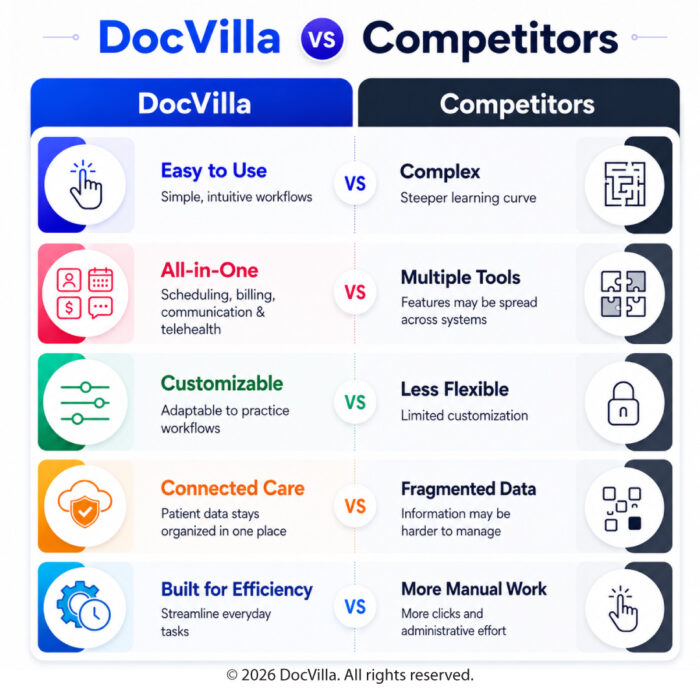
Most of the systems above make you assemble a stack — an EHR here, a billing add-on there, a separate telehealth vendor, a bolted-on portal. DocVilla consolidates all of it into one cloud-based platform, so the chart, the schedule, the visit, and the claim live in the same system. Pricing is per provider across four tiers — Bronze, Silver, Gold, and Platinum — so practices pay for the providers they have, not for modules they don’t use. See the full platform on our EHR page, current details on plans and pricing, and what practices say on our reviews and testimonials page.
See DocVilla for Yourself
The fastest way to compare is to watch your own workflow run in DocVilla. Schedule a free demo — a live online walkthrough configured for your specialty — and if you’re switching from any of the systems above, our team manages the full data migration, from demographics to clinical notes to balances.
Disclaimer: The comparisons linked above are based on publicly available information — vendor websites, published documentation, and user reviews — current as of the date each comparison was last updated. Features, integrations, and pricing for third-party products change frequently and may vary by plan, region, and practice size. All product names, logos, and brands are the property of their respective owners and are used for identification purposes only; their use does not imply endorsement or affiliation. Before making a purchasing decision, verify current capabilities and pricing directly with each vendor. For current information about DocVilla, contact us or schedule a demo.