What Medical Practices Need to Know and How DocVilla EHR Supports Co-Signer Workflows
Nonphysician Practitioners (NPPs)—primarily Nurse Practitioners (NPs) and Physician Assistants (PAs)—are essential to modern healthcare delivery. Across primary care, urgent care, internal medicine, pediatrics, women’s health, behavioral health, orthopedics, pain management, and multispecialty clinics, NPPs play a major role in improving patient access, reducing wait times, expanding service lines, and improving practice growth. As more medical practices depend on NPP (nonphysician practitioner) -led visits, practices must also modernize their documentation and compliance workflows to ensure oversight, quality control, reimbursement accuracy, and audit readiness. One of the most important—and most frequently misunderstood—requirements in NPP (nonphysician practitioner) -driven practices is co-signing. Co-signature workflows determine how and when an NPP’s (nonphysician practitioner) notes, orders, or clinical documentation must be reviewed and signed by a supervising or collaborating physician, medical director, or credentialed provider. In 2026, co-sign requirements for nonphysician practitioner remain highly relevant because they impact payer compliance, incident-to billing rules, onboarding and clinical governance policies, hospital or facility credentialing guidelines, malpractice risk management protocols, and state-specific supervision frameworks. This guide explains NPP (nonphysician practitioner) co-sign requirements, clarifies when co-signatures are legally or operationally required, outlines the difference between state law and payer policy, and shows how DocVilla EHR supports robust co-signer workflows for NPP-based medical practices. The goal of this article is to drive traffic from medical practices and providers researching EHR/EMR and practice management software—especially those looking for compliant, efficient co-signing capabilities in a modern cloud EHR. If you are an NP evaluating platforms, see our guide to the best EHR for nurse practitioners — including co-sign routing, EPCS, and per-provider pricing.
What Is an NPP (Nonphysician Practitioner)?
The term Nonphysician Practitioner (NPP) is commonly used in clinical operations, payer policy, and healthcare billing contexts to describe licensed clinicians who provide medical care but are not physicians (MD/DO). The most common NPP roles in outpatient settings include Nurse Practitioners (NPs) and Physician Assistants (PAs). Depending on the payer and the clinical setting, other clinicians may fall under the NPP category as well. However, for most practice management and EHR documentation purposes, NPP typically refers to NPs and PAs. NPPs may provide patient evaluation, diagnosis, treatment, prescribing, procedures, counseling, and follow-up care depending on state scope-of-practice regulations, credentialing, and practice policy.
Because NPPs frequently work as part of physician-led or collaborative care teams, documentation review and co-sign workflows are common. These workflows help practices ensure appropriate oversight, maintain consistent standards across providers, and satisfy regulatory or payer documentation rules.
What Does “Co-Sign” Mean in Healthcare Documentation?
A co-signature is a formal electronic signature applied by a supervising or credentialed provider to a note, order, or documentation entry created by another provider (such as an NPP). In practical terms, the NPP completes the clinical documentation, signs it, and then routes it to a designated physician or co-signer. The co-signer reviews the note, may add comments or edits based on practice policy, and signs as well. The EHR stores evidence of this review and signature with an audit trail, including timestamps and user identity.
Co-signature workflows serve several purposes. They provide oversight evidence in collaborative practice models. They support quality assurance programs. They may be required during onboarding or probationary periods for new NPP hires. They help practices standardize documentation and clinical protocols. They may also be used to satisfy payer requirements depending on billing methods. For practice owners, co-signing is less about limiting NPP independence and more about ensuring operational consistency, compliance protection, and clinical risk management.
Are Co-Signatures Always Required for NPP Notes?
No. Co-signatures are not always required for NPP documentation. Requirements vary widely based on state scope-of-practice law, payer policy, credentialing status, facility rules, and internal practice governance. Some states allow nurse practitioners full practice authority, meaning an NP may diagnose, treat, and prescribe independently without physician supervision. In those settings, co-signatures may not be legally required. However, even if state law does not require co-signature, a practice might still implement co-sign protocols based on internal policy, payer requirements, or risk management strategies. Physician assistants, on the other hand, often operate under varying forms of physician supervision depending on state regulations and the supervising agreement. This can increase co-sign requirements based on the practice’s compliance approach.
In 2026, the reality is that co-sign requirements are most commonly driven by practice policy, payer billing structure, and clinical governance—not just state laws. The best approach for clinics is to implement flexible EHR workflows that support co-sign when needed and avoid bottlenecks when not required.
Why Co-Sign Requirements Matter for Medical Practices in 2026
In modern outpatient medicine, documentation is not only clinical—it is operational, financial, and legal. Co-signature workflows impact multiple high-stakes areas of practice operations. First, reimbursement: if a claim is billed under certain rules such as incident-to, shared visits, or supervision-required services, documentation must support those rules. If co-signature is missing or inconsistent, the practice may face denied claims or payment recoupment during audits. Second, compliance: practices must comply with credentialing rules, internal protocols, and supervision agreements. Third, liability: documentation is the legal record of care delivered. Co-signature provides proof that oversight occurred when required. Fourth, quality assurance: co-signature workflows help practices standardize care, especially for new hires, trainees, or high-risk clinical scenarios.
As practices scale, the administrative burden of tracking co-sign requirements manually becomes risky and inefficient. For this reason, practices increasingly seek EHR platforms—like DocVilla—that include robust co-signer capability with routing, queue management, audit trails, and configurable controls.
The Difference Between State Law Requirements and Practice Policy Requirements
Medical practices often confuse co-sign requirements because they assume requirements are solely based on scope-of-practice laws. In reality, scope-of-practice law defines what an NPP can do clinically and what physician involvement is required. But documentation co-signature may be required or recommended for different reasons, including payer policy and internal protocols. A practice may require co-sign for certain visit types even if state law does not. A payer may require documentation elements supporting supervision but may not explicitly say “co-signature required.” Credentialing bodies or facility regulations may require chart review and co-signing for certain providers. Additionally, malpractice risk management programs may require physician review for high-risk conditions or prescribing.
Practices should treat co-signature as a workflow requirement that must adapt to multiple frameworks. The EHR should support configurable co-sign policies so the clinic can apply co-sign only where necessary. A rigid co-sign rule applied universally can create major operational bottlenecks and physician overload.
Common Scenarios Where NPP Co-Signatures Are Required or Strongly Recommended
In real clinic operations, co-sign workflows are most commonly used in the following situations.
During NPP onboarding and probationary periods, many practices require co-signature for every NPP visit for the first 3 to 90 days. This ensures consistency, supports training, and builds documentation quality. Some practices also require co-signature for a percentage of charts for 6 to 12 months after hiring.
For certain high-risk clinical conditions, practices require physician review to reduce risk. Examples include chest pain evaluations, neurologic complaints, high-risk pediatric complaints, psychiatric medication starts, anticoagulant adjustments, high-risk pregnancy-related symptoms, and complex chronic pain management.
For controlled substances prescribing protocols, some practices require physician involvement for opioid prescribing, stimulant prescriptions, benzodiazepines, or specific psychiatric medications. Co-signature may be required for documentation, prescribing justification, or controlled substance workflows depending on practice policy.
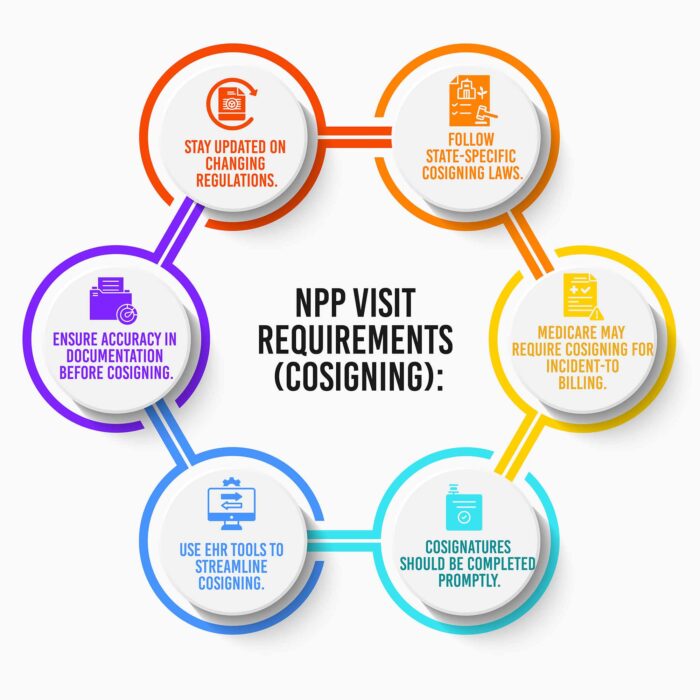
For incident-to billing compliance, practices may apply stricter documentation oversight. Co-signing may be part of ensuring the supervising physician is involved and that documentation supports billing.
For facility rules and credentialing requirements, outpatient clinics affiliated with hospitals, ASCs, or larger groups may follow policies requiring co-signature even when not mandated by state law.
For chart audits and quality assurance programs, some practices require physician review for a random percentage of NPP encounters each month.
The key takeaway is that co-signature is often required by practice design and compliance strategy, not only by law. Therefore, the EHR must support flexibility.
The Risks of Improper Co-Sign Workflow Management
Practices that do not implement strong co-sign workflows face predictable problems. Notes remain unsigned for long periods. Physicians forget which notes require review. NPPs become frustrated by chart backlog. Billing gets delayed because chart closure is incomplete. Audit readiness becomes weak because oversight documentation is inconsistent. The practice may face recoupment risk if documentation does not support billed services. It also raises medico-legal risk if oversight is required but cannot be proven through EHR audit trails.
As clinic volume increases, manual tracking methods such as spreadsheets, emails, or staff reminders become unreliable. Co-signature workflows should be managed through EHR automation, not through manual effort. This is why practices evaluating EHR software should treat co-signer capability as a high-priority requirement.
What an Ideal Co-Sign Workflow Should Look Like in a Modern EHR
To be compliant and efficient, co-sign workflows should be designed around speed and accountability.
First, the NPP completes the note and signs it electronically. Second, the system automatically routes the note to the assigned co-signer based on provider relationship rules and note type requirements. Third, the co-signer receives alerts and can see pending co-sign tasks in a dashboard or work queue. Fourth, the co-signer reviews the note, adds comments if needed, and co-signs electronically. Fifth, the EHR records all events in a secure audit trail including timestamps, user identity, and signature sequence. Sixth, the system provides reporting so managers can monitor outstanding co-sign tasks and ensure compliance timelines are met.
The EHR must also support selective co-sign rules so clinics do not overload physicians with unnecessary review. If everything needs co-sign, nothing gets done efficiently. Practices need configurable rules based on internal policy, specialty, and compliance needs.
How DocVilla EHR Supports Co-Signer Capability for NPP Practices
DocVilla EHR includes strong co-signer capability designed for real-world outpatient clinic workflows where NPPs and physicians collaborate daily. DocVilla supports role-based access and permissions so practices can define what NPPs can sign independently and what requires co-signature. This is essential for practices with mixed provider types and supervision arrangements.
DocVilla enables practices to assign NPPs to supervising physicians or collaborating providers within the system. When an NPP creates and signs a clinical note, the platform can route that note to the assigned co-signer automatically based on configuration. This removes the need for manual tracking. It also ensures the correct physician receives the correct note for review.
DocVilla provides a clear workflow for co-signing through task-based management. Co-signers can view pending notes that require review, reducing the risk of missing documentation. This is a critical feature for multi-provider clinics and multi-location practices where supervising physicians may not be present onsite. Remote co-sign capability improves efficiency and supports modern practice models, including telemedicine-first care delivery.
DocVilla maintains a strong audit trail for co-signature workflows. Each signature is recorded with the provider identity and timestamp. This supports compliance, credentialing documentation, and payer audit readiness. Practices can demonstrate that oversight occurred, which is essential for risk management and reimbursement protection.
DocVilla also supports flexible customization for clinic policy design. Practices can apply co-sign rules selectively by provider, encounter type, and operational protocol. This allows clinics to require co-signature during onboarding periods, for high-risk visit types, or for controlled substance prescribing documentation, while allowing independent signing for routine visits where appropriate. This balance is essential because co-sign should provide oversight without creating bottlenecks.
DocVilla integrates co-sign workflows into the broader EHR + practice management platform. This matters because chart closure impacts billing. When co-sign workflows are efficient, billing teams can process claims sooner. When co-sign workflows fail, revenue cycle slows. DocVilla supports operational flow by ensuring documentation, signing, and billing readiness align smoothly.
Co-Sign Workflows for Orders, Lab Requests, and Prescribing for NPP
Many practices require physician involvement not only for notes, but also for certain orders and prescribing workflows. DocVilla supports eRx and EPCS capabilities where applicable, enabling practices to implement compliant controlled substance workflows. If the practice requires physician review for certain orders or prescriptions, DocVilla supports routing and oversight through permissions and workflow configuration.
This is particularly valuable for behavioral health clinics, pain management practices, and high-volume primary care clinics where medication management is frequent. With proper workflows, the EHR can support both safety and efficiency.
Co-Signer Workflows for NPP Onboarding, Training, and QA Programs
One of the most common use cases for co-sign is onboarding new NPP staff. DocVilla supports structured review workflows, allowing supervising physicians to review and co-sign NPP notes during early employment periods. Over time, practices can transition to partial review models where only a portion of visits require review or where only certain visit categories require physician sign-off.
This supports clinician development and standardization. It also supports multi-provider consistency because physicians can ensure templates and documentation standards are being followed.
Best Practices for Medical Practices Implementing Co-Sign Requirements for NPP
Even with the right EHR, practices must implement clear rules. The clinic should define exactly which encounter types require co-signature, which NPP roles require co-signature, which physicians are eligible co-signers, expected timelines for co-sign completion, and whether billing can proceed without co-signature. Many practices require co-sign within 24–48 hours to prevent delayed billing.
Practices should train both NPPs and physicians on the workflow and ensure co-sign dashboards are monitored regularly. Leadership should also track compliance metrics monthly. The goal is to reduce co-sign backlog while maintaining oversight standards.
A critical best practice is to avoid over-applying co-sign rules. If every note requires review, supervising physicians become overloaded and notes pile up. Practices should apply co-sign strategically: onboarding, high-risk visits, controlled substances, and QA review cycles.
Why Co-Signer Capability Should Be a Must-Have EHR Feature for Any NPP-Based Clinic
Practices employing NPPs (nonphysician practitioner) should treat co-sign support as a must-have feature when selecting EHR software. Without co-sign workflows in the EHR, practices rely on manual tracking and face increased risk. A proper co-sign system must include provider assignment, routing, queues, notifications, audit trails, remote signing, and flexibility. Co-sign capability is not only a feature for compliance. It is a feature for operational scalability. As practices grow, the ability to manage oversight within the EHR becomes essential.
DocVilla EHR supports these capabilities so practices can implement compliant, efficient NPP oversight workflows without slowing documentation or billing.
Final Thoughts: Co-Sign Requirements Are a Compliance and Growth Issue, and DocVilla Supports Efficient Oversight
In 2026, medical practices increasingly rely on NPPs to grow access and expand services. With that reliance comes the need for structured documentation oversight. Co-sign workflows support compliance, audit readiness, quality assurance, and risk mitigation. But if co-sign is not managed properly, it becomes a bottleneck that slows chart closure and billing.
DocVilla EHR supports co-signer capability designed for NPP-based clinics through role-based permissions, supervising provider assignment, automated routing, queue-based review workflows, audit trails, remote co-signing, and flexible configuration policies. This helps practices balance oversight with efficiency, allowing NPPs to work at full potential while ensuring supervising physicians maintain appropriate governance.
For practices evaluating EHR/EMR and practice management software, choosing an EHR platform with robust co-sign workflows is essential for long-term scalability, compliance protection, and revenue cycle efficiency.
To see how DocVilla can optimize your Medical Practice documentation and billing, schedule a free demo today.