Estimated reading time: 9 minutes
Key Takeaways
- EHR data migration is complex and critical for patient care continuity; errors can lead to clinical mistakes and administrative issues.
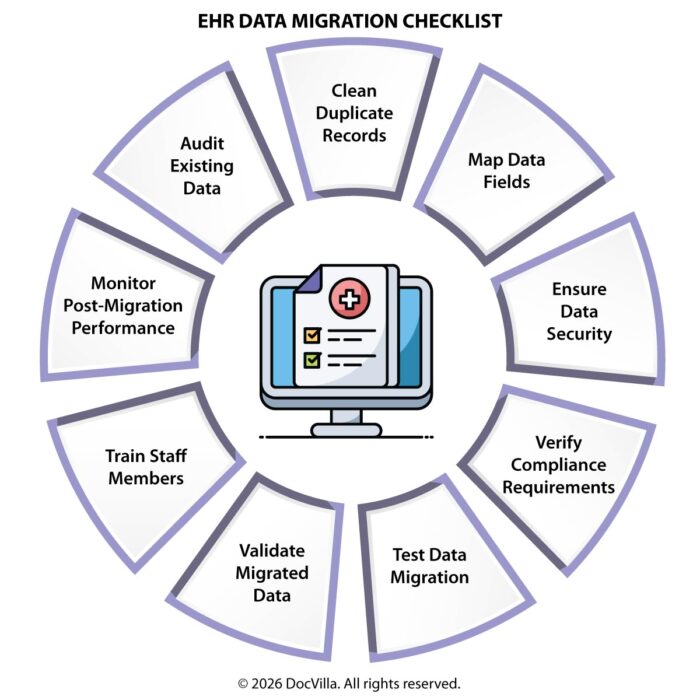
- A comprehensive EHR data migration checklist includes pre-migration planning, data assessment, mapping, and post-migration testing.
- Practices should prioritize data cleaning and deduplication before migrating to ensure that the new system operates accurately and efficiently.
- Choosing a modern cloud-based EHR platform simplifies the migration process by providing tools for data import, integration, and ongoing support.
- By following a structured approach and using the EHR data migration checklist, medical practices can transition smoothly while maintaining operational efficiency.
Switching Electronic Health Record (EHR) systems is one of the most complex and high-risk transitions a medical practice can undertake. While the decision to move to a new EHR or integrated practice management platform is often driven by the need for better workflows, improved usability, or enhanced features, the process of migrating data from one system to another requires careful planning and execution. Patient records contain critical clinical, financial, and operational information that must be transferred accurately to ensure continuity of care. Any errors during migration can disrupt workflows, delay patient care, and create compliance risks. For this reason, medical practices must approach EHR data migration with a structured strategy that minimizes risk and ensures data integrity. A well-defined migration checklist helps practices prepare for each stage of the process, from initial planning and data mapping to testing, validation, and post-migration optimization. Practices that follow a comprehensive migration plan can avoid common pitfalls such as data loss, mismatched records, and workflow disruptions. In addition, selecting a modern, cloud-based EHR and practice management platform can simplify migration by offering better tools for data import, integration, and ongoing system updates. This guide provides a detailed EHR data migration checklist designed to help medical practices transition smoothly to a new system while maintaining operational efficiency and patient care quality.
Why EHR Data Migration Matters
EHR systems store a wide range of patient information, including demographic data, medical histories, lab results, prescriptions, billing records, and appointment schedules. When transitioning to a new system, all relevant data must be transferred accurately to ensure that providers have access to complete patient information.
Data migration is not just a technical process; it is a critical component of patient care continuity. Incomplete or inaccurate data can lead to clinical errors, billing issues, and compliance violations. For example, missing allergy information or medication histories could result in unsafe treatment decisions.
Because of these risks, data migration must be handled with precision and attention to detail.
Common Challenges in EHR Data Migration
Many medical practices underestimate the complexity of EHR data migration. Common challenges include incompatible data formats, incomplete records, duplicate entries, and inconsistent data structures between systems. Legacy systems may store data in formats that are difficult to extract or convert.
Another challenge is deciding how much historical data to migrate. Some practices attempt to migrate all historical records, while others choose to transfer only recent data and archive older information separately. Each approach has trade-offs related to cost, complexity, and accessibility.
Staff training and workflow adjustments also play a role in successful migration. Even when data is transferred accurately, staff members must learn how to access and use information within the new system.
Pre-Migration Planning Checklist
The success of an EHR migration project depends heavily on preparation. Practices should begin by defining clear objectives for the transition. These objectives may include improving workflow efficiency, enhancing reporting capabilities, or integrating new features such as telehealth or patient portals.
Next, practices should assemble a migration team that includes clinical staff, administrative personnel, and IT specialists. Each team member plays a role in ensuring that data is transferred accurately and workflows are preserved.
It is also important to establish a realistic timeline for the migration process. Rushing the transition can increase the risk of errors and disruptions.
Data Inventory and Assessment
Before migrating data, practices must identify all data sources within the existing system. This includes patient demographics, clinical notes, lab results, imaging reports, billing records, and appointment histories.
Conducting a data inventory helps determine which data elements need to be migrated and which can be archived. Practices should evaluate data quality and identify inconsistencies or duplicate records that may need to be cleaned before migration.
Data assessment ensures that only accurate and relevant information is transferred to the new system.
Data Mapping and Standardization
Data mapping is one of the most critical steps in the migration process. It involves defining how data fields in the old system correspond to fields in the new system. For example, patient demographic fields such as name, date of birth, and contact information must be mapped correctly to ensure consistency.
Standardizing data formats helps prevent errors during migration. For example, date formats, coding systems, and measurement units should be consistent across records. Proper mapping ensures that data is interpreted correctly within the new system.
Choosing What Data to Migrate
Not all data needs to be migrated during the transition. Practices must decide whether to transfer all historical records or only a subset of recent data. Migrating all data provides complete access to patient histories but increases complexity and cost.
Some practices choose to migrate only active patient records and recent encounters while archiving older data in a separate system. This approach reduces migration complexity while maintaining access to historical information when needed.
Data Cleaning and Deduplication
Data quality is essential for successful migration. Practices should review records for errors, duplicates, and outdated information before transferring data to the new system. Duplicate patient records can create confusion and lead to inaccurate clinical decisions.
Cleaning data before migration ensures that the new system starts with accurate and reliable information. This step also improves reporting accuracy and reduces administrative workload.
Backup and Risk Mitigation
Before initiating migration, practices must create secure backups of all existing data. Backups provide a safety net in case issues arise during the migration process. If data is lost or corrupted, backups allow practices to restore information quickly.
Risk mitigation strategies should also include contingency plans for system downtime or unexpected delays. Practices should communicate with staff and patients about potential disruptions during the transition.
Migration Execution Checklist
Once planning and preparation are complete, the migration process can begin. Data extraction involves exporting information from the existing system in a format that can be imported into the new EHR platform.
Data transformation may be required to convert information into compatible formats. This step ensures that data aligns with the structure of the new system.
Data loading involves importing the transformed data into the new EHR system. This process should be monitored closely to identify any errors or inconsistencies.
Testing and Validation
Testing is a critical phase of the migration process. Practices should conduct multiple rounds of testing to ensure that data has been transferred accurately. This includes verifying patient records, clinical notes, billing data, and appointment schedules.
Validation involves comparing data in the new system with the original records to confirm accuracy. Staff members should review sample records to ensure that information is complete and accessible.
Testing should also include workflow validation to ensure that clinical and administrative processes function correctly within the new system.
Staff Training and Workflow Adjustment
Successful migration requires staff members to understand how to use the new EHR system effectively. Training sessions should cover documentation workflows, scheduling processes, billing procedures, and patient communication tools.
Providing hands-on training helps staff members become comfortable with the system and reduces the likelihood of errors. Practices should also encourage feedback from staff to identify areas where additional training may be needed.
Go-Live Preparation
The go-live phase marks the transition from the old system to the new EHR platform. Practices should schedule go-live dates carefully to minimize disruptions, often choosing periods with lower patient volumes.
During go-live, support teams should be available to address technical issues and assist staff members with system navigation. Monitoring system performance during this phase helps identify any remaining issues.
Post-Migration Optimization
After migration, practices should continue monitoring system performance and data accuracy. Feedback from staff and patients can help identify areas for improvement.
Post-migration optimization may include adjusting workflows, refining templates, and integrating additional features. Continuous improvement ensures that the new system delivers maximum value.
Compliance and Security Considerations
EHR data migration must comply with healthcare regulations related to data privacy and security. Practices must ensure that data is transferred securely and that access controls are maintained throughout the process.
Encryption, secure authentication, and audit logs help protect patient information during migration. Compliance with regulatory standards is essential for avoiding legal risks.
How Technology Simplifies Data Migration
Modern cloud-based EHR platforms often include tools that simplify data migration. These platforms support standardized data formats and integration capabilities that reduce the complexity of transferring information.
Automated migration tools can map data fields, identify inconsistencies, and streamline the transfer process. Vendor support teams also play a critical role in guiding practices through migration.
How DocVilla Supports EHR Data Migration
DocVilla provides a cloud-based EHR and practice management platform designed to simplify data migration for medical practices. The platform includes tools that support data mapping, import, and validation, ensuring that patient information is transferred accurately. Dedicated support teams assist practices throughout the migration process, from initial planning to post-implementation optimization. Integrated workflows for scheduling, billing, and clinical documentation reduce the need for multiple systems, making migration more efficient. By providing a structured migration approach and ongoing support, DocVilla helps practices transition smoothly to a modern EHR system while minimizing disruptions.
Preparing for Future Data Interoperability
Healthcare interoperability is becoming increasingly important as providers share information across systems. Practices should choose EHR platforms that support standardized data exchange protocols, enabling seamless integration with laboratories, pharmacies, and other healthcare organizations.
Interoperability ensures that patient data remains accessible and useful across different care settings.
Final Thoughts: A Structured Approach to EHR Migration
EHR data migration is a complex process that requires careful planning, execution, and validation. By following a comprehensive checklist, medical practices can minimize risks and ensure that patient data is transferred accurately. From data inventory and mapping to testing and post-migration optimization, each step plays a critical role in the success of the transition. Choosing a modern, integrated EHR and practice management platform simplifies migration and supports long-term operational efficiency. Practices that approach migration strategically will be better positioned to leverage new technology and deliver high-quality patient care.
To see how DocVilla can optimize your Medical Practice documentation and billing, schedule a free demo today.