
What Is the Best EHR for Urology?
Updated: August 2026
The best EHR for urology combines specialty documentation — customizable templates for prostate exams, bladder scans, and urodynamic testing, plus ED questionnaires and HPI forms — with the workflows a procedure-heavy practice runs on: detailed procedure and surgery tracking with patient outcomes, long-term trend graphs for values like weight, BMI, and blood pressure, and billing built on urology-specific ICD-10 and CPT codes. DocVilla brings these together in one cloud platform with scheduling for both consults and procedural bookings, telehealth follow-ups, and a patient portal. Practices comparing urology EMR software will find both sides covered here — a full EMR and EHR with urology templates, procedure tracking, and billing in one system.
Leading Cloud-Based EHR for Urology Practices
In the specialized field of urology, healthcare providers require an Electronic Health Record (EHR) and Electronic Medical Records (EMR) system that is robust, customizable, and integrated with practice management tools to streamline both clinical and administrative operations. DocVilla’s cloud-based EHR for Urology is designed specifically to meet these needs, enhancing efficiency and patient care with advanced features tailored for urology practices. From in-depth medical billing solutions to innovative telemedicine options and a dynamic patient portal, DocVilla offers a comprehensive suite that supports the unique aspects of urological care.

Comprehensive EHR for Urology
DocVilla’s Urology EHR EMR system is meticulously engineered to cater to the specialized needs of urologists, ensuring optimal management of patient care and clinic operations.
Key Features of DocVilla’s Urology EHR:
Specialized Urology Templates: Utilize customizable templates designed for common urological conditions and procedures, such as prostate exams, bladder scans, and urodynamic tests, ensuring comprehensive and swift documentation.
Diagnostic Results in the Chart: Keep urology test results — urinalysis, PSA and other lab panels, ultrasound and cystoscopy reports — organized in the patient’s chart: results from integrated labs flow in electronically through HL7, and reports and images from in-office testing can be uploaded and stored securely with the visit.
Medication Management: Effectively manage and monitor medication prescriptions and interactions, particularly important for treatments involving urological conditions.
Procedure Tracking: Keep detailed records of procedures and surgeries with tools that allow for tracking patient outcomes and surgical details, improving the quality of care and compliance with healthcare standards.
Streamlined Urology Practice Management
DocVilla’s Practice Management software is a cornerstone of the EHR EMR system, designed to enhance the efficiency of urology practices through streamlined scheduling, billing, and administrative tools.
Efficient Scheduling and Appointment Management:
- Manage patient appointments with ease, accommodating both regular consultations and procedural bookings, enhancing patient flow and optimizing clinic resources.
Advanced Urology Medical Billing:
- Leverage a comprehensive urology medical billing system designed to handle the complexities of urology coding and insurance claims, ensuring accurate and timely reimbursements.
Customizable Reporting and Analytics:
- Access detailed analytics and customizable reports to track practice performance, patient demographics, and health outcomes, aiding in strategic planning and operational adjustments.
Telemedicine Integration in Urology Care
Incorporate telemedicine capabilities to provide continuous, accessible care to patients, enhancing convenience and extending care capabilities.
Virtual Consultations: Offer remote consultations as a core component of the service, particularly useful for follow-up visits and initial consultations that do not require physical exams.
Integrated Communication Tools: Utilize video conferencing and messaging tools that facilitate effective communication between patients and providers, maintaining high standards of care.
Dynamic Patient Portal for Enhanced Patient Engagement
DocVilla’s patient portal is specifically designed to enhance patient interaction and engagement in urology, providing tools and resources that empower patients and streamline communications.
Key Portal Features:
Real-Time Health Record Access: Enable patients to access their medical records, including test results and treatment plans, fostering transparency and proactive health management.
Appointment Scheduling: Allow patients the convenience of scheduling and managing their appointments online, reducing administrative burdens and improving patient satisfaction.
Secure Messaging: Provide a secure platform for patients to communicate with their healthcare providers, ask questions, and receive medical advice, improving the patient experience and care continuity.
Specialized Urology Medical Billing
Handle the specific challenges of urology medical billing with DocVilla’s specialized solutions that ensure maximized revenue and minimized administrative hassles.
Urology-Specific Billing and Coding: Use up-to-date ICD-10 and CPT codes tailored for urology to ensure all services are accurately documented and billed.
Efficient Claim Processing: Streamline the management of insurance claims and patient billing, reducing delays and increasing reimbursement rates.
Robust Denial Management: Equip your practice with powerful tools to quickly identify, address, and reduce claim denials, significantly improving revenue flow.
Generate quick notes using Urology specific templates
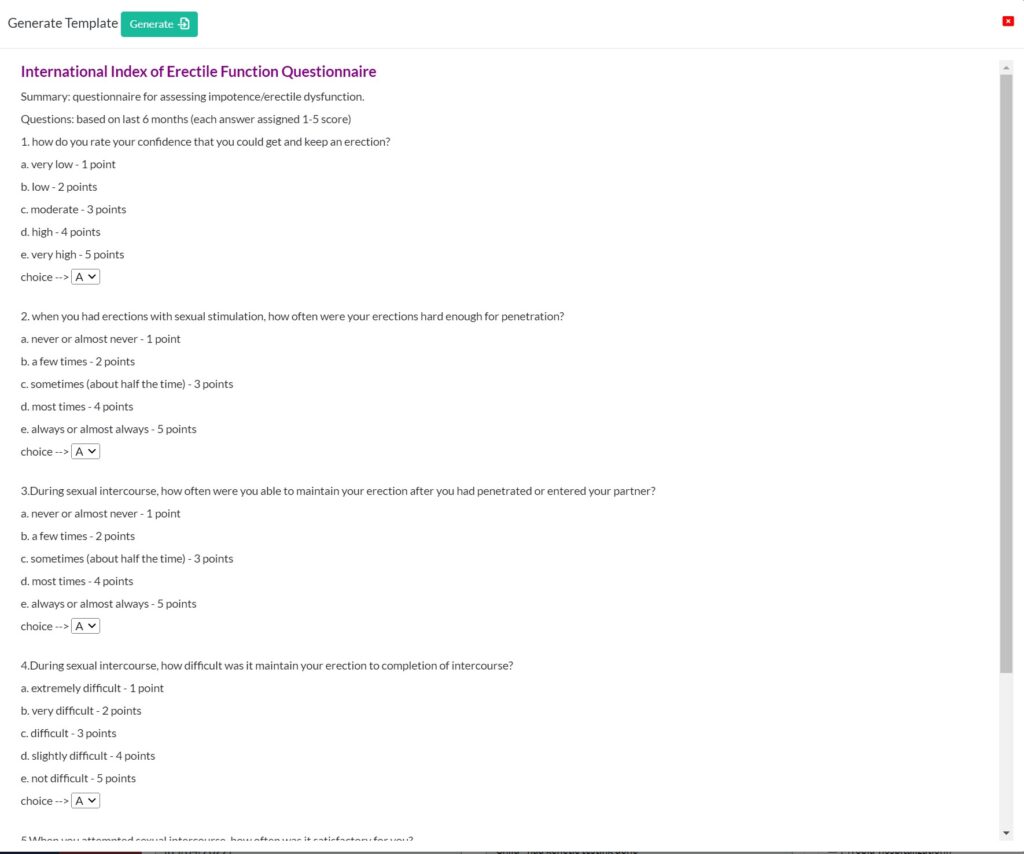
Accelerate your charting process with access to prebuilt or customizable medical forms from our extensive library. Utilize tools such as ED Questionnaire, HPI complaint forms, and various other assessment forms to streamline documentation and improve clinical efficiency.
Visualize and analyze long-term health trends with our comprehensive tools that graph and track historical data for weight, BMI, blood pressure, etc. This enhanced insight allows for more effective management of patient health over time.
Utilize HIPAA compliant in-built Speech-To-Text functionality or create your own custom SOAP templates. DocVilla is the best cloud based Urology EHR EMR with ability to create custom templates.
Send Lab Order and Receive Results
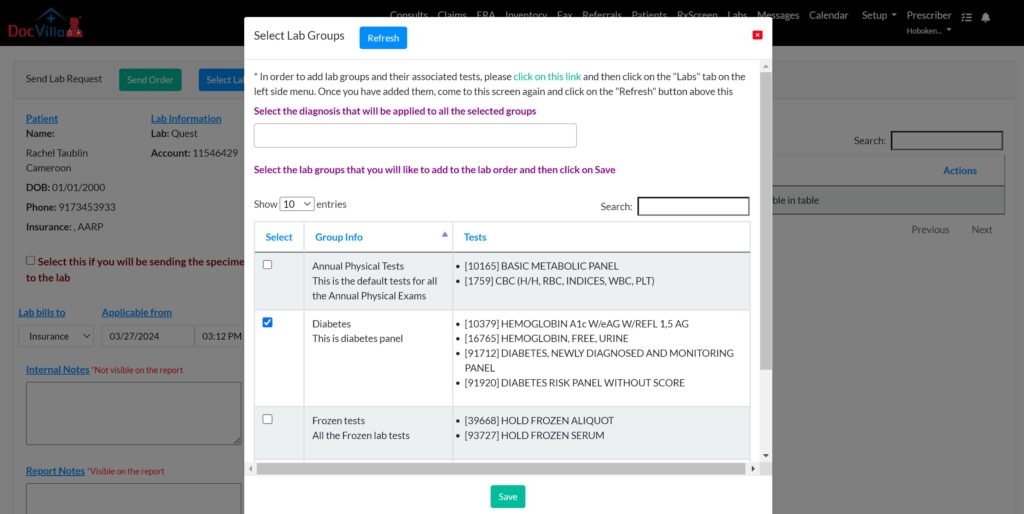
Efficiently manage lab orders and effortlessly receive results through our HL7 bidirectional connectivity and seamless integration with supported laboratories. Lab outcomes are automatically organized within patient charts and can be conveniently shared with patients via our patient portal, enhancing communication and care coordination. DocVilla is all in one cloud based EHR EMR Practice Management for Urology.
Send/Receive Referrals (Direct Messaging)
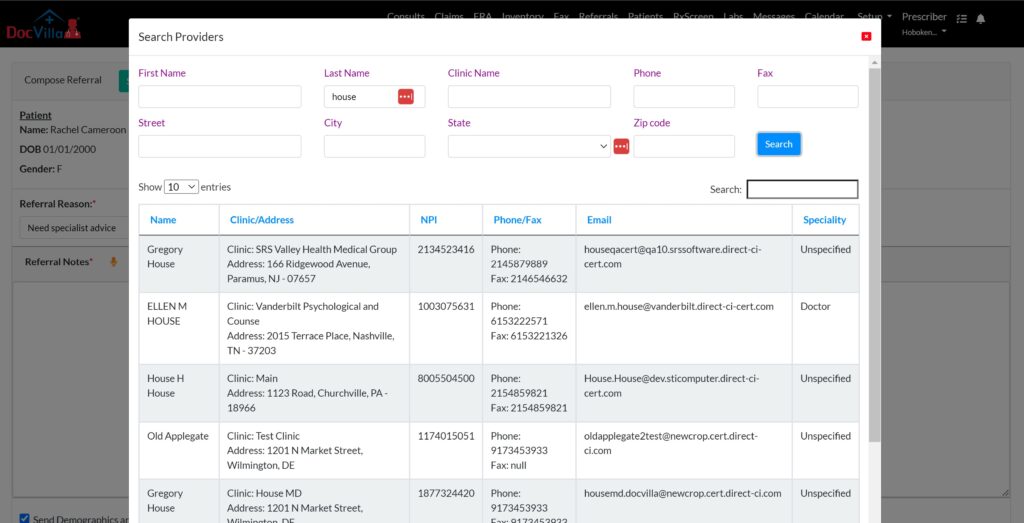
Safely exchange referrals or direct messages in full compliance with HIPAA standards with a network of over 2 million healthcare providers and hospitals across the country. DocVilla collaborates with DirectTrust.org to offer these secure communication services. Utilize our network search feature to find providers within the DirectTrust.org network, enabling the secure transmission of patient information through Direct Secure Messaging. You can also utilize integrated HIPAA compliant electronic fax to send/receive patient charts. DocVilla is all in one cloud based EHR EMR Practice Management for Urology.
E-prescribe through Surescripts
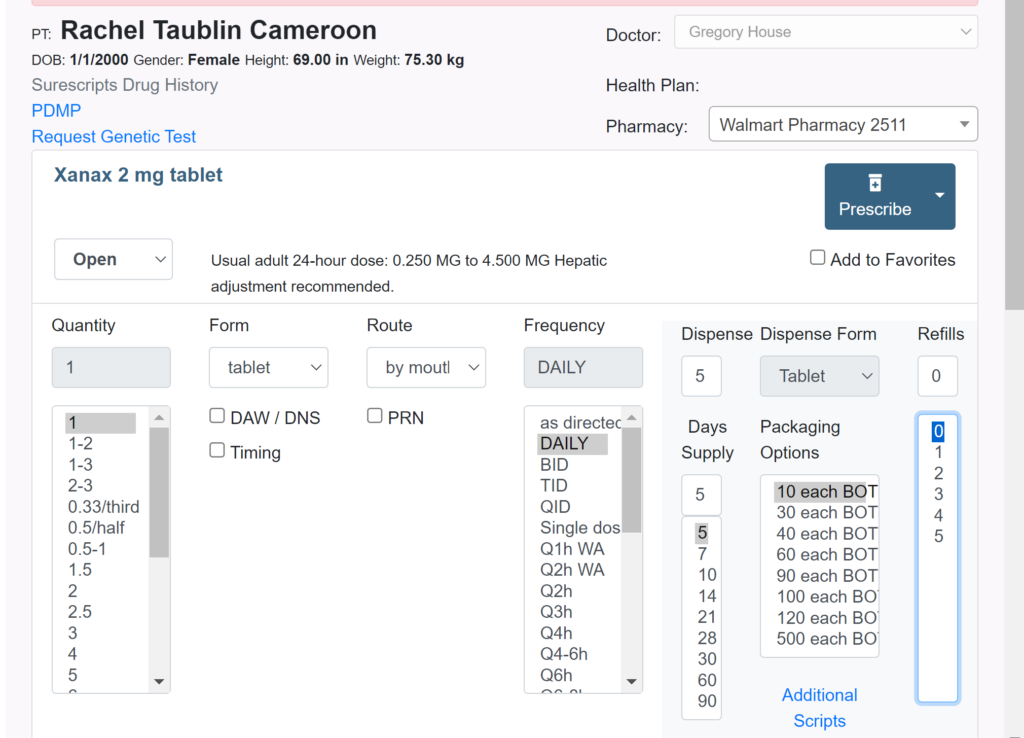
Seamlessly e-prescribe a wide array of medications, including controlled substances when necessary, directly through DocVilla EHR using Surescripts network. This ensures your patients get the critical medications they need precisely when they need them, promoting better health outcomes and patient satisfaction.
Quickly access your patient’s medication history using the Surescripts database or retrieve controlled substance records through Bamboo. This feature ensures you have comprehensive insights into your patient’s medication background, enabling informed prescribing decisions.
Submit claims and receive ERAs/EOBs
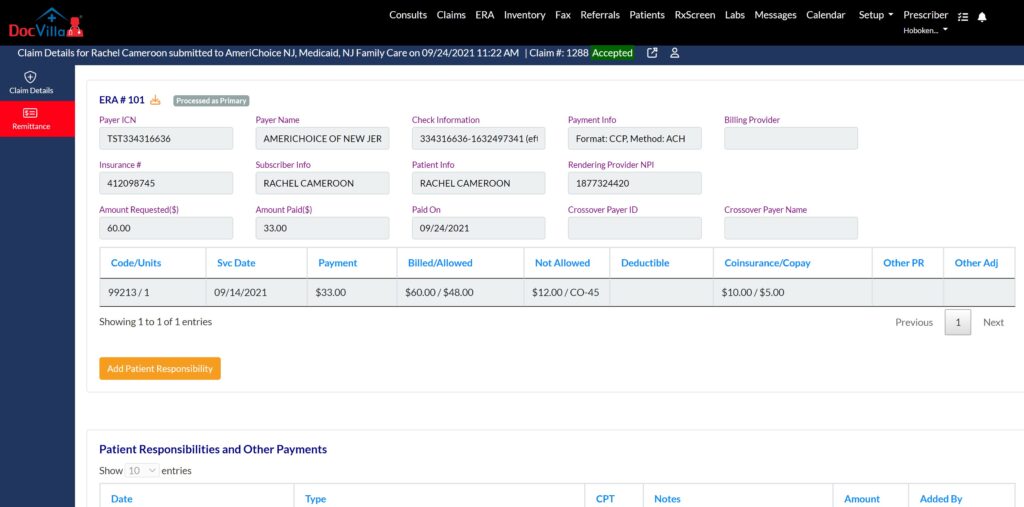
Accelerate your payment process with DocVilla. Swiftly submit claims to thousands of payers nationwide directly from our platform and receive ERA (Electronic Remittance Advice) or EOBs swiftly. Easily allocate patient responsibilities and automatically dispatch electronic invoices through text, email, or the patient portal. Patients can conveniently pay using their HSA, FSA, or credit cards via a secure payment link, streamlining the billing and payment process. Check real time eligibility to know patient responsibility (copays, deductibles and co-insurance)
Trusted by independent practices
DocVilla is rated 4.9 out of 5 across 178 verified customer reviews — read them here. In 2026, DocVilla was recognized as a Software Advice Most Recommended EHR and earned Capterra’s top rating.
DocVilla pricing for urology practices
DocVilla offers four per-provider plans — Bronze, Silver, Gold, and Platinum — so a urology practice can start with the configuration that fits and scale as it grows. Current rates and what each tier includes are on our plans and pricing page, and because every practice’s workflows, billing, and integrations differ, exact pricing for your practice is determined during a one-hour demo configured for your specialty.
See it working in one demo
The fastest way to evaluate a urology EHR is to watch your own workflows run in it. In a DocVilla demo, ask to see three things:
- Chart a urology visit end-to-end — pull up a prostate exam or urodynamics template, complete an ED questionnaire, and view the patient’s long-term trend graphs for values like weight, BMI, and blood pressure. Time how long documentation takes.
- Follow one procedure from documentation to claim — a cystoscopy or biopsy: procedure note, urology-specific coding, eligibility check, and the claim scrub on screen.
- Run a telehealth follow-up — confirm a virtual follow-up visit charts and bills exactly like an office visit, in the same system.
Every DocVilla demo is a full hour, one-on-one, configured for urology before the call.
Switching to DocVilla from another EHR
Many urology practices come to DocVilla from other EHR systems. Our team manages the full transition — demographics, clinical notes, documents, and balances — and because every practice’s records are different, we prepare a migration plan and quote after reviewing your data. See the EHR data migration guide for how the process works and what typically transfers, and the EHR Data Migration Checklist for how to prepare your practice for the switch.
Frequently asked questions
What is the best EHR for urology?
The best EHR for urology combines specialty templates — prostate exams, bladder scans, urodynamic testing, ED questionnaires, and HPI forms — with procedure and surgery tracking, long-term trend graphs for values like weight, BMI, and blood pressure, urology-specific ICD-10 and CPT billing, telehealth, and a patient portal in one platform. DocVilla is built to cover all of these for urology practices.
Can I document and track procedures in DocVilla?
Yes. DocVilla keeps detailed records of urology procedures and surgeries — with tools for tracking patient outcomes and surgical details — and carries the documentation through to urology-specific coding, claim submission, and denial management in the same system.
Does DocVilla have urology-specific templates?
Yes. DocVilla includes customizable templates for common urological conditions and procedures — plus ED questionnaires and HPI complaint forms. You can also create your own SOAP templates and document by dictation with built-in speech-to-text.
How much does DocVilla cost for a urology practice?
DocVilla offers four per-provider plans — Bronze, Silver, Gold, and Platinum. Current rates and what each tier includes are on the plans and pricing page, and exact pricing for your practice is determined during a one-hour demo configured for your specialty.
Does DocVilla help urology practices switch from another EHR?
Yes. Our team manages the transition, including demographics, clinical notes, documents, and balances. Because every practice’s data is different, we prepare a migration plan and quote after reviewing your records.
Modernize Patient Engagement with integrated Patient Portal
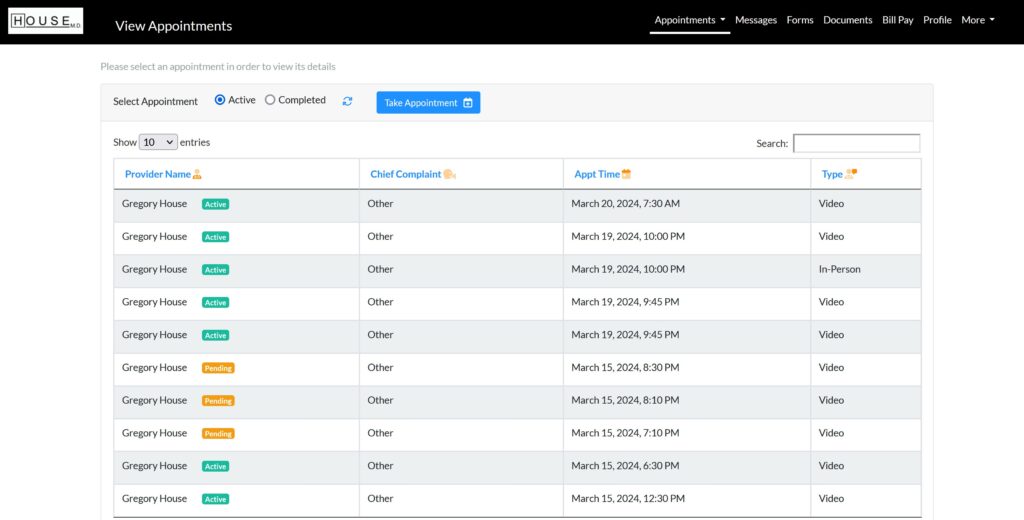
DocVilla provides integrated patient portal, designed to enhance patient satisfaction and significantly reduce administrative workload. Through our patient portal, patients can effortlessly schedule appointments, pay bills, securely communicate with healthcare providers, upload documents, and complete forms digitally. With a single click, providers can share documents directly with patients via the portal, streamlining the communication process. Moreover, our platform supports the capability for users to access information for multiple patients under a single account. For example, a parent can easily view and manage their child’s health information through their own patient portal, ensuring convenient and consolidated access to essential health data.
Send/Receive HIPAA compliant Electronic Fax (efax)
Digitally scan, upload, and attach a variety of documents, including ultrasounds, paper charts, and photographs, with ease. Securely transmit these documents through our integrated, HIPAA-compliant electronic fax service, ensuring that your sensitive information is handled with the utmost care and confidentiality.

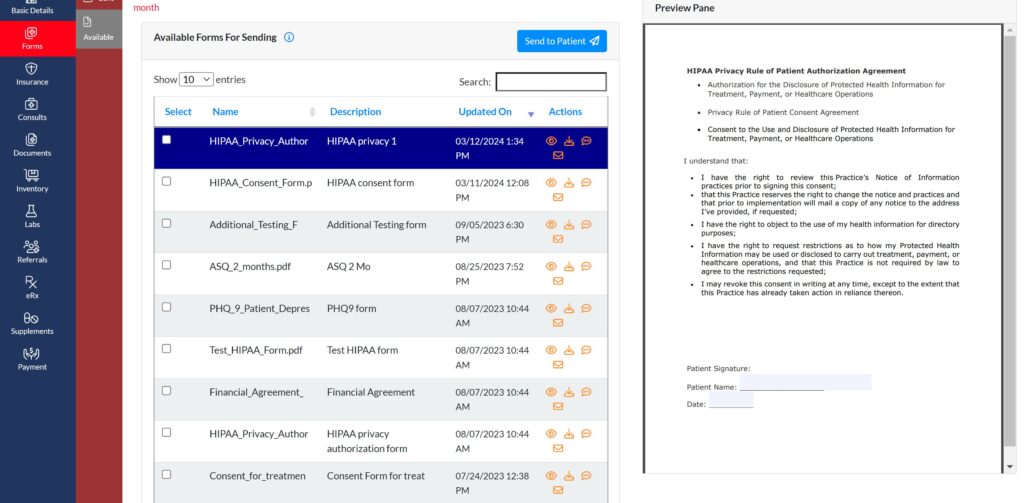
Send Electronic Consent forms
Dispatch Electronic Consent Forms to patients via text, email, or through the patient portal and effortlessly obtain their electronic signatures. This streamlined process ensures a smooth, secure, and efficient way to manage consent forms, enhancing patient engagement and compliance.
Key Features of Urology EHR EMR and Practice Management Software
Cloud Based Electronic Medical Records (EMR) and Electronic Health Records (EHR) Software for Urology Practices
Cloud Based
DocVilla EHR/EMR is accessible anytime, anywhere using a web browser. It runs on Google and AWS cloud with an uptime guarantee of 99.999%. DocVilla uses 256 bit encryption.
SOAP Templates
Create unlimited SOAP templates for your organization. Layer them for patients with multiple symptoms. Use one click macros to dynamically generate content.
Electronic Prescribing
Sending unlimited eRx including Controlled Substances using Surescripts network to over 75000 pharmacies across the nation. Compose compound drugs and get Allergy-Drug interaction notification.
Scheduling
Manage your calendar. DocVilla calendar even integrates with your smart phone and google calendar so you are always on top of your upcoming appointments.
Lab Integration
Using HL7 based interface, DocVilla can integrate with any lab of your choice. We also offer integration of APIs from various labs at no costs to you.
Powerful Analytics
DocVilla offers powerful analytics and reports to help you make critical decisions for your practice and account for unrealized revenue. We can even develop custom reports for your practice.
Integrated Telemedicine
DocVilla EMR offers HIPAA compliant free integrated telemedicine (video calling and messaging) within the platform. It is included in all the plans without any extra charge.
Patient Portal
DocVilla offers an integrated patient portal where patients can schedule appointments, message your practice, pay bills, and securely upload documents. The portal can also be customized and white-labeled for your practice.
Flexible Billing
Generate superbills using ICD 10 codes. Apply copays, deductibles to patient account. Send paperless bills to the patient, charge credit from DocVilla, file for insurance claim.
Task Management
Assign tasks to your staff members with due dates, notes, corresponding patient and chart records. Get auto notifications and keep track of completion.
Automatic Updates
Since DocVilla is cloud based, it is always up to date. No need to install any software. Open up the browser, login and start using DocVilla EHR. Available anytime, anywhere.
Document Management
Securely upload documents such as x-rays, MRIs, blood reports, copy of insurance corresponding to encounters. Documents are stored safely in cloud using 256 bit encryption.
Eligibility Checks
Perform Real time Eligibility Checks of the patient insurance coverage in Realtime with just one click. Get data on copays, deductible, maximum out of pocket etc. Reduce chances of denial by using technology.
Electronic Claim Filing
Filing for insurance claim with just one click. All the data including CPTs, date of services, billing provider NPI etc. gets populated automatically in CMS 1500 form.
Patient Statements
Generate account statements to patient explaining their responsibility, services rendered and insurance payments applied. Patients can access paperless statements through their DocVilla patient portal.


Why Choose DocVilla EHR and Practice Management for Your Urology Practice?

Choosing DocVilla’s cloud-based EHR EMR for urology ensures you are equipped with a system designed to meet the unique demands of urologists:
Customization and Flexibility: Tailor every aspect of the EHR to fit the specific workflows and clinical requirements of your urology practice.
Security and Compliance: Ensure all patient data is protected with robust security measures and compliance with HIPAA and other regulatory standards.
Scalability: As your practice grows, DocVilla’s scalable solutions grow with you, adding new features and functionalities as needed.
Dedicated Support: Benefit from ongoing support and training from experts who understand the nuances of urology, ensuring you maximize the use of your EHR system.
DocVilla’s cloud-based EHR for urology is more than just software; it’s a strategic tool designed to streamline operations, enhance patient care, and optimize management in urology settings. By integrating DocVilla’s comprehensive EHR and practice management tools into your urology practice, you gain the ability to provide superior healthcare, backed by efficient administrative operations and a comprehensive patient engagement strategy.
Resources for Urology EHR EMR systems
Read articles about Electronic Health Records EHR EMR and Practice Management that will help you to run your Urology practice efficiently

AI Claim Scrubbing in DocVilla: Cleaner Claims Before They Leave the EHR
October 6, 2026
No Comments
Read More »

Patient AI Summary in DocVilla: AI-Generated Chart Summaries Before Every Visit
October 6, 2026
No Comments
Read More »

Denial Codes Explained: CO-45, CO-97, CO-16, and the Other CARC Codes Every Practice Sees (and How to Fix Each)
September 4, 2026
No Comments
Read More »

Provider Credentialing for a New Medical Practice: CAQH, PECOS, Timelines, and How Enrollment Differs
September 4, 2026
No Comments
Read More »