
DocVilla + Quest Diagnostics Lab: Bi-Directional Lab Integration for a Faster, Safer Clinical Workflow
Cloud Based Electronic Medical Records (EMR) and Electronic Health Records (EHR) Software can streamline your practice and enhance patient care with seamless (bi-directional or uni-directional) connection with Quest Diagnostics Lab
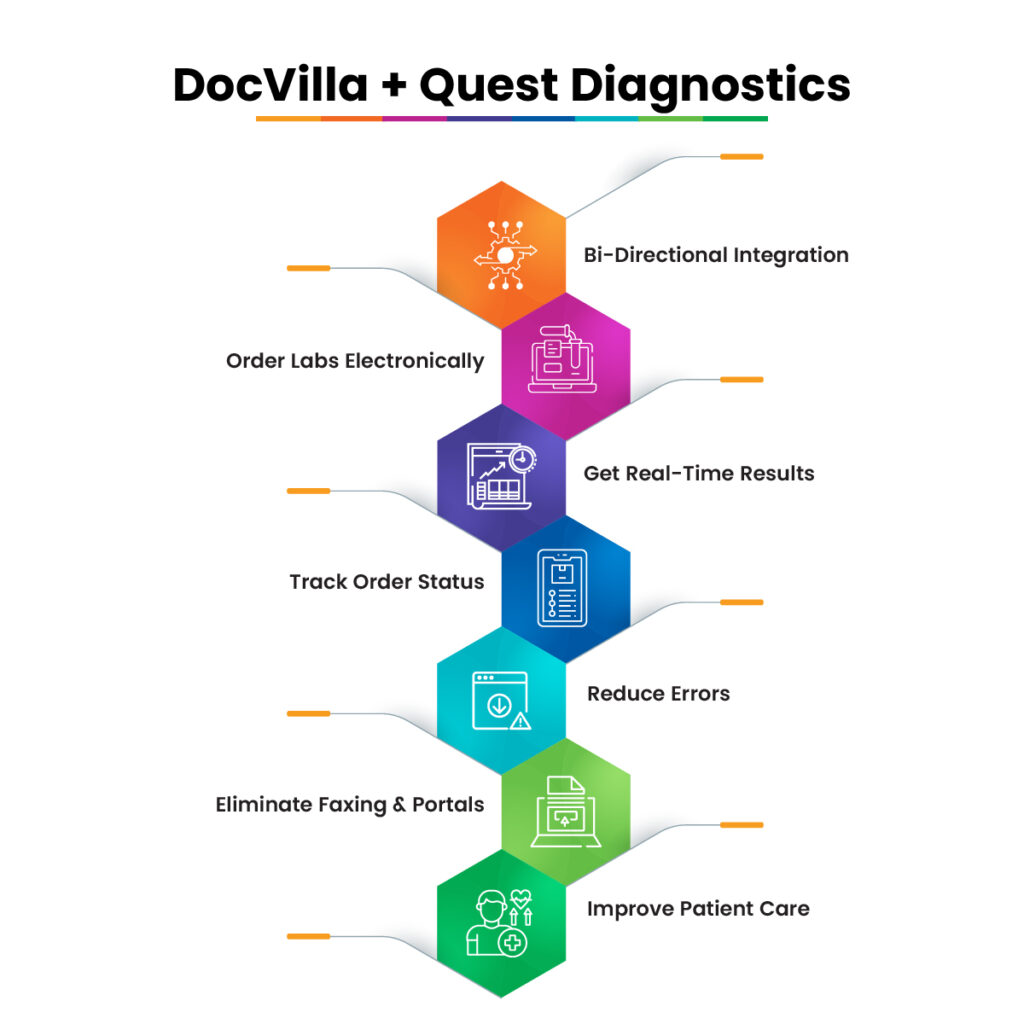
DocVilla EHR integrates natively with Quest Diagnostics Lab in a true bi-directional integration workflow—electronic orders flow out, structured results flow back in. Practices use DocVilla to place orders, print barcoded specimen labels, track order status, and receive discrete and PDF results that attach to the patient chart automatically. The result is fewer manual steps, fewer errors, and faster clinical decisions.
Who this page is for: Independent practices, multispecialty groups, urgent care clinics, concierge/DPC, med spas, and multi-state telehealth providers that need a cloud-based EHR with Quest Diagnostics Lab integration to streamline ordering and results management across locations and time zones.
At-a-glance benefits
-
Bi-directional Quest Lab interface integration: eOrdering out; results in discrete [where applicable (requires additional engineering fees)] + PDF.
-
No double entry: Orders, ICD-10, and demographics sync directly from DocVilla.
-
Turnaround clarity: Real-time order status and abnormal flags.
-
Patient engagement: Results available in the patient portal (provider-controlled).
-
Compliance & security: HIPAA-aligned processes, audit trails, and role-based access.
-
Scales with growth: Multi-location, multi-provider, multi-time-zone friendly.
Why Practices Choose DocVilla EHR Quest Diagnostics Lab Integration
1) End-to-End Lab Ordering Without Leaving Your EHR
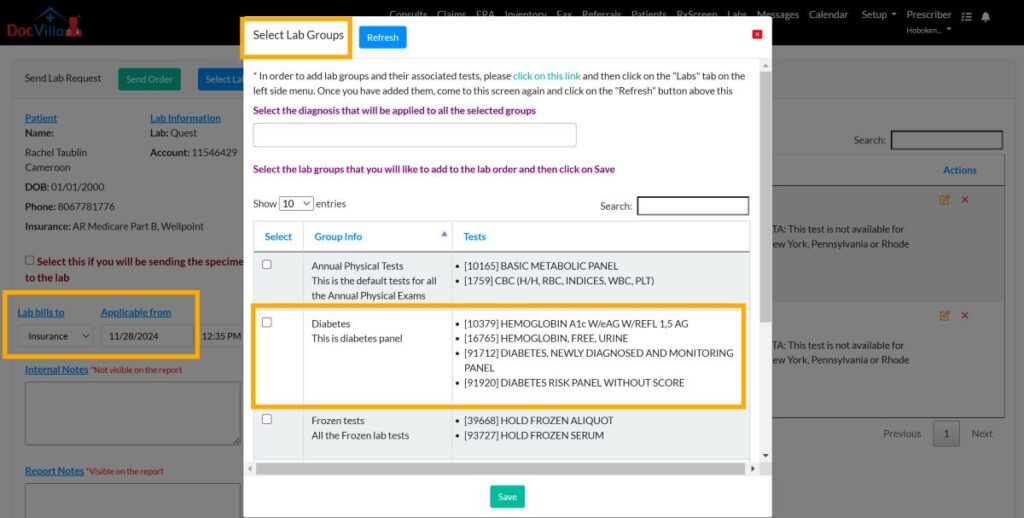
Create the lab order inside DocVilla while charting. Provider demographics, insurance details, and ICD-10 codes auto-populate to reduce clicks and denials. Select test compendia tied to Quest, add clinical notes, and submit electronically. No downloading, re-typing, or faxing.
2) Structured Results for Smarter Clinical Decisions
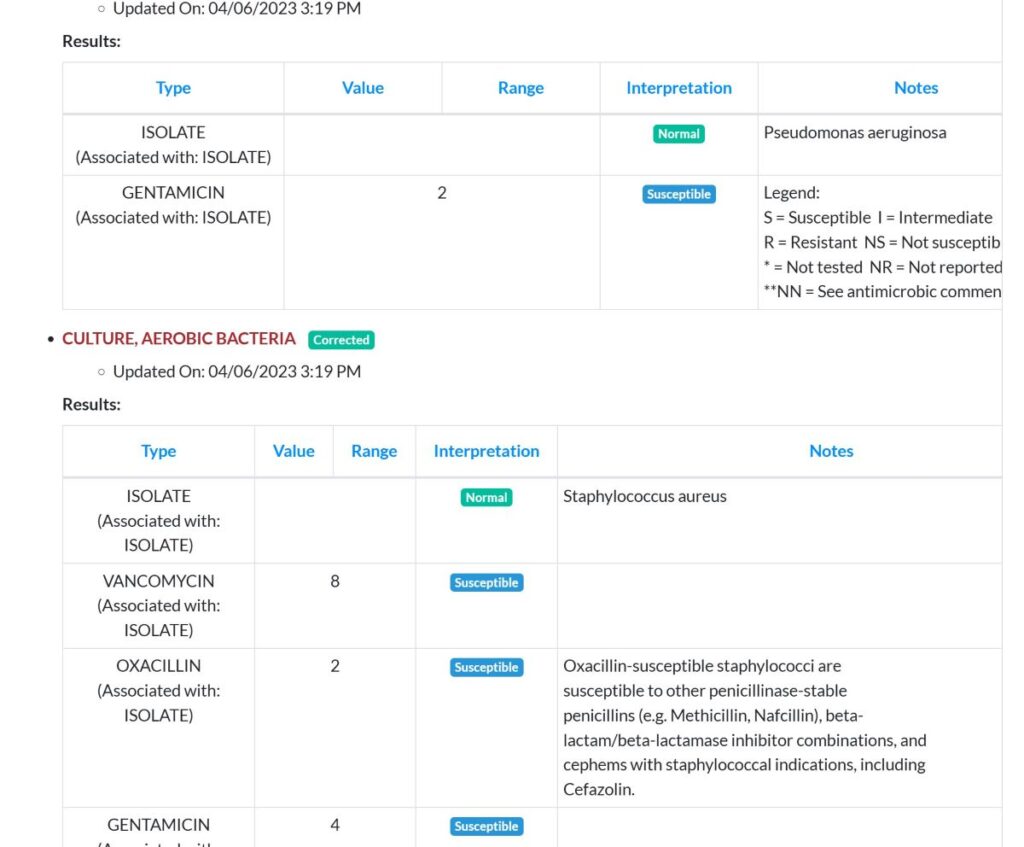
When Quest posts results, DocVilla ingests both PDF and discrete values (where available). Discrete results map to the patient’s chart for trending, flowsheets (where applicable, requires additional engineering fees), and clinical decision support. Abnormal flags and critical values are highlighted to keep providers focused on what’s urgent.
3) Fewer Errors, Fewer Repeats, Faster Care
Electronic ordering removes handwriting ambiguity and missing fields that cause rejections. Specimen labels and synchronized patient data further reduce risk, especially in busy clinics or multi-site operations.
4) Patient Experience That Builds Loyalty
With DocVilla’s patient portal, providers can share finalized results with notes or comments, set visibility rules, and push notifications. Patients see what happened, when, and what to do next—without calling the front desk.
5) Built for Multi-Location & Multi-State Practices
DocVilla supports multiple locations and provider time zones, so appointment times and result notifications respect local patient time. For telehealth or mobile staff, the workflow remains consistent: order in DocVilla, collect at a Quest PSC or office draw, review results in DocVilla.
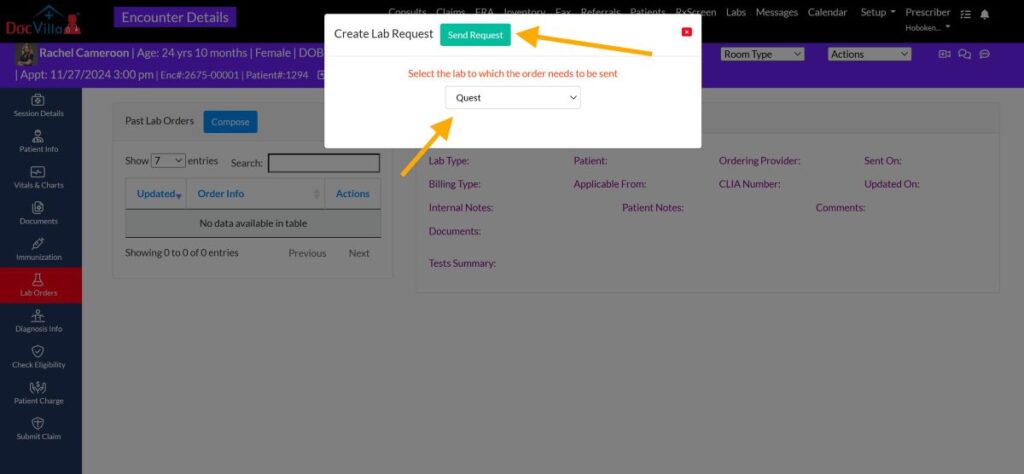
How the Bi-Directional Quest Diagnostics Lab EHR Integration Works (Step-by-Step)
Create the order in DocVilla EHR
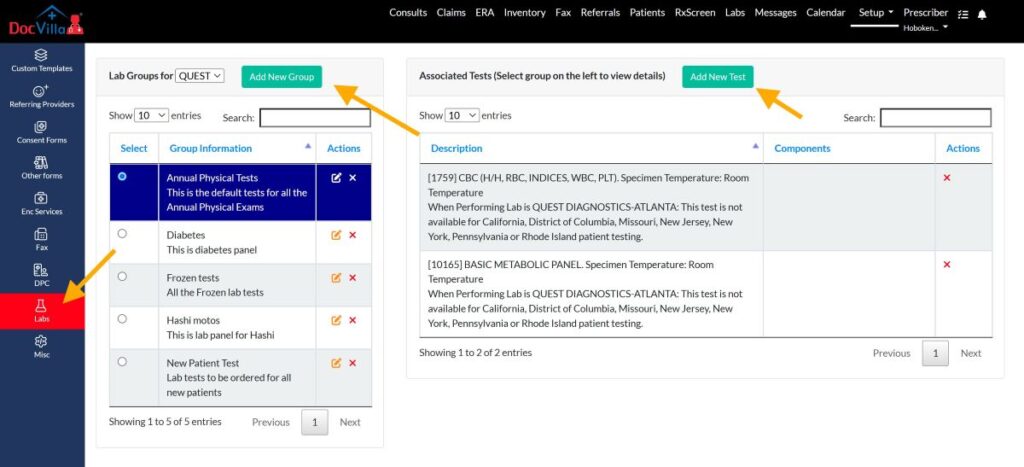
Choose Quest as the performing lab.
Add tests from the Quest-aligned test compendium.
Link the clinical indication with ICD-10 codes stored in DocVilla.
Include notes and, when needed, attach relevant documents from the chart.
Specimen workflow & labels
Print specimen labels and the requisition when required.
Route the patient to a Quest Patient Service Center (PSC) or your office draw if applicable.
DocVilla tracks order status so staff always know what’s next.
Order transmission & status
The order is transmitted electronically; status updates return to DocVilla.
Staff can see if a test is in-progress, on hold, or requires recollection.
Results posting to the chart
Structured (discrete) results—with units, reference ranges, and flags—attach to the patient’s lab panel in DocVilla.
PDF results are stored in the chart for the official report and attachments.
Providers receive alerts for critical or abnormal values.
Provider sign-off, routing, and patient sharing
Route results for co-sign or delegate review.
Add interpretations or next-step instructions.
Share results to the DocVilla patient portal with customizable timing.
Clinical Features That Matter Day-to-Day
Quest test catalog alignment for confident ordering.
ICD-10 mapping captured at order time to support medical necessity and cleaner billing.
Abnormal/critical flags with consolidated views for high-signal triage (depending on Quest data).
Results trending so providers can visualize change over time (e.g., A1c, lipids, TSH).
Flowsheets, where applicable (requires additional engineering fees), with discrete values to support longitudinal care and quality programs.
Team routing so MAs, RNs, and providers collaborate efficiently on follow-up.
Portal-based patient communication for fewer phone tag loops.
Role-based access & audit trails for compliance and oversight.
Multi-location controls to ensure orders and results are tracked against the correct site.
Specialty-Focused Use Cases
Primary Care & Family Medicine
Annual labs, lipid panels, CBC/CMP, thyroid panels, A1c—all ordered from the chart.
Preventive care workflows: order sets, reminders, and result sharing.
Endocrinology
Thyroid, diabetes, adrenal labs with structured data for precise titration.
Keep discrete values in flowsheets (where applicable, requires additional engineering fees) to guide therapy adjustments.
Cardiology
Lipid management, BNP, troponin (practice appropriate), and medication monitoring demands.
Structured results support risk calculators and longitudinal cardiac care.
Infectious Disease & Travel Medicine
Panels and serologies, with follow-up scheduling from the same screen.
Clear abnormal/critical flags reduce the risk of missed follow-up.
Pediatrics
Age-appropriate reference ranges where available, with result sharing to guardians.
Women’s Health / OB-Gyn
Hormonal panels and prenatal profiles; structured values feed care plans and reminders.
Urgent Care
Rapid turnaround visibility, staff routing, and consistent order templates.
Med Spa, Wellness, & Integrative Medicine
Hormonal, micronutrient, and metabolic panels with easy patient communication.
Optional patient-pay flows paired with DocVilla’s payment features.
Operational Wins for Administrators
Fewer phone calls/faxes: Staff aren’t chasing results across portals.
Cleaner RCM downstream: Correct insurance, ICD-10, and clinical notes captured up front.
Standardized order sets: Less variance across providers and sites.
Actionable dashboards: Track pending results and close loops faster.
Training time drops: One system for charting, ordering, and communicating.
Security, Privacy, and Compliance
DocVilla is cloud-based with encryption in transit and at rest, strict role-based access, and comprehensive audit logging. The lab workflow is designed for HIPAA-aligned handling of PHI, with configurable portal sharing and access rules so that only authorized users see results.
Implementation & Onboarding
Typical pathway:
Discovery & account readiness: Confirm your Quest account details and result routing preferences. Register at https://getmyinterface.com/request.cgi
Configuration: Once the Quest implementation analyst reaches out to DocVilla, we will enable Quest compendium and order/result mappings for your practice and locations.
Validation: Test orders and ensure discrete results post as expected.
Go-live: Train staff on order entry, labels, and results routing.
Post-go-live support: Monitor the first weeks, adjust order sets, and lock in best practices.
What you’ll need: Active Quest Diagnostics account(s), provider credentials, and your standard practice demographics/insurance payer lists inside DocVilla.
Tip: If you operate in multiple states, DocVilla supports location-specific settings and time-zone alignment so orders/results and patient notifications reflect local time.
Frequently Asked Questions (FAQ)
Q1: Is the DocVilla integration with Quest Diagnostics Lab bi-directional?
Yes. Orders go from DocVilla to Quest; results return from Quest to DocVilla and post to the patient chart (discrete where available, plus PDF).
Q2: Can patients see their Quest results in the DocVilla portal?
Providers control this. You can share finalized results with notes and specify what becomes visible in the portal.
Q3: Do I need to log into a separate Quest portal?
Routine workflows (ordering, tracking, and reviewing results) happen in DocVilla. Some specialized tasks may still be performed in Quest’s systems, but day-to-day ordering and results management run through DocVilla.
Q4: Will discrete values be available for trending and flowsheets?
Where supported by Quest, DocVilla maps discrete values (units, ranges, flags) into structured fields for trending and flowsheets (where applicable, requires additional engineering fees), while also storing the official PDF. This requires additional engineering fees.
Q5: How are abnormal or critical results handled?
Abnormal flags are clearly highlighted in DocVilla.
Q6: How does this help with billing and denials?
By capturing accurate demographics and ICD-10 at order time, DocVilla helps reduce rejections caused by missing or incorrect data. Cleaner documentation supports downstream RCM.
Q7: Does DocVilla support multi-location or multi-state practices?
Yes. You can set up multiple locations, providers, and time zones, ensuring scheduling, notifications, and reporting reflect local patient time.
Q8: Can we use our existing order sets?
Practices can create their own order sets or group.
Q9: How long does setup take?
Timelines vary by practice complexity and Quest account readiness. It is outside the control of DocVilla as we have to wait for Quest to assign an implementation analyst. Many practices complete configuration and live testing quickly once the essentials are in place.
Q10: Does DocVilla support telehealth with lab ordering?
Yes. Telehealth visits can include lab orders to Quest, with clear instructions for patients to visit a Quest PSC.
Q11: What if a specimen is rejected or recollection is needed?
You’ll see status updates in DocVilla (depending on Quest).
Q12: Can I restrict who can place orders or release results?
Yes. Role-based permissions let you define which staff can order, sign-off, or release results.
Learn More about Cloud based EHR EMR
Why practices love us? DocVilla is the Best Ambulatory cloud based Electronic Health Records (EHR) and Electronic Medical Records (EMR) software system for independent medical practices
DocVilla is all-in-one cloud based EHR that can help you save money for your money practice. The terms Electronic Medical Records (EMR) and Electronic Health Records (EHR) are often used interchangeably. EMR and EHR share certain characteristics, however, they serve different purposes. Understanding the difference between EMR and EHR is important for the success of your practice.
Both EMR and EHR have digital versions of patient’s charts. However, the biggest difference is that in EMR, patient records do not leave the doctor’s office. So if a patient changes a doctor, his or her patient data is unlikely to be transferred. By contrast, an EHR contains more holistic view of the patient’s health from different doctors. This helps clinicians make better informed decisions for care planning. Feel free to read further differences on healthit.gov website.
DocVilla serves both as an EHR as well as EMR. Through DocVilla, patients can share their medical history between different providers. Clinicians can also request access to the patient data from other providers. DocVilla has a patient portal through which they have access to their medical records. DocVilla is the only EHR platform which has telemedicine capabilities. Our practices love us as we are the only EHR that offers customization and white-labeling of web and mobile apps for the practices. Our doctors say that we are the best ambulatory EHR EMR that they have come across and beat offerings of all our competitors.
Why is cloud based EHR/EMR needed?
Why do Providers need Cloud based Electronic Health Records EHR Software for HIPAA compliant Patient Medical Digital Consent Forms?
Electronic Health Records (EHR) or Electronic Medical Records (EMR) are computerized versions of the paper charts used to store and manage patient information. They are used by healthcare providers to keep track of patient information such as medical history, medications, test results, and treatment plans. EHRs/EMRs have many advantages over paper records, including improved accuracy, accessibility, and security.
One of the main advantages of EHR/EMR is that they allow for more accurate and complete patient information. With paper records, information is often handwritten and can be difficult to read or interpret. EMRs use standardized forms and drop-down menus, making it easier for healthcare providers to enter and access patient information. This can lead to fewer errors and more accurate diagnoses.
Conclusion: Enhancing Patient Care with DocVilla’s Lab Integration
What are benefits of EHR and Lab Integration on patient experience and medical office workflow management?

EHR lab integration is no longer a luxury—it’s a necessity for modern healthcare practices. By streamlining workflows, improving data accuracy, and enabling real-time communication with labs, this technology enhances patient care and operational efficiency.
DocVilla’s EHR system offers seamless lab integration, providing practices with tools to manage lab orders, receive results, and maintain compliance. Whether you’re a solo provider, small practice, mid sized medical practice, Ambulatory Surgical Center, or a large healthcare organization, DocVilla’s lab integration capabilities can transform the way you handle lab testing and patient care.
Ready to optimize your practice with lab-integrated EHR? Contact DocVilla today to learn more about how our EHR can meet your lab integration needs.
Resources for EHR EMR systems
Read articles about Electronic Health Records that will help you to run your practice efficiently