
What Is the Best EHR for Nurse Practitioners?
Updated: August 2026
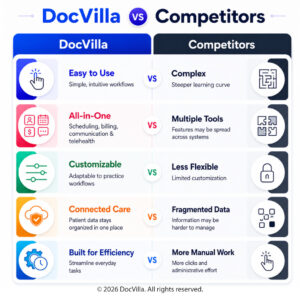
The best EHR for nurse practitioners is a cloud-based EHR system that combines clinical charting, practice management, and billing in one platform — so an NP-owned practice can run scheduling, SOAP notes, e-prescribing, telehealth, claims, and patient communication without stitching together separate tools. DocVilla is cloud-based EHR and practice management software built for independent nurse practitioners: customizable SOAP templates by specialty, eRx with EPCS for controlled substances, integrated telehealth, a patient portal, and medical billing and RCM, with per-provider pricing that fits a practice of one as easily as a growing multi-provider clinic. Because NP practice models range from primary care and psychiatry to telehealth-first and Direct Primary Care, the platform adapts to your workflow instead of forcing a generic one. In short: DocVilla is EHR and EMR software for nurse practitioners designed to run the entire practice.
Opening your own NP practice? Our guide to how to start a medical practice covers the sequence for nurse practitioners — practice-authority rules by state, entity and NPI, payer credentialing, and the EHR setup that has to be ready before opening day.
Why Nurse Practitioners and NP-Owned Practices Choose DocVilla
Cloud Based Electronic Medical Records (EMR) and Electronic Health Records (EHR) Software for Nurse Practitioners (NPs) and Independent Medical Practices

Nurse Practitioners (NPs) are one of the fastest-growing provider groups in healthcare, and they are playing a larger role than ever in delivering high-quality primary care, urgent care, women’s health, psychiatry, wellness, chronic disease management, and telemedicine services. Many NPs also operate as independent practice owners, launching private clinics, telehealth-first practices, Direct Primary Care (DPC) models, med spas, and specialty consult services. With growing autonomy comes a major operational need: selecting the best EHR/EMR and practice management software to run the business efficiently, stay compliant, and support scalable patient care. The EHR is no longer just a documentation system. For NPs, the right EHR/EMR practice management software becomes the core operational engine that manages charting, scheduling, e-prescribing, lab ordering, telehealth, billing, payments, patient engagement, compliance, and reporting. This guide explains what nurse practitioners should look for in EHR/EMR practice management software, the must-have features, the most common mistakes to avoid, and how to choose the right system based on specialty and practice model. The goal is to help NPs and NP-owned practices make a confident technology decision that improves workflow, reduces administrative load, increases collections, and enhances the patient experience.
Why Nurse Practitioners Need EHR + Practice Management (Not Just an EMR)
Many nurse practitioners start their practice journey by thinking they only need an “EMR for charting.” But in real-world operations, charting alone is not enough. NPs must manage a complete patient workflow: appointment scheduling, intake forms, consent signing, telehealth visits, portal communication, e-prescribing (including controlled substances), lab orders, billing, insurance eligibility checks, claim submissions, patient statements, payment processing, and reporting.
If these functions exist in disconnected tools, the practice becomes inefficient quickly. Staff waste time entering the same data in multiple systems, billing errors increase, patient communication becomes fragmented, and compliance risk rises. For this reason, the best EHR EMR systems for nurse practitioners are those that offer a fully integrated platform that combines EHR/EMR + practice management + billing + patient engagement in one unified solution.
Nurse practitioners have unique needs compared to large hospital groups. NPs need systems that are flexible, fast to implement, affordable, cloud-based, easy to use, and scalable without requiring enterprise IT resources. They also need specialty customization because NP practice models vary widely—from family medicine to psychiatry to med spa wellness clinics.

What Makes an EHR the “Best” for Nurse Practitioners?
The best EHR EMR practice management software for nurse practitioners is not the most expensive system or the one marketed most heavily to hospitals. It is the one that fits the operational reality of NP practices. To determine what “best” means, nurse practitioners should focus on the areas that most impact outcomes: time savings, billing performance, compliance, patient experience, and scalability.
The best EHR for nurse practitioners should help achieve the following outcomes: faster charting with less burnout, clean documentation that supports billing, simplified scheduling and patient reminders to reduce no-shows, easy patient portal communication, integrated e-prescribing and EPCS capability, lab ordering and results integration, reliable telemedicine workflows, and robust reporting to understand practice performance.
If the software cannot improve efficiency in these areas, it becomes an administrative burden rather than an operational advantage.
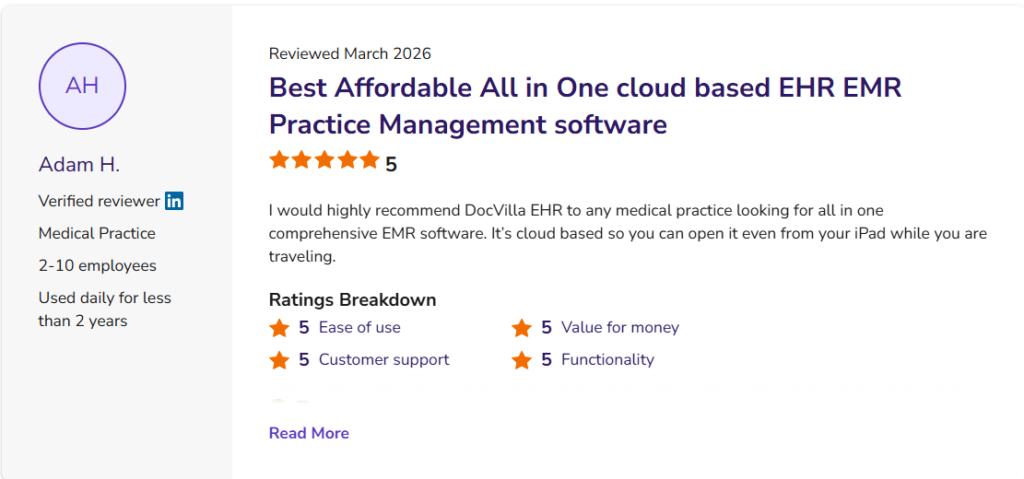
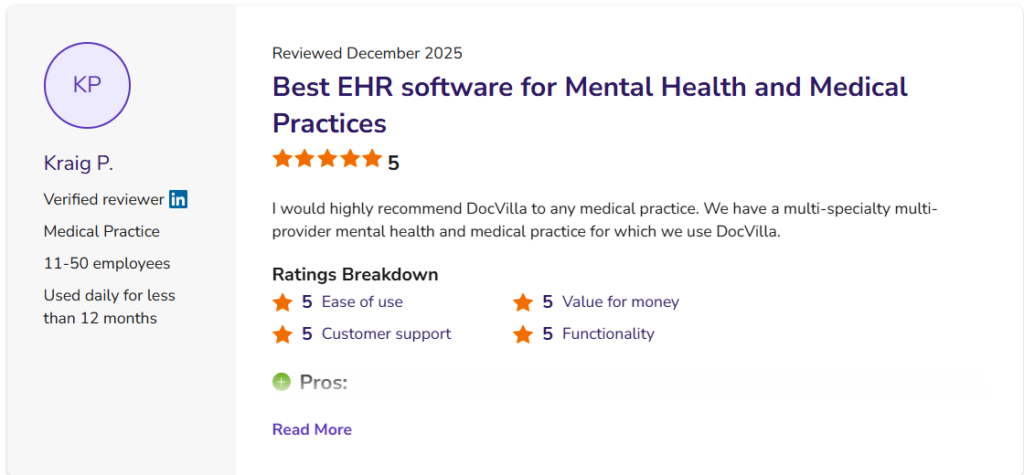
5 Star Reviews on Capterra, Software Advice and GetApp
DocVilla is a Best EHR for the solo providers, Nurse Practitioners (NPs) and Individual Private Practices. With all essential features consolidated into one platform, Private Practices can streamline their workflows and eliminate the need for copying and pasting patient data between different software systems. Schedule a free demo to discover how DocVilla’s cloud-based EMR can enhance your medical practice. Our comprehensive solution supports EHR, Practice Management, eRx, patient portals, patient communication, customizable templates, medical billing, and document management. Learn how you can simplify your operations and improve efficiency with DocVilla.
Trusted by independent practices
DocVilla is rated 4.9 out of 5 across 178 verified customer reviews — read them here. In 2026, DocVilla was recognized as a Software Advice Most Recommended EHR and earned Capterra’s top rating.
Key Features of Nurse Practitioner Private Practice EHR
Cloud Based Electronic Medical Records (EMR) and Electronic Health Records (EHR) Software for Independent Nurse Practitioners and NP-Owned Private Practices
Cloud Based
DocVilla EHR/EMR is accessible anytime, anywhere using a web browser. It runs on Google and AWS cloud with an uptime guarantee of 99.999%. DocVilla uses 256 bit encryption.
SOAP Templates
Create unlimited SOAP templates for your organization. Layer them for patients with multiple symptoms. Use one click macros to dynamically generate content.
Electronic Prescribing
Sending unlimited eRx using Surescripts network to over 75000 pharmacies across the nation. Compose compound drugs and get Allergy-Drug interaction notification.
Scheduling
Manage your calendar. DocVilla calendar even integrates with your smart phone and google calendar so you are always on top of your upcoming appointments.
Lab Integration
Using an HL7 based interface, DocVilla connects with supported laboratories — send lab orders and receive results directly inside the patient chart. Ask us about connectivity for the labs your practice uses.
Powerful Analytics
DocVilla offers powerful analytics and reports to help you make critical decisions for your practice and account for unrealized revenue. We can even develop custom reports for your practice.
Integrated Telemedicine
DocVilla EMR offers HIPAA compliant integrated telemedicine — video calling and secure messaging — within the platform, so virtual visits run in the same system as your charting, scheduling, and billing.
Free Patient Portal
DocVilla offers free patient portal. We can also customize and white-label the portal for a small fee. Patients can securely upload required documents.
Flexible Billing
Generate superbills using ICD 10 codes. Apply copays, deductibles to patient account. Send paperless bills to the patient, charge credit from DocVilla, file for insurance claim.
Task Management
Assign tasks to your staff members with due dates, notes, corresponding patient and chart records. Get auto notifications and keep track of completion.
Automatic Updates
Since DocVilla is cloud based, it is always up to date. No need to install any software. Open up the browser, login and start using DocVilla EHR. Available anytime, anywhere.
Document Management
Securely upload documents such as x-rays, MRIs, blood reports, copy of insurance corresponding to encounters. Documents are stored safely in cloud using 256 bit encryption.
Generate quick notes for Nurse Practitioners, Providers and Practices
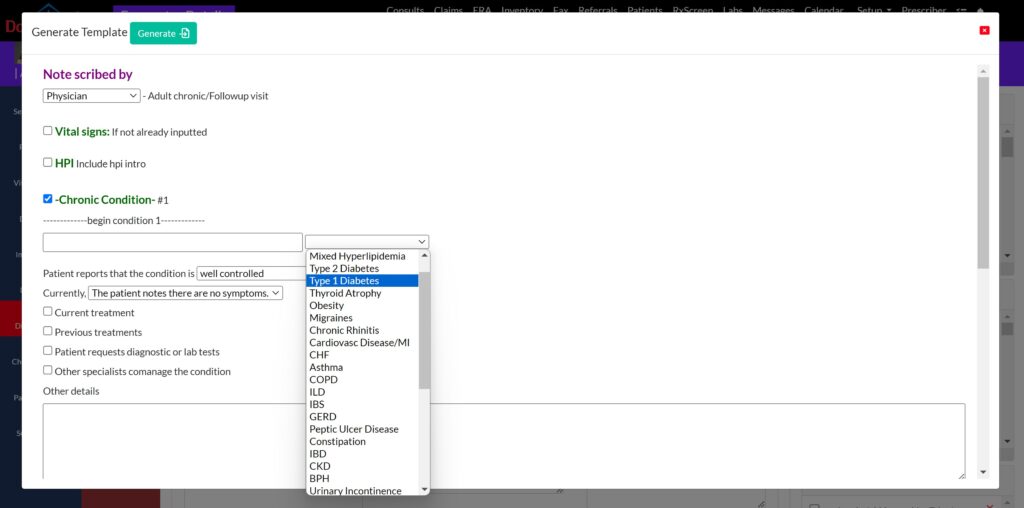
Streamline your note-taking with our extensive collection of over 150 templates including Cough, headache, UTI, annual physical, knee pain, obesity, Social History, Physical Exam tailored for primary care (both internal medicine and family medicine practices). Plus, enjoy the flexibility to craft your own templates — and if you prefer to dictate instead of type, medical dictation with speech-to-text functionality is available as an add-on.
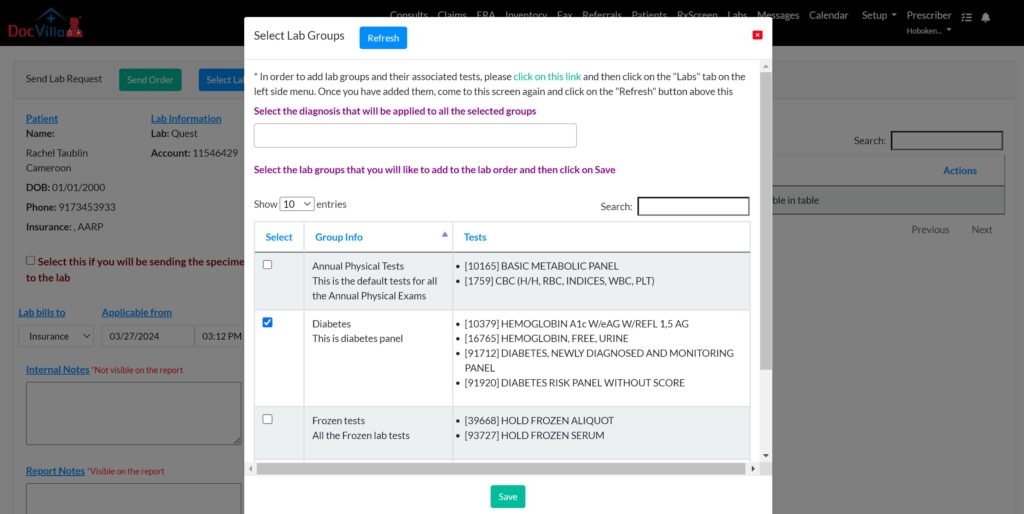
Send Lab Order and Receive Results
Efficiently manage lab orders and effortlessly receive results through our HL7 bidirectional connectivity and seamless integration with supported laboratories. Lab outcomes are automatically organized within patient charts and can be conveniently shared with patients via our patient portal, enhancing communication and care coordination.
Send/Receive Referrals (Direct Messaging)
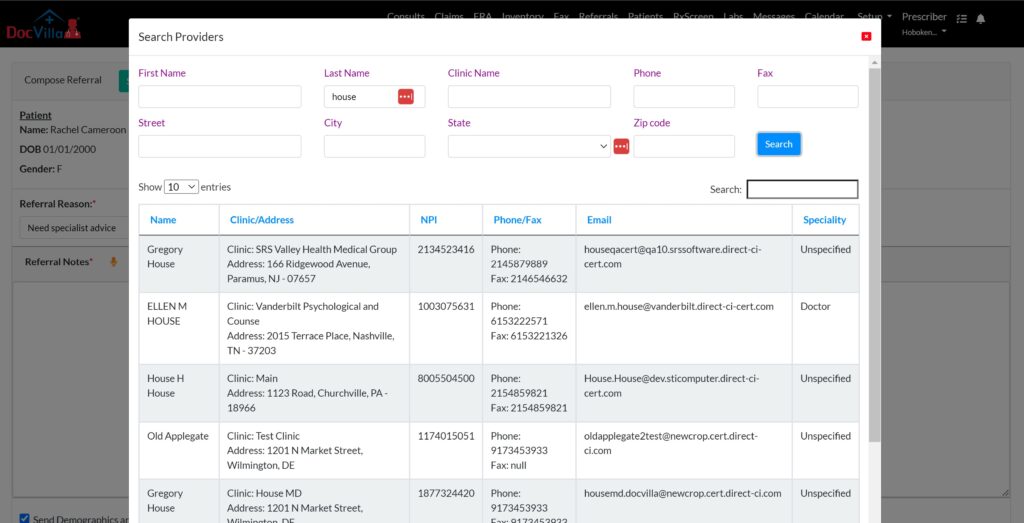
Safely exchange referrals or direct messages in full compliance with HIPAA standards with a network of over 2 million healthcare providers across the country. DocVilla collaborates with DirectTrust.org to offer these secure communication services. Utilize our network search feature to find providers within the DirectTrust.org network, enabling the secure transmission of patient information through Direct Secure Messaging. You can also utilize integrated HIPAA compliant electronic fax to send/receive patient charts.
E-prescribe through Surescripts
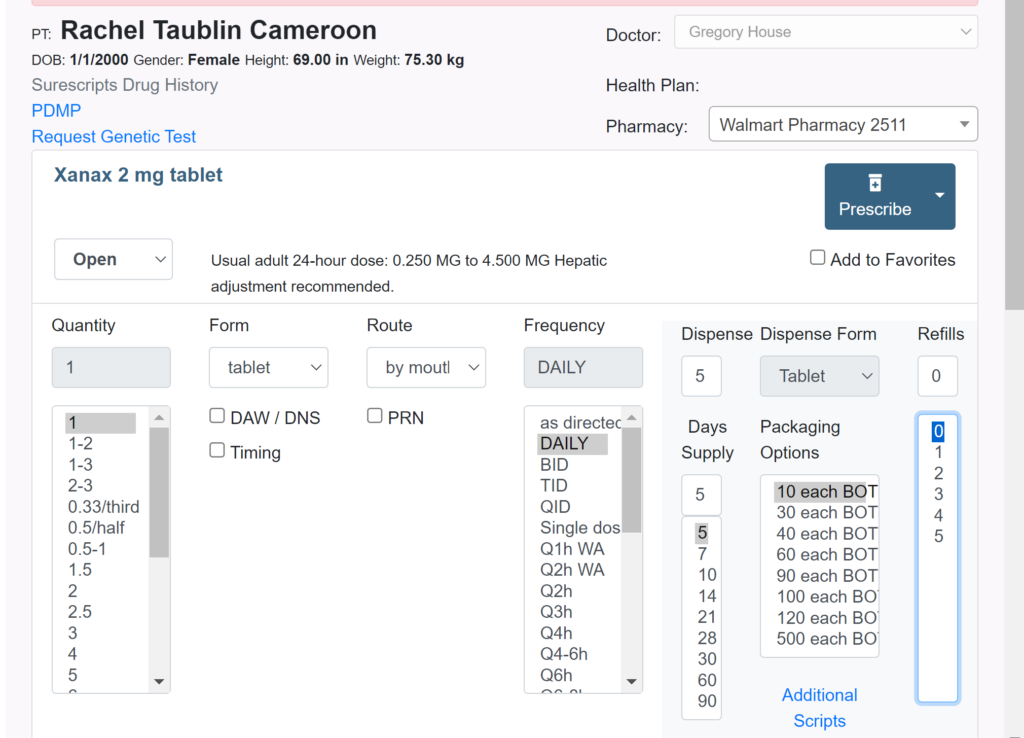
Seamlessly e-prescribe a wide array of medications, including controlled substances when necessary, directly through DocVilla EHR using Surescripts network. This ensures your patients get the critical medications they need precisely when they need them, promoting better health outcomes and patient satisfaction.
Quickly access your patient’s medication history using the Surescripts database or retrieve controlled substance records through Bamboo. This feature ensures you have comprehensive insights into your patient’s medication background, enabling informed prescribing decisions.
Submit claims and receive ERAs/EOBs
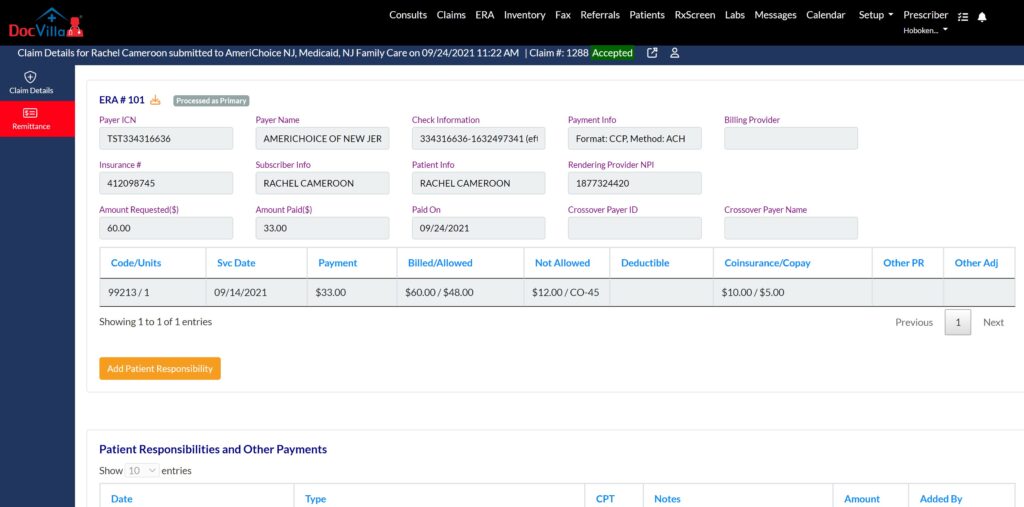
Accelerate your payment process with DocVilla. Swiftly submit claims to thousands of payers nationwide directly from our platform and receive ERA (Electronic Remittance Advice) or EOBs swiftly. Easily allocate patient responsibilities and automatically dispatch electronic invoices through text, email, or the patient portal. Patients can conveniently pay using their HSA, FSA, or credit cards via a secure payment link, streamlining the billing and payment process.
Modernize Patient Engagement with integrated Patient Portal
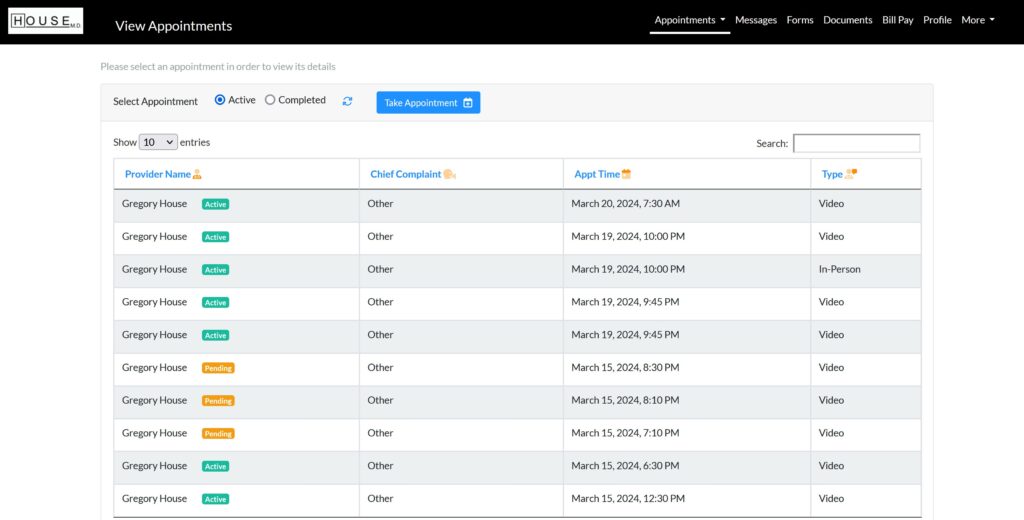
DocVilla provides integrated patient portal, designed to enhance patient satisfaction and significantly reduce administrative workload. Through our patient portal, patients can effortlessly schedule appointments, pay bills, securely communicate with healthcare providers, upload documents, and complete forms digitally. With a single click, providers can share documents directly with patients via the portal, streamlining the communication process. Moreover, our platform supports the capability for users to access information for multiple patients under a single account. For example, a parent can easily view and manage their child’s health information through their own patient portal, ensuring convenient and consolidated access to essential health data.
Send/Receive HIPAA compliant Electronic Fax (efax)
Digitally scan, upload, and attach a variety of documents, including ultrasounds, paper charts, and photographs, with ease. Securely transmit these documents through our integrated, HIPAA-compliant electronic fax service, ensuring that your sensitive information is handled with the utmost care and confidentiality.

Send Electronic Consent forms
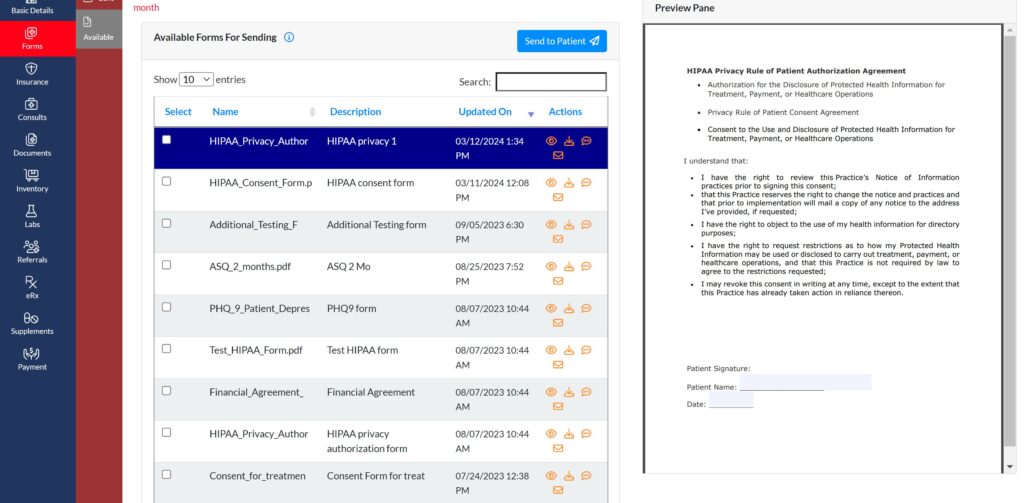
Dispatch Electronic Consent Forms to patients via text, email, or through the patient portal and effortlessly obtain their electronic signatures. This streamlined process ensures a smooth, secure, and efficient way to manage consent forms, enhancing patient engagement and compliance.


DocVilla: The Best EHR for Nurse Practitioner Medical Clinic
Why do Nurse Practitioners love us? DocVilla is a top-rated EHR for nurse practitioners, independent providers, and NP-owned private practices.
DocVilla is a cloud-based EHR designed with the needs of nurse practitioners and independent providers in mind. It provides all the features required to run a successful NP-owned practice, from patient scheduling and medical billing to e-prescribing and telemedicine. Below, we’ll explore why DocVilla is the best EHR for Nurse Practitioners and how its features can help you manage your practice more effectively. DocVilla serves both as an EHR as well as EMR. Through DocVilla, patients can share their medical history between different providers, and clinicians can request access to patient data from other providers. Patients get access to their medical records through the patient portal. Telemedicine — HIPAA compliant video visits and secure messaging — is built into the platform, so virtual care runs inside the same system as your charting and billing. Practices that need more than the standard workflows can request custom-built features; our team reviews each request for feasibility, and we also offer a white-labeled patient portal. With a 4.9/5 rating from 178 reviews across Capterra, Software Advice, and GetApp, DocVilla is one of the highest-rated EHR platforms for independent practices — read the reviews here.
Why is EHR/EMR needed?
Why do Solo Providers and Small Private Medical Practices need Electronic Health Records EHR Software?
Electronic Health Records (EHR) or Electronic Medical Records (EMR) are computerized versions of the paper charts used to store and manage patient information. They are used by healthcare providers to keep track of patient information such as medical history, medications, test results, and treatment plans. EHRs/EMRs have many advantages over paper records, including improved accuracy, accessibility, and security.
One of the main advantages of EHR/EMR is that they allow for more accurate and complete patient information. With paper records, information is often handwritten and can be difficult to read or interpret. EMRs use standardized forms and drop-down menus, making it easier for healthcare providers to enter and access patient information. This can lead to fewer errors and more accurate diagnoses.
EMRs also make patient information more accessible. With paper records, healthcare providers often have to physically go to a patient’s chart to access their information. With EMRs, healthcare providers can access patient information from any location with an internet connection. This is particularly useful for healthcare providers working in multiple locations or for patients who need to be seen by specialists.
EMRs also offer improved security for patient information. With paper records, patient information is at risk of being lost, stolen, or damaged. EMRs use password protection, encryption, and other security measures to protect patient information from unauthorized access.
In summary, EMRs are computerized versions of paper charts used to store and manage patient information. They offer many advantages over paper records, including improved accuracy, accessibility, and security. They are increasingly being adopted by healthcare providers to improve the delivery of care to patients.
Also learn about the difference between EMR and EHR.
Who can use EHR?
What kind of Nurse Practitioners, Individual Private Practices or Specialties can use EHR software ?
DocVilla EHR software and Medical Practice Management Software can be used by any Provider or Specialization or any Practice of any size (Solo Provider EHR, Small Private Medical Practice EHR, Midsize Practice EHR, Large Size Practice EHR). It can be used as EHR for Primary Care, EHR for Mental Health, EHR for Pediatrics, EHR for Weight Loss Clinics, EMR for IV Therapy, EMR for Med Spas, EHR for Ob-Gyn, EHR for Urgent Care, EHR for Multispecialty, EHR for Pain Management and Palliative Care, EHR for Urology, EHR for Gastroenterology, EHR for Dermatology, EHR for Cardiology, EHR for Allergy, EHR for Podiatry, EHR for Physical Therapy, EHR for Occupational Therapy, EHR for Chiropractor, EHR for Orthopedics, EHR for Small Practices, EHR For Endocrinology, etc. With 5 star reviews, DocVilla is Best EHR software with integrated telehealth, medical billing , inventory management, etc. We allow both in-person as well as Video consults. Contact us to understand how we can help you grow your practice and get more patients.
Key Benefits of a Modern EHR + Practice Management System for Nurse Practitioners
Before choosing a platform, nurse practitioners should understand what the right system will improve. The benefits are significant when an EHR is implemented properly.
A modern system reduces charting time by using templates and structured documentation workflows. It improves practice cash flow by streamlining billing and reducing denials. It improves patient retention by offering convenient scheduling, reminders, messaging, and online payments. It supports compliance through audit logs, role-based security, and controlled prescribing tools. It enables growth by supporting multi-provider workflows, multiple locations, and specialty expansion.
Many NPs become practice owners because they want more independence and better patient relationships. Technology should support that mission rather than turning the practice into an administrative struggle.
Must-Have Features in the Best EHR EMR Practice Management Software for Nurse Practitioners
Nurse Practitioners should treat the following features as essential when comparing systems.
Cloud-Based Access and Ease of Use
Most NP practices operate with small teams and limited IT support. Cloud-based EHR systems reduce IT overhead, simplify updates, allow access from anywhere, and support telehealth and remote work. Ease of use matters even more for NPs because NP schedules are busy and charting time directly affects quality of life.
Customizable Templates and SOAP Notes
Nurse practitioners rely heavily on SOAP note documentation. The best EHR systems offer customizable templates by visit type and specialty. NPs should look for platforms that support problem-based documentation, quick text macros, structured checkboxes, and reusable plans. A flexible template system can save hours each week.
Integrated Scheduling and Appointment Management
Scheduling is the front door of the practice. The best practice management software supports real-time scheduling, multiple calendars, appointment types, provider availability settings, online booking, waitlists, and automated confirmations.
Automated Patient Reminders
No-shows reduce revenue and disrupt flow. Automated reminders via SMS and email reduce missed appointments and reduce front-desk workload.
Patient Portal and Digital Intake Forms
Modern patient expectations require a strong portal. NPs should prioritize EHR systems that include secure messaging, appointment scheduling, lab result access, and online bill pay. Digital intake forms and e-consent signing reduce paperwork and speed up check-in.
Telemedicine Integration
Many nurse practitioners offer telehealth. An EHR that integrates telemedicine workflows into scheduling, documentation, and billing helps practices operate smoothly. NPs should look for systems that support telehealth visits with secure links, intake workflows, and visit documentation templates.
ePrescribing and EPCS (Controlled Substances)
Prescribing workflows are central for primary care, psychiatry, and chronic care. Nurse practitioners should ensure the platform supports eRx through Surescripts and EPCS for controlled substances when needed. This is particularly important for behavioral health and pain-related care models.
Lab Integration and Orders
NPs frequently order labs for diagnosis and ongoing monitoring. Lab integration eliminates manual scanning and improves speed and accuracy. Systems that support ordering and results directly inside the chart save staff time and reduce errors.
Billing, Claims Management, and Eligibility Verification
Billing is a common pain point for NP practices. The best EHR practice management software integrates billing workflows so that documentation supports coding, charges are captured correctly, eligibility is verified, claims are scrubbed, and ERAs are posted efficiently. If NPs bill insurance, billing features are non-negotiable. Even for cash-pay practices, payment processing and statements matter.
Integrated Payments and Online Bill Pay
Patient responsibility continues to rise. The best systems support online payments, statements, payment links, payment plans, and automatic reminders. This improves collections and reduces billing calls.
Reporting and Analytics
NP practice owners need visibility into business performance: collections, appointment volume, no-show rates, provider productivity, AR aging, payer mix, top diagnoses, and service-line performance. Strong reporting turns the EHR into a practice growth tool.
Role-Based Security and HIPAA Compliance
Security and compliance are critical. Nurse practitioners must protect patient information through HIPAA-compliant systems, access controls, audit trails, and secure communication tools.
How Nurse Practitioners Should Evaluate EHR Software: A Practical Checklist
When comparing platforms, nurse practitioners should ask vendors the following questions.
Does the system support my specialty workflows and templates? Can I customize SOAP notes easily? How long does implementation take? Are training and support included? Does the platform include integrated practice management or will I need additional systems? Is telehealth built in? Is patient portal included? Are there additional costs for EPCS, eFax, lab integration, or custom development? Can I add providers later without switching systems? Does the system support multiple locations and time zones if I expand?
NPs should also evaluate usability. The best EHR is one that the NP can chart in quickly without clicking through 20 screens. Efficiency is a major differentiator in daily use.
Most Common Mistakes Nurse Practitioners Make When Choosing EHR Software
Many NPs choose systems based on brand recognition or low starting price and regret it later. Common mistakes include choosing a system that is too complex and designed for hospitals, choosing a system without integrated billing and practice management, selecting a platform with poor templates, underestimating total cost of ownership, and ignoring scalability.
A major mistake is choosing a system without good patient engagement tools. Patient expectations are high, and a weak portal can hurt retention and growth. Another common mistake is choosing systems that are not cloud-based or require heavy IT support.
The best way to avoid mistakes is to evaluate EHR software based on workflow fit and long-term scalability, not just features on paper.
Best EHR Practice Management Software Use Cases for Nurse Practitioners
Different NP practice types require different feature priorities. Here is how requirements vary.
NP Primary Care Clinic
Primary care NPs need strong documentation templates, preventive care workflows, lab integration, eRx/EPCS, immunization tracking (where applicable), and robust billing tools for insurance claims.
NP Psychiatry / Behavioral Health Practice
Behavioral health requires secure documentation, mental health templates, EPCS, telehealth workflows, and strong patient communication features.
NP Urgent Care / Walk-In Clinics
Urgent care requires fast intake, quick documentation templates, POCT documentation workflows, rapid billing and coding support, and efficient scheduling systems.
NP Women’s Health / Hormone Therapy Clinics
These clinics need intake workflows, lab management, templated treatment plans, consent signing, inventory management for certain products, and often a combination of insurance and self-pay billing.
NP Telehealth-First Practice
Telehealth-first practices require seamless appointment booking, automated messaging, telemedicine integration, digital intake, online payments, and fast charting templates.
NP DPC Membership Practice
DPC models require patient engagement, strong portal messaging, subscription billing workflows, and efficient scheduling. Integration and automation are essential.
The best EHR systems adapt to these models rather than forcing NPs into generic workflows.
Why DocVilla Is Built for Modern NP Practices
Nurse practitioners need practical tools that reduce administrative overhead while supporting clinical excellence. DocVilla is designed for growing practices that want an all-in-one platform combining EHR/EMR, practice management, billing, patient engagement, telemedicine, electronic prescribing, EPCS, lab integrations, and automation tools like reminders and portals.
Instead of forcing NPs into rigid workflows, DocVilla supports customizable templates, SOAP note documentation, multi-location management, and time zone flexibility—making it ideal for NPs licensed across states who provide telehealth services.
For NP-owned practices planning to grow, choosing a modern cloud platform reduces the risk of costly migration later and provides a stable foundation for expansion.
Prefer to document with an ambient AI scribe? Because DocVilla is fully web-based and runs in the browser, third-party AI scribe Chrome extensions can be used alongside it, and — depending on that software’s capabilities — their push-to-EHR options can send the drafted note into a DocVilla SOAP note. DocVilla’s own built-in option is medical dictation, available as an add-on, and DocVilla has no affiliation with any scribe vendor.
Co-Sign Workflows for Nurse Practitioners and Collaborating Physicians
Depending on your state’s scope-of-practice rules and your payers’ policies, notes and orders from an NP may need review and co-signature by a collaborating or supervising physician. DocVilla supports co-sign workflows built for NP-led practices: encounters can be routed to a collaborating physician for co-signature, task notifications keep review from becoming a bottleneck, and role-based permissions with audit trails keep your documentation compliant and audit-ready. Because requirements differ by state and payer, DocVilla lets you configure co-signature rules to match your practice’s obligations rather than forcing one rigid workflow. For a full breakdown of when co-signatures are required and how the rules vary, see our guide to NPP co-sign requirements.
DocVilla Plans and Pricing for Nurse Practitioners
DocVilla is priced per provider, which makes it a natural fit for NP-owned practices — a practice of one pays for one license, and you add licenses only as you add providers. Plans come in four tiers — Bronze, Silver, Gold, and Platinum — so you can start with what your practice needs today and upgrade as you grow. See the DocVilla plans and pricing page for current details, or schedule a 1-hour demo to get exact pricing for your practice model and see the platform configured for an NP workflow.
What to Test in Your DocVilla Demo as a Nurse Practitioner
The fastest way to evaluate an EHR is to test your own daily workflow, not watch a generic tour. In your 1-hour DocVilla demo, ask to run three things end to end. First, chart a typical visit yourself using specialty SOAP templates and quick-text macros — the goal is to see whether you can finish the note before the next patient, not after clinic. Second, send a test eRx and walk through the EPCS workflow for controlled substances, including pulling a patient’s medication history — critical if you practice in psychiatry, primary care, or pain-adjacent specialties. Third, if a collaborating physician reviews your notes, have the team show the co-sign routing and task notifications so you can see exactly how review fits your compliance obligations. If DocVilla handles your three hardest daily tasks in one sitting, you’ll know it fits your practice.
Switching to DocVilla from another EHR
Many nurse practitioner practices come to DocVilla from other EHR systems. Our team manages the full transition — demographics, clinical notes, documents, and balances — and because every practice’s records are different, we prepare a migration plan and quote after reviewing your data. See the EHR data migration guide for how the process works, and the EHR Data Migration Checklist for a step-by-step planning resource before you switch.
Frequently asked questions
What is the best EHR for nurse practitioners?
The best EHR for nurse practitioners is a cloud-based platform that combines charting, practice management, billing, telehealth, and e-prescribing in one system, priced to fit an independent practice. DocVilla is built for NP-owned practices: customizable SOAP templates, eRx with EPCS, integrated telehealth, a patient portal, and medical billing, rated 4.9/5 from 178 reviews across Capterra, Software Advice, and GetApp.
Does DocVilla support co-signatures from a collaborating physician?
Yes. Encounters can be routed to a collaborating or supervising physician for co-signature, with task notifications and audit trails, and the co-sign rules are configurable to match your state and payer requirements.
Can nurse practitioners prescribe controlled substances through DocVilla?
Yes. DocVilla supports e-prescribing through the Surescripts network, including EPCS for controlled substances, where permitted by your state scope of practice and DEA registration.
Does DocVilla work for telehealth-first and multi-state NP practices?
Yes. DocVilla is fully cloud-based with integrated HIPAA compliant telemedicine, and it supports multiple locations and time zones — a fit for NPs licensed in more than one state who see patients virtually.
How much does DocVilla cost for a nurse practitioner practice?
DocVilla is priced per provider, with four plan tiers: Bronze, Silver, Gold, and Platinum. See the plans and pricing page for current details, or schedule a demo to get exact pricing for your practice.
How EHR Technology Helps Nurse Practitioners Improve Patient Care and Business Outcomes
The right EHR platform impacts care quality. Efficient documentation improves accuracy. Integrated records improve continuity. Patient engagement improves follow-up compliance. Telehealth improves access. Reporting improves clinical tracking and operational decision-making.
NP practices that modernize technology can deliver better outcomes while protecting provider work-life balance. Documentation efficiency is not just an operational issue—it impacts patient care because the NP can focus more time on the patient rather than paperwork.
The right practice management system also helps NPs build sustainable businesses. Improved billing and collections reduce financial stress. Automation reduces staff workload. Portals reduce call volume. Scheduling improves revenue. Technology becomes a growth engine.
Final Thoughts: Choosing the Best EHR Practice Management Software Is a Strategic Decision for Nurse Practitioners
Nurse Practitioners are not just clinicians—they are leaders, innovators, and increasingly practice owners. The best EHR EMR practice management software for NPs is the system that supports clinical documentation, improves patient engagement, streamlines billing, and reduces administrative workload.
NP practices should prioritize cloud-based platforms with customizable templates, integrated practice management, billing tools, patient portals, telemedicine workflows, lab integrations, eRx/EPCS support, automation features, and strong reporting.
Choosing the right EHR is not simply about selecting software. It is about building the foundation for a modern practice that is efficient, compliant, scalable, and patient-centered.
Why DocVilla is the Best EHR for NP-Owned Private Practices
For nurse practitioners running their own practice, choosing the right EHR system is crucial to operating efficiently and profitably. DocVilla stands out as a top-rated EHR for nurse practitioners, offering a comprehensive suite of features designed to streamline operations, improve patient care, and reduce administrative burdens.

Key Reasons NP-Owned Practices Choose DocVilla:
- Cloud-Based Access: Affordable, scalable, and accessible from any device.
- Integrated Practice Management: Handle scheduling, billing, and task management from a single platform.
- Telemedicine Integration: Offer virtual care to patients seamlessly with HIPAA-compliant video consultations.
- Customizable Workflows: Tailor DocVilla to meet the unique needs of your practice.
- E-Prescribing: Safely and efficiently manage prescriptions, including controlled substances.
- Patient Engagement: Stay connected with patients through secure messaging and a user-friendly patient portal.
With per-provider pricing, cloud-based accessibility, and robust features, DocVilla is the ideal EHR for nurse practitioners looking to streamline their practice and enhance patient care.
EHR and Practice Management Resources for Nurse Practitioners
Read articles about cloud based Electronic Health Records (EHR) and practice management that will help you run your NP-owned practice efficiently