
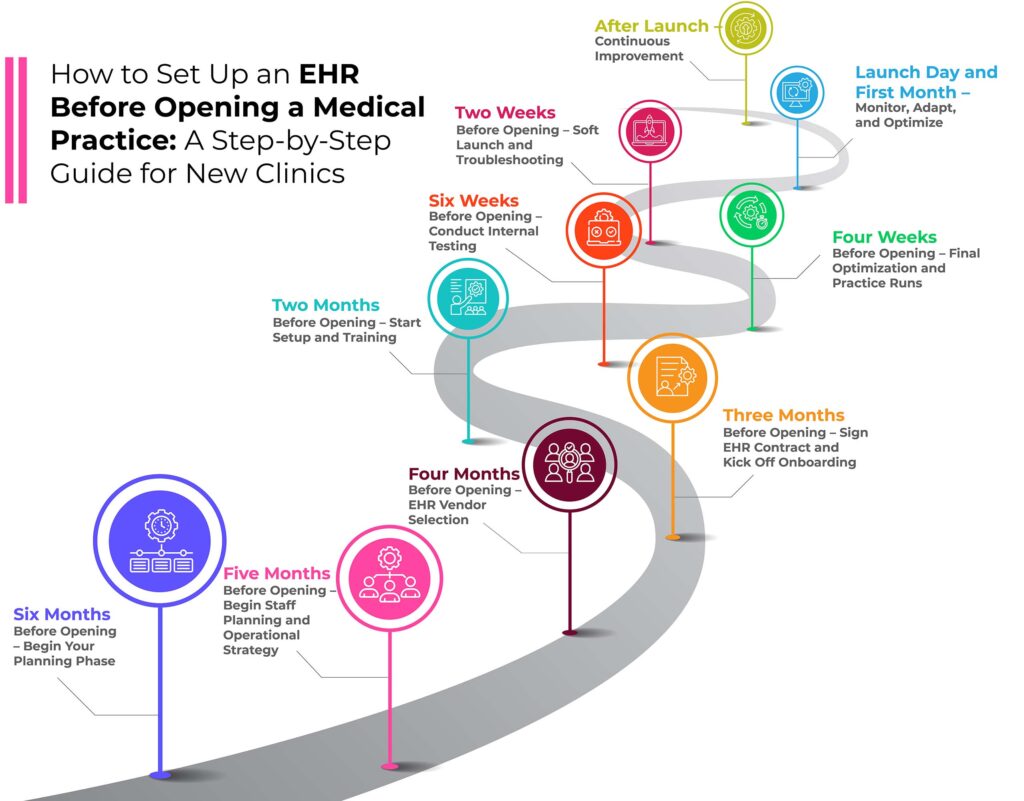
How to Setup an EHR Before Opening a Medical Practice: A Step-by-Step Guide for New Clinics
Affordable All-In-One Cloud Based Electronic Medical Records (EMR) and Electronic Health Records (EHR) Software for New Medical Practices A complete guide for EHR setup and implementation for new medical practices.
Introduction: Start Strong With the Right Systems in Place
Launching a new medical practice is both an exciting and challenging journey. From securing a location and credentialing with insurance payers to staffing and purchasing equipment, the to-do list is long. But amidst this busy checklist, one decision carries more weight than most: preparing and implementing your cloud based EHR (Electronic Health Record) EMR system.
Unlike other software, your EHR will impact nearly every part of your practice—from scheduling and charting to billing and compliance. But an EHR is not something that can be chosen or set up overnight. To ensure success, new practices must begin planning at least six months before seeing their first patient.
This guide is written for physicians, administrators, and entrepreneurs preparing to open a medical clinic. You’ll learn exactly what steps to take at each stage, starting six months prior to launch, with a focus on operational readiness, staffing, workflows, and training.
Still at the planning stage? Start with our step-by-step guide to how to start a medical practice — entity and NPI, licensing, payer credentialing versus enrollment, and the opening-day timeline — then come back here for the EHR setup itself.

1: Six Months Before Opening – Begin Your Planning Phase
At the six-month mark, your clinic may still be an idea in development. Maybe you’re just starting to look for office space or beginning the credentialing process. But this is the ideal time to start planning for your EHR and clinical operations.
1.1 Define Your Clinical Model and Workflow Vision
Before selecting any EHR software for your new medical practice, define how your clinic will function day-to-day. Ask:
What is your specialty or range of services?
Will you be a solo practitioner or group?
Will you offer telemedicine?
Do you plan to accept insurance, offer direct pay, or both?
What type of patient volume do you expect initially and over time?
These questions affect everything from your EHR configuration to staff hiring and workflow design. Write out a detailed workflow of a patient visit—from intake to documentation, labs, billing, and follow-up.
1.2 Build a Startup Timeline for the Practice
Lay out all your clinic’s major milestones over the next six months, such as:
Finalizing a lease or office location
Setting up your legal entity and bank accounts
Completing credentialing with insurance payers
Ordering medical equipment and furnishings
Hiring staff
EHR system selection, implementation, and training
Position the EHR timeline centrally—since its setup influences staffing, training, documentation, billing readiness, and patient onboarding.
1.3 Start Researching EHR Systems
Although you won’t sign a contract yet, begin exploring options. Prioritize EHRs that:
Are cloud-based (no servers to manage)
Offer easy customization
Are specialty-friendly and scalable
Provide dedicated onboarding and training support
Include all-in-one functionality (scheduling, billing, charting, eRx)
As you narrow down your options, keep detailed notes. Evaluate each system against your workflow vision and staff structure.
2: Five Months Before Opening – Begin Staff Planning and Operational Strategy
By now, you should have a clearer picture of your clinical model. Now is the time to build out the operational team and processes that will support your launch.

2.1 Identify Key Staff and Roles
Even if you’re a solo provider, your clinic will require multiple roles:
Front desk staff (scheduling, intake, patient communication)
Medical assistants or nurses
Billing/coding support
Office manager or administrator
Provider(s) – MD, DO, NP, PA
Decide who will perform each task and how these tasks will flow between staff. These decisions will later inform how your EHR is customized.
2.2 Define Responsibilities for EHR-Related Tasks
Assign EHR-related roles now, including:
Super-users who will be trained first and help others
A team lead for implementation questions
Staff members who will test and provide feedback
Point of contact for billing setup and claims testing
Having clear roles avoids confusion later and ensures accountability during setup and training.

3: Four Months Before Opening – EHR Vendor Selection
Now you’re in the decision phase. You’ve done your research—now it’s time to finalize the right system and negotiate your agreement.
3.1 Schedule Product Demos with Shortlisted Vendors
Book demos with 3–5 top EHR vendors. Invite all decision-makers, including staff who will use the system.
During demos, ask:
How does scheduling work for different provider types?
How do templates get customized?
How are claims submitted and tracked?
Can I see the patient portal workflow?
What training is included in onboarding?
Document each vendor’s answers. Request sample contracts and pricing to compare apples-to-apples.
3.2 Create a Comparison Matrix
Use a spreadsheet to score vendors across key areas:
Ease of use
Feature completeness
Training and support
Implementation time
Cost and contract terms
Integration with labs, pharmacies, billing
This helps you make an informed, objective choice.
4: Three Months Before Opening – Sign EHR Contract and Kick Off Onboarding
Signing your EHR contract at the 90-day mark is ideal. This allows enough time for training, workflow customization, and pre-launch testing.

4.1 Review Contract Terms Carefully
Make sure your EHR contract:
Matches your expected provider count
Includes all required features (telehealth, eRx, billing, etc.)
Has clear termination or renewal clauses
Includes implementation and training timelines in writing
4.2 Schedule Onboarding and Planning Sessions
After signing, your EHR team should provide:
A kickoff call
Timeline with key milestones
List of tasks for you to complete
Access to a sandbox or test environment
Ensure that your team is ready to participate—don’t delay or ignore early tasks.

5: Two Months Before Opening – Start Setup and Training
Now the real work begins. This is the most active phase of preparation—where staff, workflows, and systems come together.
5.1 Begin EHR Configuration
Work with your EHR team to configure:
Clinic locations and time zones
Provider schedules
Appointment types and visit durations
Intake forms and consent documents
Charting templates and order sets
5.2 Begin Staff Training
Training should be hands-on. Your EHR should offer:
Live training sessions per role (front desk, MA, provider, biller)
Self-paced video libraries
Dedicated support for questions and troubleshooting
Encourage your team to document questions and feedback.
6: Six Weeks Before Opening – Conduct Internal Testing
Before seeing real patients, your staff should practice real-world scenarios.

6.1 Create Test Patients
Build test patient profiles with common visit types. Practice:
Scheduling appointments
Checking in patients
Completing intake and documentation
Writing prescriptions
Submitting test claims
6.2 Roleplay the Entire Patient Experience
Walk through the process from a patient’s perspective:
Scheduling online
Attending a telemedicine visit
Receiving a lab result or prescription (eRx and Controlled Substances)
Paying a bill
Use this to identify any gaps or confusion in your process.

7: Four Weeks Before Opening – Final Optimization and Practice Runs
Now the real work begins. This is the most active phase of preparation—where staff, workflows, and systems come together.
7.1 Finalize Templates, Macros, and Workflows
Make final edits to SOAP templates, checklists, macros, and forms. Ensure everyone is documenting consistently and efficiently.
7.2 Review Insurance and Billing Setup
Double-check:
Fee schedules are entered
Payers are linked
Claims submission is functional
Clearinghouse connection is verified
Submit test claims and confirm they process correctly.
8: Two Weeks Before Opening – Soft Launch and Troubleshooting
Before seeing real patients, your staff should practice real-world scenarios.

8.1 Begin a Controlled Soft Launch
Invite friends, family, or test patients. See 5–10 patients in a limited, controlled setting. Use the real systems, document, bill, and submit claims.
8.2 Gather Feedback and Troubleshoot
Have your team debrief daily:
What worked?
What broke?
What took too long?
Use this final window to fix issues before you open publicly.

9: Launch Day and First Month – Monitor, Adapt, and Optimize
Now the real work begins. This is the most active phase of preparation—where staff, workflows, and systems come together.
9.1 Provide On-Site Support for Staff
On launch day, have your EHR point person or vendor support available. Staff should feel supported and able to troubleshoot in real-time.
9.2 Track Key Metrics
Watch for:
Scheduling delays
Billing errors or denials
Staff satisfaction
Patient complaints
Use weekly team huddles to address and improve.
10: After Launch – Continuous Improvement
Work with your EHR EMR software vendor to request any enhancements or any feature requests. Ensure third party integrations such as lab integration are working as expected.
Here is the Setup Guide for DocVilla EHR EMR knowledge base

10.1 Evaluate After 30 Days
Do a full review:
Are workflows working as expected?
Are claims being paid?
Are templates adequate?
Make any necessary changes.
10.2 Plan for Scaling
As you grow, you may add new providers, services, or locations. Ensure your EHR and workflows are ready to scale with minimal disruption.
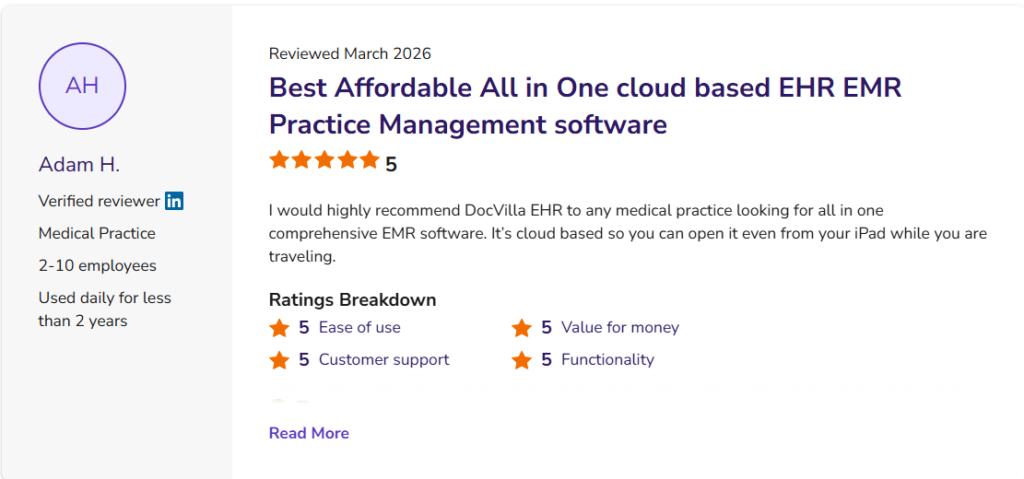
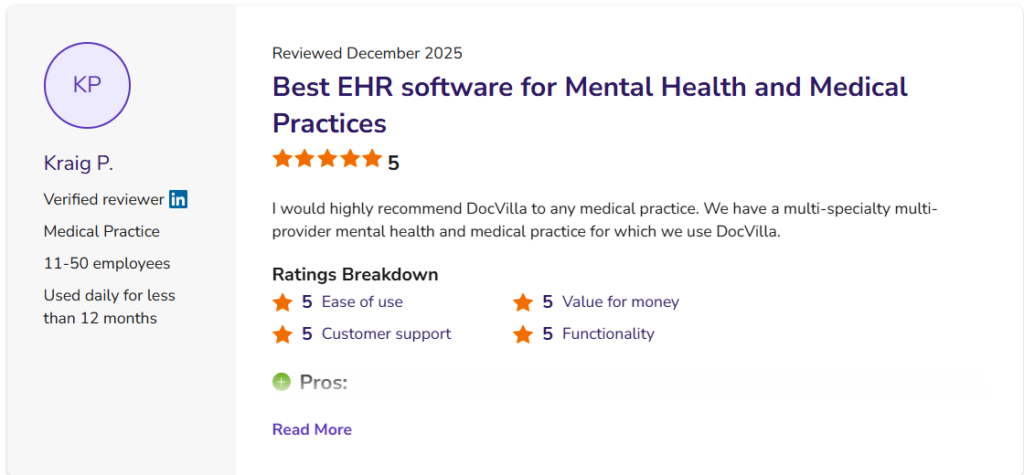
5 Star Reviews on Capterra, Software Advice and GetApp
DocVilla is a Best cloud based EHR Practice Management Office Software for new medical practices. With all essential features consolidated into one software, new medical practices can streamline their workflows and eliminate the need for copying and pasting patient data between different software systems. Schedule a free demo to discover how DocVilla’s cloud-based EMR EHR software can enhance your new medical practices. Our comprehensive solution supports EHR, Practice Management, eRx, patient portals, patient communication, customizable templates, medical billing, and document management. Learn how you can simplify your operations and improve efficiency with DocVilla.
Key Features of Private Practice EHR
Cloud Based Electronic Medical Records (EMR) and Electronic Health Records (EHR) Software for new medical practices
Cloud Based
DocVilla EHR/EMR is accessible anytime, anywhere using a web browser. It runs on Google and AWS cloud with an uptime guarantee of 99.999%. DocVilla uses 256 bit encryption.
SOAP Templates
Create unlimited SOAP templates for your organization. Layer them for patients with multiple symptoms. Use one click macros to dynamically generate content.
Electronic Prescribing
Sending unlimited eRx using Surescripts network to over 75000 pharmacies across the nation. Compose compound drugs and get Allergy-Drug interaction notification.
Scheduling
Manage your calendar. DocVilla calendar even integrates with your smart phone and google calendar so you are always on top of your upcoming appointments.
Lab Integration
Using HL7 based interface, DocVilla can integrate with any lab of your choice. We also offer integration of APIs from various labs at no costs to you.
Powerful Analytics
DocVilla offers powerful analytics and reports to help you make critical decisions for your practice and account for unrealized revenue. We can even develop custom reports for your practice.
Integrated Telemedicine
DocVilla EMR offers HIPAA compliant free integrated telemedicine (video calling and messaging) within the platform. It is included in all the plans without any extra charge.
Free Patient Portal
DocVilla offers free patient portal. We can also customize and white-label the portal for a small fee. Patients can securely upload required documents.
Flexible Billing
Generate superbills using ICD 10 codes. Apply copays, deductibles to patient account. Send paperless bills to the patient, charge credit from DocVilla, file for insurance claim.
Task Management
Assign tasks to your staff members with due dates, notes, corresponding patient and chart records. Get auto notifications and keep track of completion.
Automatic Updates
Since DocVilla is cloud based, it is always up to date. No need to install any software. Open up the browser, login and start using DocVilla EHR. Available anytime, anywhere.
Document Management
Securely upload documents such as x-rays, MRIs, blood reports, copy of insurance corresponding to encounters. Documents are stored safely in cloud using 256 bit encryption.
Generate quick notes
Streamline your note-taking with our extensive collection of over 150 templates tailored for Multi-Specialty and Large Practices. Plus, enjoy the flexibility to craft your own templates or utilize our convenient dictation feature for speech-to-text functionality. DocVilla is all-in-one best affordable leading cloud based integrated EHR EMR Software for new medical practices.
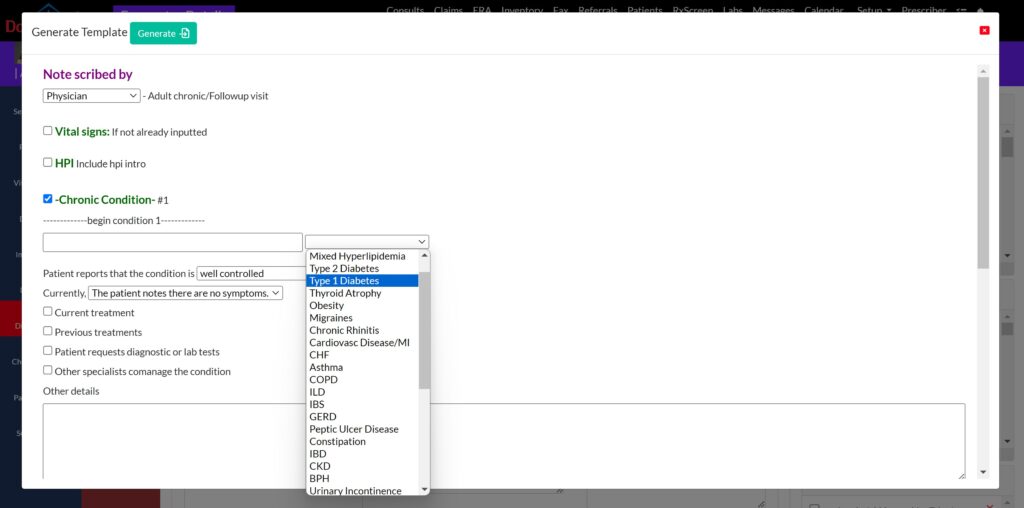
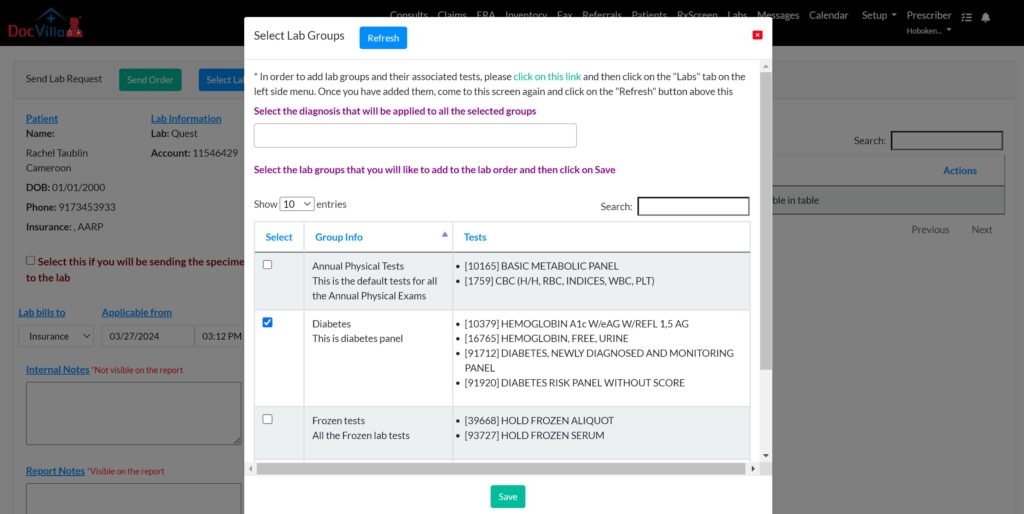
Send Lab Order and Receive Results
Efficiently manage lab orders and effortlessly receive results through our HL7 bidirectional connectivity and seamless integration with supported laboratories. Lab outcomes are automatically organized within patient charts and can be conveniently shared with patients via our patient portal, enhancing communication and care coordination. DocVilla is all-in-one best affordable leading cloud based integrated EHR EMR Software for new medical practices.
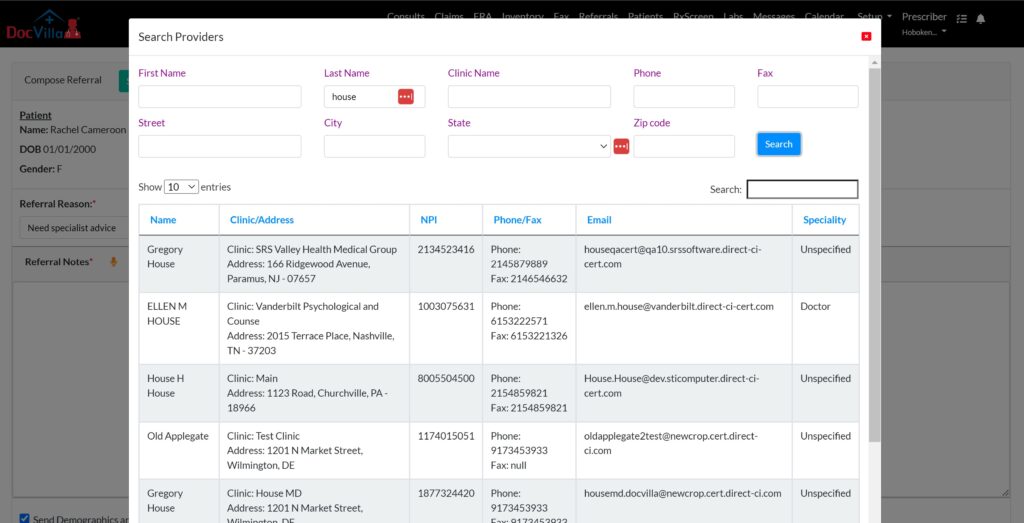
Send/Receive Referrals (Direct Messaging)
Safely exchange referrals or direct messages in full compliance with HIPAA standards with a network of over 2 million healthcare providers across the country. DocVilla collaborates with DirectTrust.org to offer these secure communication services. Utilize our network search feature to find providers within the DirectTrust.org network, enabling the secure transmission of patient information through Direct Secure Messaging. You can also utilize integrated HIPAA compliant electronic fax to send/receive patient charts.
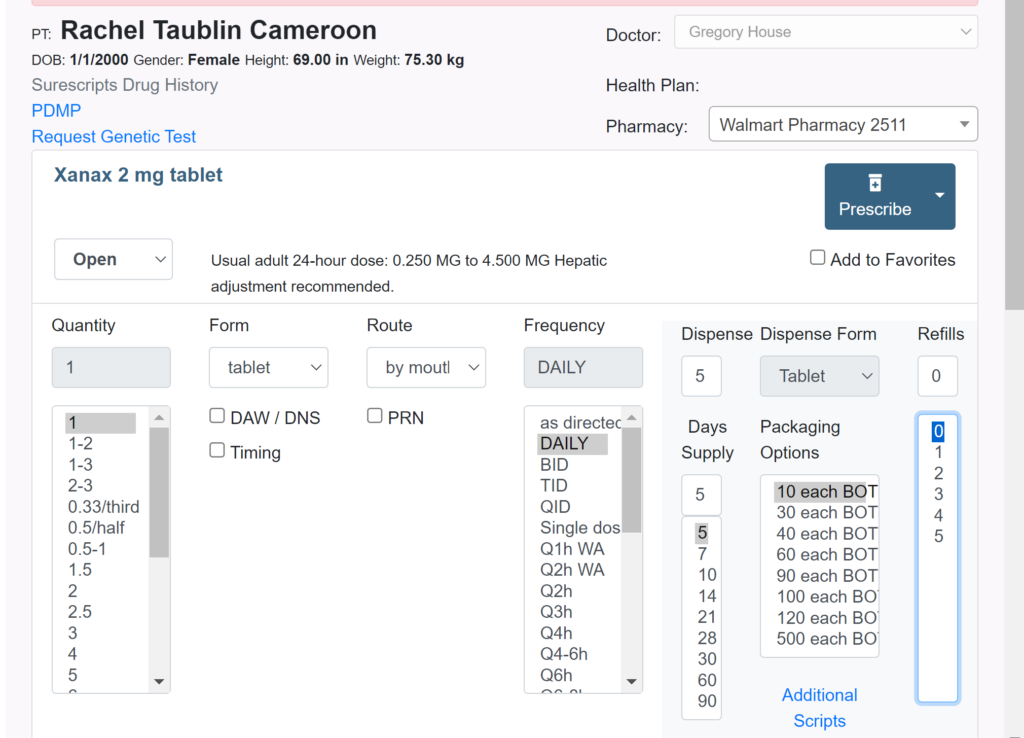
E-prescribe through Surescripts
Seamlessly e-prescribe a wide array of medications, including controlled substances when necessary, directly through DocVilla EHR using Surescripts network. This ensures your patients get the critical medications they need precisely when they need them, promoting better health outcomes and patient satisfaction.
Quickly access your patient’s medication history using the Surescripts database or retrieve controlled substance records through Bamboo. This feature ensures you have comprehensive insights into your patient’s medication background, enabling informed prescribing decisions.
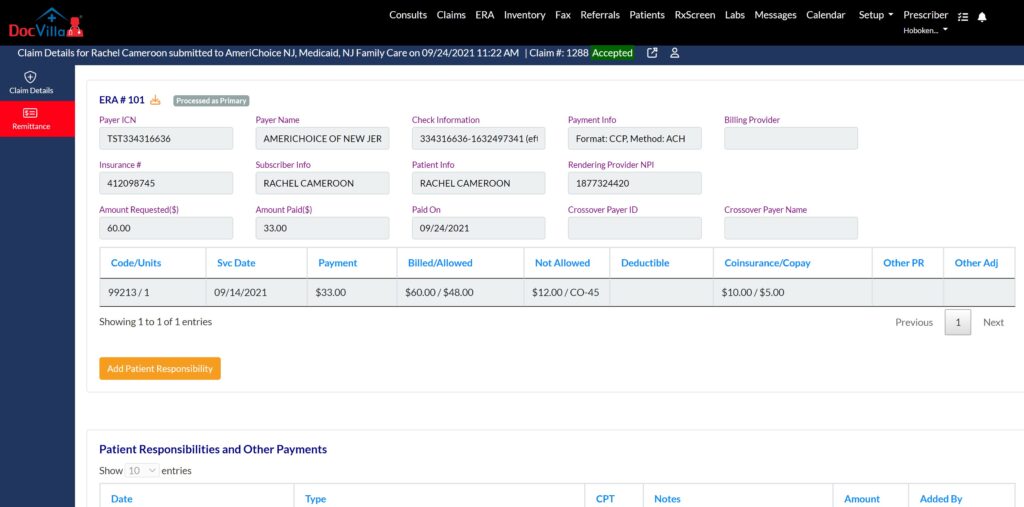
Submit claims and receive ERAs/EOBs
Accelerate your payment process with DocVilla. Swiftly submit claims to thousands of payers nationwide directly from our platform and receive ERA (Electronic Remittance Advice) or EOBs swiftly. Easily allocate patient responsibilities and automatically dispatch electronic invoices through text, email, or the patient portal. Patients can conveniently pay using their HSA, FSA, or credit cards via a secure payment link, streamlining the billing and payment process. DocVilla is all-in-one best affordable leading cloud based integrated EHR EMR Software for ASC.
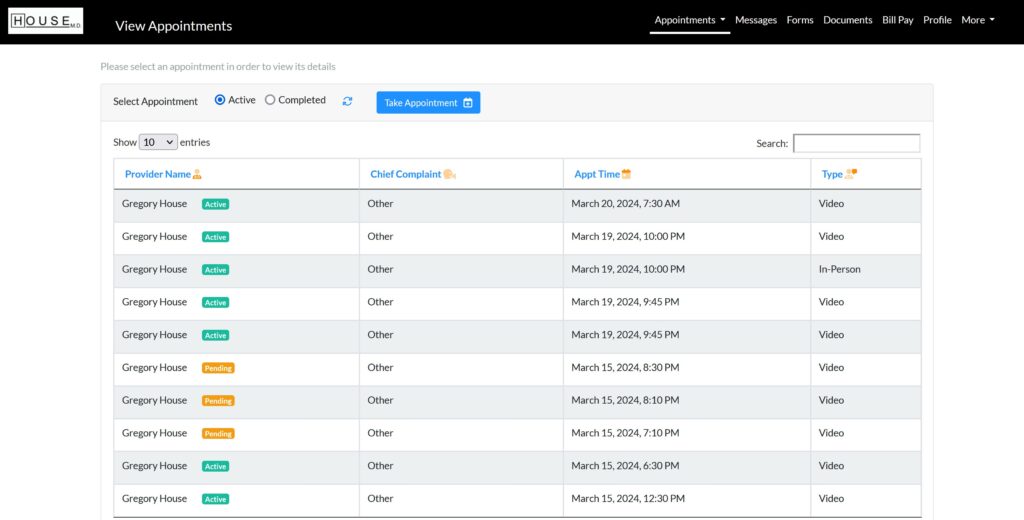
Modernize Patient Engagement with integrated Patient Portal
DocVilla provides integrated patient portal, designed to enhance patient satisfaction and significantly reduce administrative workload. Through our patient portal, patients can effortlessly schedule appointments, pay bills, securely communicate with healthcare providers, upload documents, and complete forms digitally. With a single click, providers can share documents directly with patients via the portal, streamlining the communication process. Moreover, our platform supports the capability for users to access information for multiple patients under a single account. For example, a parent can easily view and manage their child’s health information through their own patient portal, ensuring convenient and consolidated access to essential health data.
Send/Receive HIPAA compliant Electronic Fax (efax)
Digitally scan, upload, and attach a variety of documents, including ultrasounds, paper charts, and photographs, with ease. Securely transmit these documents through our integrated, HIPAA-compliant electronic fax service, ensuring that your sensitive information is handled with the utmost care and confidentiality.

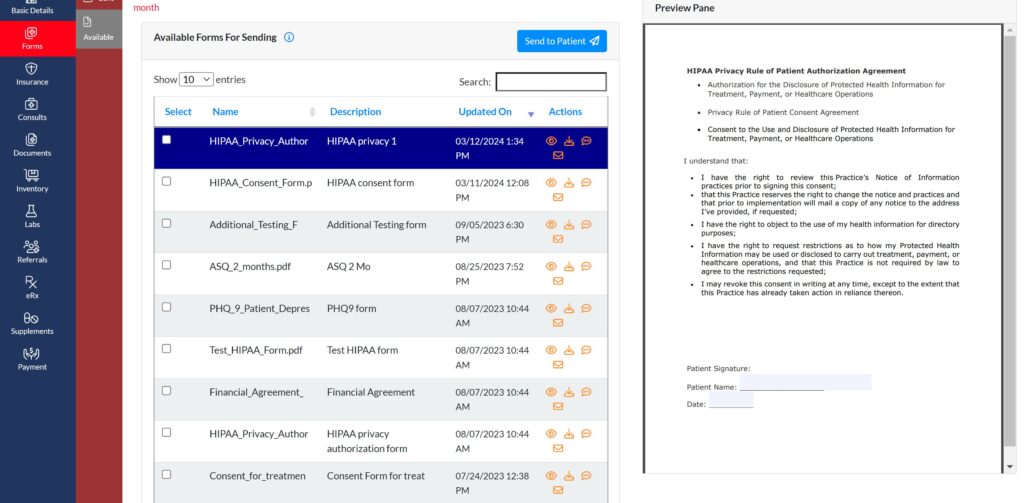
Send Electronic Consent forms
Dispatch Electronic Consent Forms to patients via text, email, or through the patient portal and effortlessly obtain their electronic signatures. This streamlined process ensures a smooth, secure, and efficient way to manage consent forms, enhancing patient engagement and compliance.


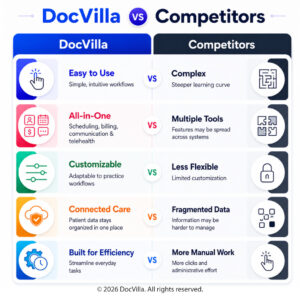
Why Cloud-Based EHR and Practice Management Software is Essential for new medical practices
Why practices love us? DocVilla is the Best EHR Practice Management Software for new medical practices? Review the complete guide for EHR setup for new medical practice
For new medical practices, the shift to cloud-based EHR software is essential to handle the growing demand for accessibility, scalability, and efficiency. Cloud-based systems offer numerous benefits over traditional on-premise solutions, particularly for large healthcare organizations managing multiple locations and providers.
Cloud-based EHR EMR and practice management software offer significant advantages over traditional, on-premise solutions. Here’s why cloud-based systems are becoming the gold standard for new medical practices:
1. Enhanced Accessibility and Collaboration
Cloud-based systems allow for real-time data access from anywhere, which is particularly beneficial for multi-disciplinary teams in new medical practices. Surgeons, anesthesiologists, nurses, and administrative staff can collaborate seamlessly by accessing the same up-to-date patient records and schedules.
2. Scalability for Growing Practices
As your ambulatory surgical center grows, a cloud-based system can scale with you. Whether you’re adding new locations, services, or team members, cloud-based software offers flexibility without the need for costly hardware upgrades.
3. Automatic Updates and Compliance
With cloud-based software, updates and patches are automatically applied, ensuring that your system is always up-to-date with the latest security protocols, regulatory guidelines, and features. This is especially important for maintaining HIPAA compliance and CMS guidelines.
4. Cost-Effective Solutions
Cloud-based systems eliminate the need for expensive on-site servers and IT infrastructure. Instead, ASCs can pay a monthly subscription fee, making it a cost-effective solution that reduces upfront costs and ongoing maintenance expenses.
5. Data Security and Disaster Recovery
Cloud-based systems use advanced encryption technologies to protect patient data. They also offer built-in disaster recovery features, ensuring that your data is backed up and accessible in case of any system failures or emergencies.
6. Streamlined Operations and Workflow
Cloud-based software integrates EHR, billing, scheduling, and other functions into one platform, creating a seamless workflow that reduces administrative burdens and enhances efficiency.
Benefits of Using All-In-One Medical Office Software for New Medical Practices
Why do new medical practices need Electronic Health Records EHR EMR Software? A guide for EHR setup for new medical practice
Integration is a key component for large practices seeking an EHR solution. An integrated EHR for new medical practices means that all systems—practice management, telehealth, billing, and patient engagement—work together seamlessly. This integration reduces the need for multiple platforms, eliminates data silos, and enhances overall efficiency.
Using an all-in-one cloud-based EHR EMR and practice management software like DocVilla offers a wide range of benefits for new medical practices:
1. Streamlined Workflow and Efficiency
By integrating scheduling, billing, EHR, and inventory management into one platform, an all-in-one system eliminates the need to switch between multiple software applications. This streamlines the entire workflow, from patient intake to billing, and ensures that all departments are working in sync.
2. Reduced Errors and Improved Patient Safety
Integrated software reduces the likelihood of data entry errors, which can occur when using separate systems for EHR and billing. The result is more accurate medical records, improved patient safety, and fewer claim denials due to coding mistakes.
3. Faster Reimbursement and Financial Stability
Efficient billing and coding tools reduce the time it takes to submit claims and resolve denied claims. This speeds up the reimbursement process, improving cash flow and ensuring the financial stability of the new medical practice.
4. Enhanced Patient Experience
Patient portals, online scheduling, and telemedicine features improve the patient experience by providing more convenient ways to interact with their care team. Patients can easily schedule appointments, access their health records, and receive post-operative instructions through the portal.
5. Better Compliance and Documentation
All-in-one software ensures that new medical practices remain compliant with HIPAA and CMS guidelines. The system can automate documentation, track surgical protocols, and generate reports required for regulatory audits.
6. Scalability and Customization
An all-in-one system like DocVilla is scalable to meet the needs of growing new medical practices. It also offers customization options, allowing new medical practices to tailor templates, workflows, and reports based on their specific needs and the types of procedures they perform.
Who can use EHR?
What kind of Private Practices or Specialties can use EHR software?
DocVilla EHR software and Medical Practice Management Software can be used by any Provider or Specialization or any Practice of any size (Solo Provider EHR, Small Private Medical Practice EHR, Midsize Practice EHR, Large Size Practice EHR). It can be used as EHR for Primary Care, EHR for Mental Health, EHR for Pediatrics, EHR for Weight Loss Clinics, EMR for IV Therapy, EMR for Med Spas, EHR for Ob-Gyn, EHR for Urgent Care, EHR for Multispecialty, EHR for Pain Management and Palliative Care, EHR for Urology, EHR for Gastroenterology, EHR for Dermatology, EHR for Cardiology, EHR for Allergy, EHR for Podiatry, EHR for Physical Therapy, EHR for Occupational Therapy, EHR for Chiropractor, EHR for Orthopedics, EHR for Small Practices, EHR For Endocrinology, etc. With 5 star reviews, DocVilla is Best EHR software with integrated telehealth, medical billing , inventory management, etc. We allow both in-person as well as Video consults. Contact us to understand how we can help you grow your practice and get more patients.
Customization Capabilities in DocVilla:
- Specialty-Specific Templates: DocVilla allows practices to customize templates based on specific medical needs, ensuring that providers can document efficiently and accurately.
- Tailored Workflows: Custom workflows enable large practices to design processes that match their internal operations. Whether it’s handling patient check-ins, lab requests, or complex billing scenarios, DocVilla’s customizable workflows ensure smooth operation across departments.
- Advanced Reporting: Large practices need access to detailed reports on clinical performance, patient outcomes, and financial metrics. DocVilla’s customizable reporting tools allow practices to generate reports based on specific needs and goals, helping to make informed business and clinical decisions.
- User-Specific Preferences: Providers can customize the EHR interface based on their preferences, ensuring that they have easy access to the tools and information they use most frequently.
By offering extensive customization options, DocVilla’s EHR system enables large practices to create tailored solutions that meet their operational, clinical, and financial needs.
Key Considerations When Choosing EHR EMR Software for New Medical Practice
Selecting the right Electronic Health Records EHR, Electronic Medical Records EMR software for your new medical practice requires careful consideration of your practice’s specific needs. Here are some factors to keep in mind:
1. Ease of Use
Choose a system with an intuitive user interface that requires minimal training for your staff. Providers, Surgeons, nurses, and administrative staff should be able to navigate the system easily to avoid disruptions in workflow.
2. Integration with Existing Systems
If your medical practice is already using certain tools or systems, ensure that the new software can integrate seamlessly with them. This is particularly important for billing, lab, and imaging systems.
3. Specialty-Specific Features
Look for software that offers customizable templates and workflows specific to the types of procedures your practice performs. This ensures that documentation is accurate and compliant with medical standards.
4. Security and Compliance
Data security is crucial in healthcare. Choose a system that is HIPAA-compliant, offers secure data encryption, and has built-in features for tracking compliance with CMS and other regulatory bodies.
5. Scalability and Customization
Consider whether the software can scale with your practice as it grows. It should also offer customization options, such as custom templates, reports, and forms that align with your Medical Practice’s workflow.
6. Cost and Return on Investment
Evaluate the total cost of ownership, including subscription fees, implementation costs, training, and support. Consider the potential ROI from improved efficiency, faster reimbursements, and better patient care.
Key Billing Features in DocVilla:
- Automated Claims Submission: DocVilla’s billing system automates the claims submission process, reducing manual data entry and minimizing errors. Claims are sent directly to insurance providers, ensuring faster reimbursement.
- Claim Scrubbing: The system includes claim-scrubbing tools that identify potential errors before claims are submitted, improving first-pass acceptance rates and reducing claim denials.
- Insurance Eligibility Verification: Verify insurance eligibility in real-time, ensuring that patients are covered for the services they receive.
- Electronic Remittance Advice (ERA): Receive real-time updates on the status of claims and payments, and easily reconcile accounts receivable with electronic remittance advice integration.
DocVilla’s integrated medical billing solution helps large practices optimize their revenue cycle management, ensuring timely and accurate payments for the services provided.
Conclusion: Success Starts with Smart Planning
The most successful clinics don’t just choose an EHR—they prepare for it, train thoroughly, and integrate it into every part of the practice. EHR setup and implementation for new medical practice is a process and should be followed.
Start early. Get your staff involved. Customize your workflows. Practice in advance. The difference between a smooth opening and a chaotic one often lies in how early you start preparing.
A well-executed EHR setup is one of the most critical investments you will make when opening your practice. Choose wisely, and prepare thoroughly.
Resources for New Medical Practices EHR EMR Implementation and Setup
Read articles about cloud based Electronic Health Records (EHR) Software Electronic Medical Records (EMR) Software that will help your New Medical Practice